Las 7 mejores alternativas a SmartDraw para flujos de trabajo visuales modernos en 2026

¿Buscas una alternativa a SmartDraw que realmente se adapte al flujo de trabajo y al presupuesto de tu equipo? No estás solo. Muchos profesionales encuentran que los precios rígidos y la interfaz compleja de SmartDraw son un obstáculo para la creatividad, buscando una solución más intuitiva y rentable.
Para ayudarte a encontrar la opción perfecta, hemos recopilado una lista de las siete mejores alternativas a SmartDraw disponibles en 2026. Únete a nosotros mientras exploramos estas poderosas herramientas y evaluamos sus características únicas para determinar cuál se adapta más eficazmente a tu flujo de trabajo y metas organizativas.
Alternativa 1: Xmind: la alternativa completa a SmartDraw para el pensamiento moderno
Xmind funciona como una plataforma completa de mapeo mental y diagramación para el pensamiento visual, soportando diversas estructuras, incluyendo diagramas de flujo, organigramas, diagramas de espina de pescado, líneas de tiempo y matrices. Esta versatilidad asegura una transición sin problemas desde la lluvia de ideas creativa hasta la lógica estructurada en todos los casos de uso profesional.
Características destacadas
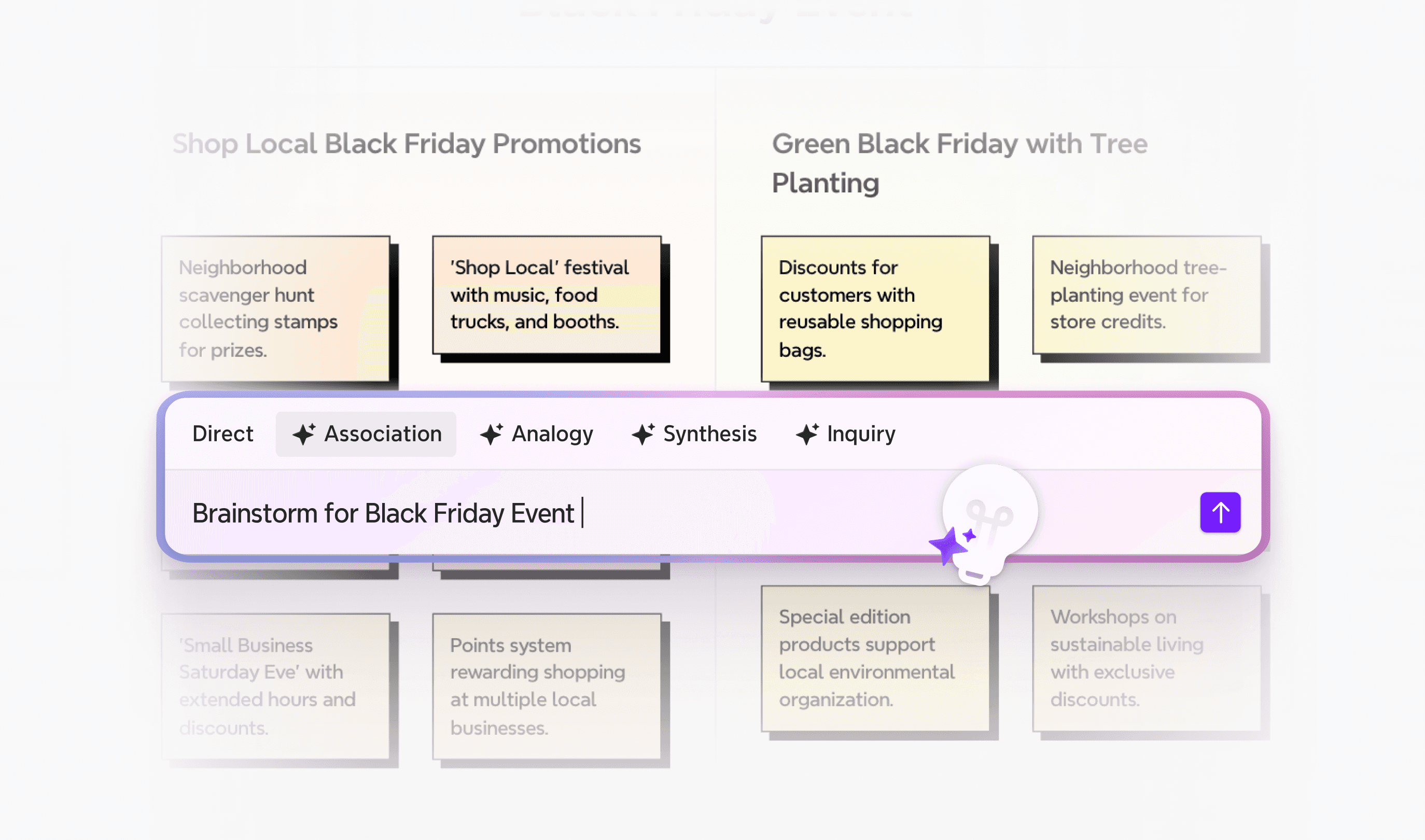
Lluvia de ideas impulsada por IA
Las capacidades impulsadas por IA distinguen a Xmind de las herramientas convencionales de diagramación. Xmind AI genera map structures from simple topic inputs, creates branches automatically, and provides smart suggestions to improve clarity. The AI can summarize long texts, files, and links while breaking down complex projects into actionable tasks.
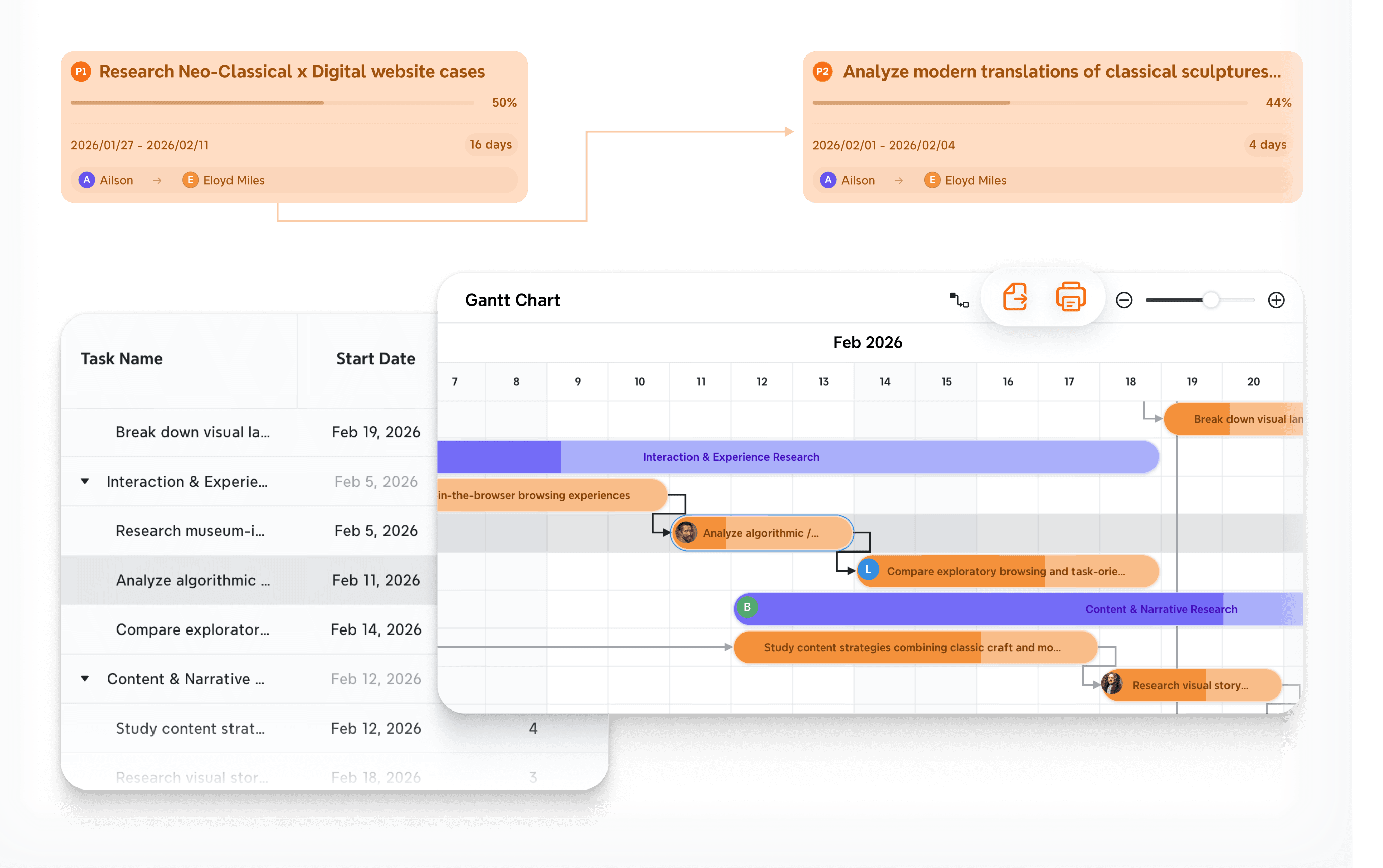
Gestión de proyectos simplificada
Zen mode ofrece un entorno libre de distracciones para sesiones de planificación intensiva. Este espacio de trabajo de pantalla completa te ayuda a concentrarte completamente en mapear sin desorden de interfaz. Pitch mode simplifica aún más tu flujo de trabajo transformando mapas mentales en presentaciones pulidas con diapositivas generadas automáticamente y temas profesionales.
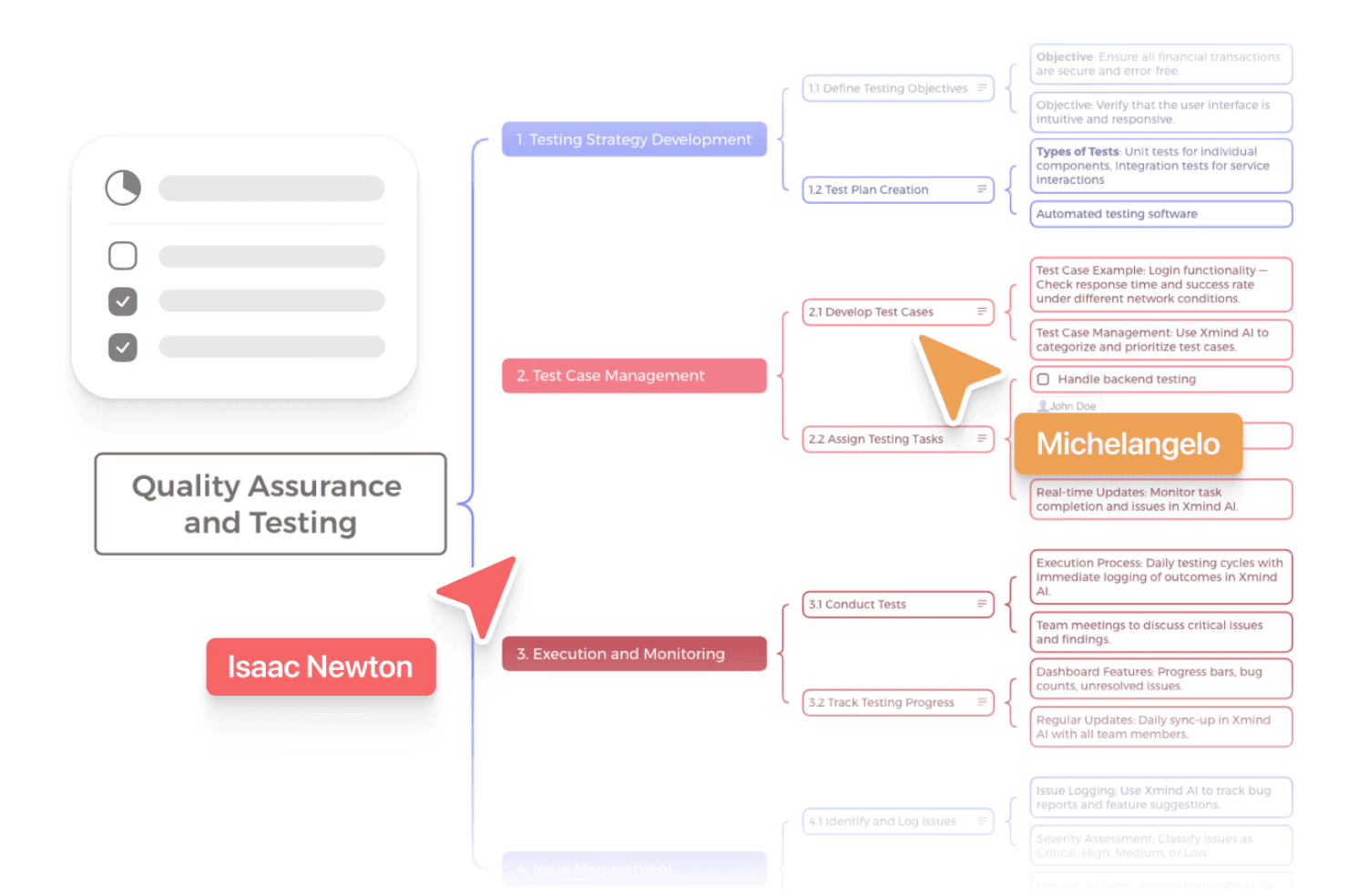
Colaboración en tiempo real
Sincroniza el genio de tu equipo sin problemas con la colaboración nativa en la nube. Las opciones de personalización de la plataforma, incluyendo algoritmos inteligentes de color e integración de medios enriquecidos, aseguran consistencia visual en cada diagrama. Puedes incrustar imágenes, enlaces y adjuntos directamente en los nodos, con soporte adicional para notas de audio y ecuaciones matemáticas LaTeX.
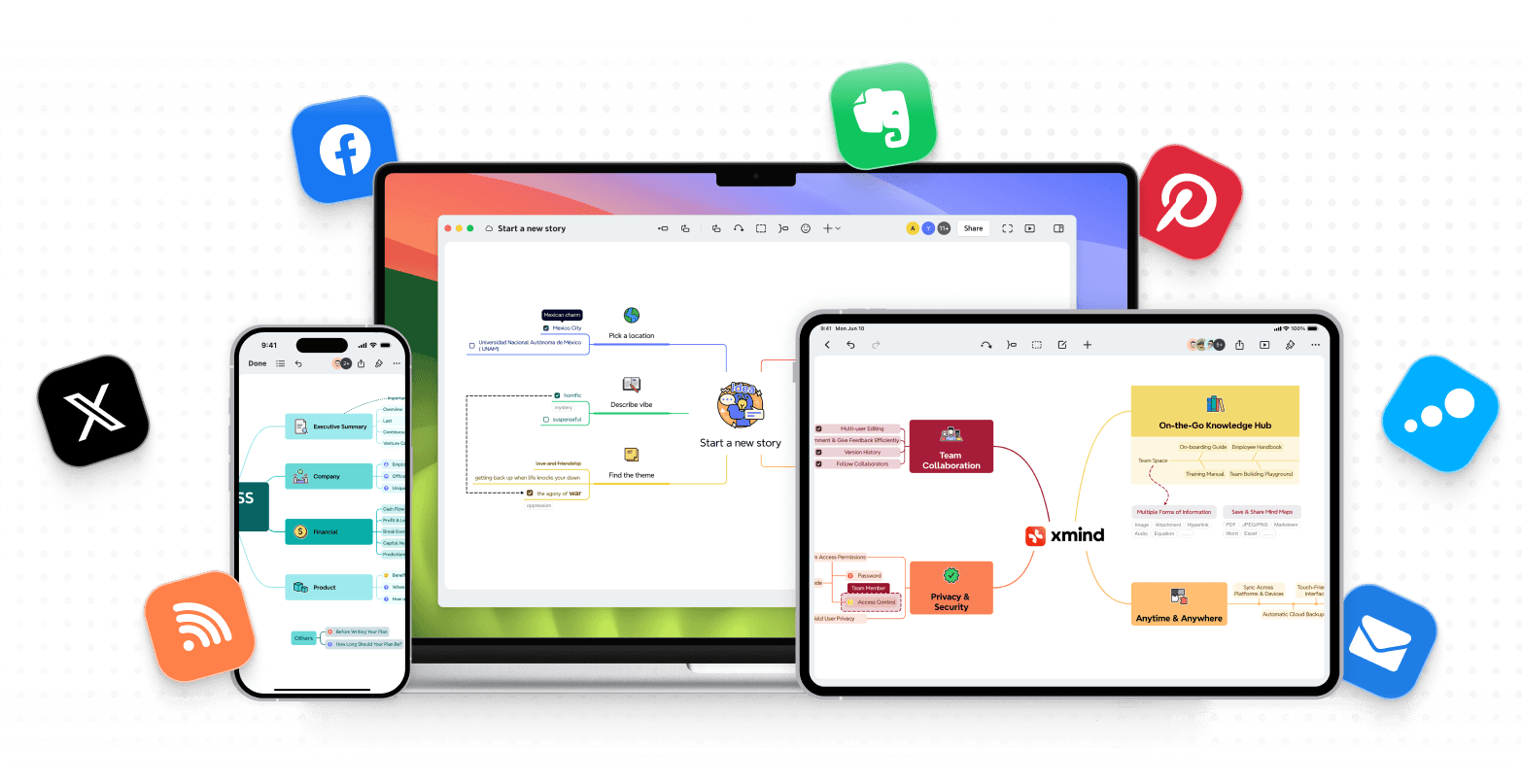
Accesibilidad multiplataforma
Captura inspiración en cualquier lugar con alto rendimiento en todos los dispositivos. Más allá de las mapas mentales radiales, Xmind soporta estructuras versátiles como diagramas de flujo, diagramas de espina de pescado y matrices. Estos plantillas simplifican la creación para cualquier escenario, desde el mapeo estratégico de negocios hasta el análisis detallado de causas, asegurando que tu trabajo se mueva contigo.
Por qué los equipos eligen Xmind
La colaboración inmediata hace posible que múltiples miembros del equipo editen el mismo Mapa simultáneamente, con sincronización instantánea en todos los dispositivos. El Plan de Equipo soporta hasta 10 miembros trabajando en un espacio de trabajo compartido, con almacenamiento seguro en la nube y controles de permisos. Los archivos del equipo se benefician de la encriptación HTTPS/SSL en tránsito y AES-256 en reposo, alojados en infraestructura AWS con cumplimiento de ISO/IEC 27001:2022 y SOC 2 Type II.
La interfaz de Xmind proporciona navegación rápida e intuitiva a través de un diseño pulido. Herramientas como Relación conectan ideas relevantes, Resumen añade resúmenes a grupos de temas y Límite destaca temas con similitudes. Estas herramientas organizativas ayudan a concretar conceptos complejos sin abrumar a los usuarios.
Mejores casos de uso
Planificación de proyectos: La planificación de proyectos se beneficia de una descomposición de tareas impulsada por IA y gráficos de Gantt mejorados, permitiéndote planificar usando días laborables reales y preparar Mapas para exportación profesional o impresión. Los equipos pueden establecer prioridades fácilmente y seguir el progreso mientras transforman lluvias de ideas creativas en flujos de trabajo accionables.
Sesiones de lluvia de ideas: Las sesiones de lluvia de ideas ganan estructura inmediata a través de la organización visual que permite que las ideas crezcan y se fusionen fluidamente. Independientemente de la ubicación, cada miembro del equipo puede contribuir en tiempo real, con la IA ayudando a estructurar pensamientos más rápido y reduciendo significativamente el tiempo de formateo manual.
Mapeo de procesos de negocio: El mapeo de procesos de negocio aprovecha la accesibilidad basada en la nube para una colaboración remota sin problemas y arreglos de trabajo flexibles. Plantillas personalizadas y características avanzadas soportan una visualización de procesos compleja, asegurando que los flujos de trabajo organizativos se documenten con precisión y claridad.
Aplicaciones educativas: Las aplicaciones educativas van desde la organización de materiales de estudio complejos hasta la gestión de contenido de cursos y proyectos grupales colaborativos. La interfaz intuitiva y las capacidades de mapeo ilimitadas hacen que Xmind sea una herramienta esencial para estudiantes y educadores que requieren potentes ayudas de aprendizaje visual e investigación.
Si deseas explorar más diferencias entre Xmind y SmartDraw, puedes leer este artículo para encontrar tu respuesta: Xmind vs SmartDraw.
Alternativa 2: Asana—integrando planificación visual estratégica con ejecución de proyectos

Asana se posiciona más allá de la pura diagramación al incorporar la planificación visual directamente en los flujos de trabajo de gestión de proyectos. No crearás diagramas estáticos que existan separadamente del trabajo real. Asana integra representaciones visuales con la ejecución de tareas, colaboración del equipo y seguimiento del progreso en una sola plataforma.
Qué hace diferente a Asana
Alineación estratégica y seguimiento de metas La plataforma conecta las metas comerciales de alto nivel con tareas diarias, creando alineación en organizaciones enteras. Esta conexión estratégica asegura que cada tarea visible en vistas de timeline o kanban se relacione directamente con resultados medibles de la empresa y objetivos a largo plazo.
Gestión visual de proyectos y programación La visualización estilo Asana combina la gestión tradicional de tareas con formatos intuitivos como timelines, tableros kanban y calendarios. Los equipos pueden monitorear cargas de trabajo e hitos de un vistazo, mientras que la función de timeline ofrece programación estilo gantt para visualizar dependencias y ajustar horarios según evolucionen las necesidades del proyecto.
Mapeo de dependencias y flujo de proyectos La gestión de dependencias es crítica para proyectos complejos. Al vincular tareas en secuencia y marcar claramente fechas de lanzamiento, previenes que los equipos comiencen el trabajo antes de que se completen los requisitos previos. Este mapeo visual elimina confusión sobre el orden de las tareas y reduce significativamente los retrasos del proyecto.
Características principales e integraciones
Vistas y plantillas de proyectos flexibles La plataforma ofrece múltiples maneras de visualizar el trabajo, incluyendo formatos de lista, tablero, timeline y calendario. Plantillas listas y personalizadas permiten a los equipos mantener la consistencia a través de iniciativas, mientras que campos personalizados y adjuntos capturan cada detalle del proyecto en un centro organizado.
Reportes automáticos y flujos de trabajo Dashboards en tiempo real proporcionan visibilidad instantánea a interesados sobre el progreso y las métricas de rendimiento. Al usar un motor de automatización intuitivo, puedes manejar tareas repetitivas como asignaciones y cambios de estado sin intervención manual, reduciendo la carga administrativa.
Ecosistema de integración extenso Con soporte para más de 200 apps, incluyendo Google Drive, Microsoft Office, Slack y Jira, los datos permanecen sincronizados a través de toda tu pila tecnológica. Esta conectividad te permite adjuntar archivos en la nube directamente y crear sincronizaciones bidireccionales que eliminan la necesidad de cambiar entre múltiples herramientas.
Colaboración segura y accesible Las características de colaboración integradas permiten comunicación directa dentro de tareas, reduciendo significativamente los correos electrónicos. Las medidas de seguridad de alto nivel como la encriptación de datos y controles de acceso aseguran que la información sensible permanezca protegida mientras proporcionan plena accesibilidad móvil para equipos en movimiento.
Retos en la curva de aprendizaje y complejidad de características
Los nuevos usuarios enfrentan una curva de aprendizaje dada la densidad de características de la plataforma. La interfaz tiene numerosas opciones que pueden abrumar a los principiantes sin una adecuada introducción. Las limitaciones de asignación de tareas permiten solo una persona por tarea y crean desafíos cuando el trabajo requiere múltiples propietarios o la persona asignada se vuelve no disponible.
Las características avanzadas requieren planes de pago. Vistas de timeline, campos personalizados, reportes avanzados y automatización todas están detrás del nivel Premium. Los costos se acumulan para equipos más grandes. Comenzando en $10.99 por usuario al mes, Asana tiene precios más altos que competidores como Jira o Smartsheet.
El extenso conjunto de herramientas se vuelve hinchado para proyectos simples. Los equipos pequeños que trabajan en iniciativas pueden encontrar muchas características innecesarias pero incapaces de ocultarlas. Esto resulta en una complejidad innecesaria de la interfaz. Las opciones de exportación se limitan a formatos JSON y CSV sin soluciones de terceros para exportaciones en PDF o Excel.
Alternativa 3: Trello: una alternativa kanban flexible para la ejecución de tareas visuales
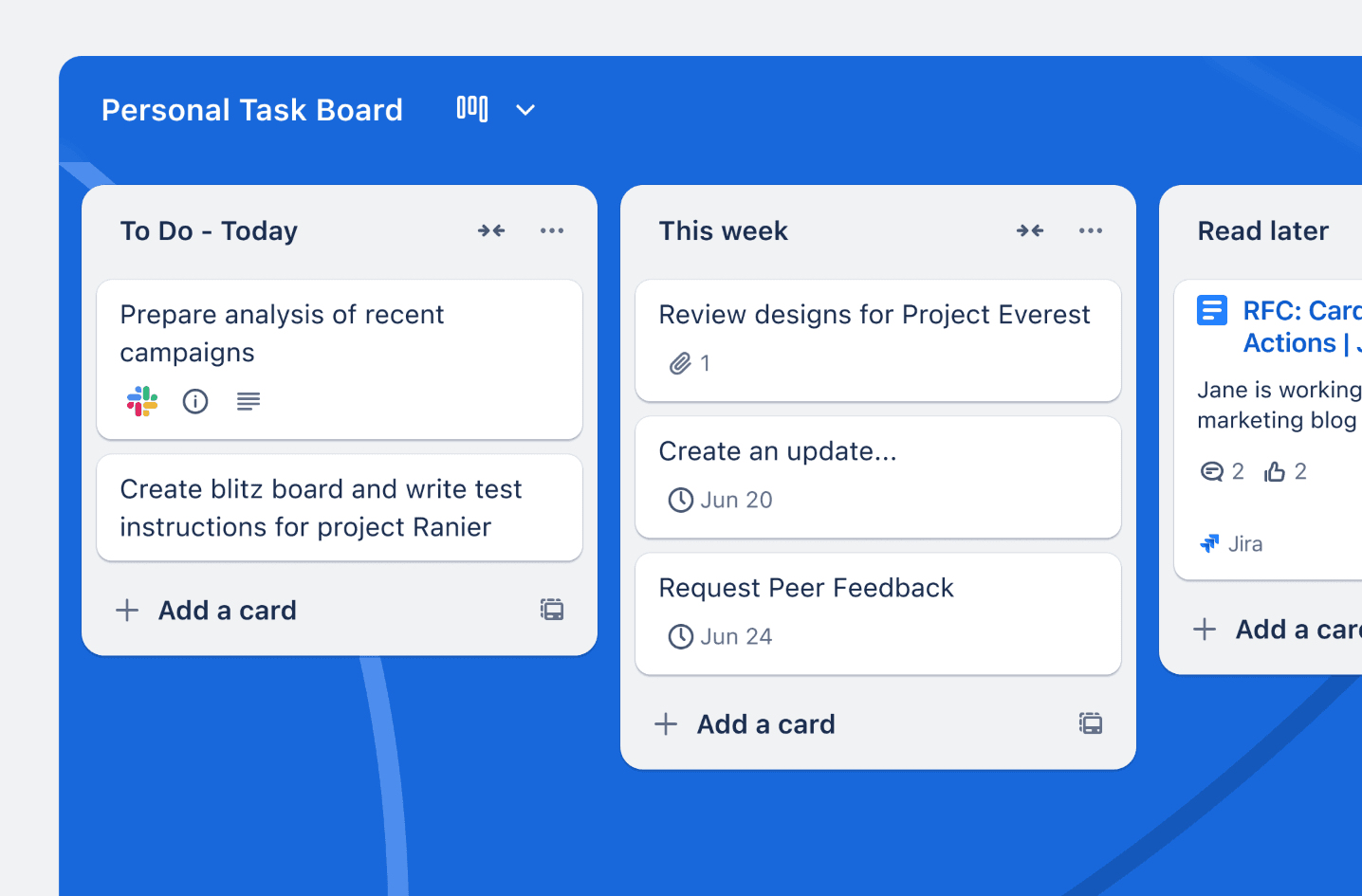
Trello transforma la gestión de tareas en una experiencia visual a través de su estructura basada en Kanban. La plataforma organiza el trabajo usando tableros, listas y tarjetas que reflejan notas adhesivas físicas en un pizarrón. Esto hace que el seguimiento de proyectos sea fácil de usar para equipos de cualquier tamaño.
Características clave y funcionalidad de tableros
Los tableros representan proyectos individuales donde los equipos coordinan esfuerzos a través de un sistema flexible de tres niveles de listas y tarjetas. Al definir etapas de flujo de trabajo como "por hacer" o "hecho", puedes descomponer proyectos complejos en componentes manejables, cada uno contiene descripciones, listas de verificación y archivos adjuntos. La interfaz intuitiva de arrastrar y soltar te permite mover tareas instantáneamente, actualizando el estado sin abrir menús. También puedes categorizar tarjetas con etiquetas codificadas por colores e integrar fechas de vencimiento con vistas de calendario para evitar fechas límites perdidas.
La plataforma mejora aún más la productividad a través de la automatización butler, una herramienta sin código que maneja trabajo manual repetitivo usando reglas y disparadores personalizados. Esto te permite automatizar movimientos de tarjetas, asignaciones de miembros y notificaciones programadas sin costo adicional. Para extender funcionalidad, los power-ups conectan tus tableros con herramientas externas como Slack, Google Drive y Jira, transformando tareas básicas en puntos de datos especializados adaptados a tus necesidades organizativas específicas.
Añadidos recientes impulsados por IA incluyen la función de bandeja de entrada, que captura y organiza tareas desde correos electrónicos, mensajes o notas de voz al extraer automáticamente fechas de vencimiento y prioridades. Funcionalidad de planificación además, sincroniza con Google Calendar, permitiéndote arrastrar tareas directamente a bloques de tiempo para asignar mejor períodos de trabajo enfocado y mantener la alineación del equipo en todos los dispositivos.
Por qué los equipos eligen Trello para gestión visual
Facilidad de uso y rápida adopción Trello sobresale donde diagramas estáticos fallan al proporcionar un entorno activo para colaboración continua. Con el 81% de los usuarios eligiendo la plataforma por su facilidad de uso, la mayoría de las organizaciones informan ver valor comercial dentro de 30 días debido a la configuración mínima y diseño intuitivo.
Colaboración natural y responsabilidad La comunicación ocurre directamente dentro de tarjetas a través de comentarios y @menciones, reduciendo la necesidad de largas cadenas de correos electrónicos. El feed de actividad rastrea cada cambio, creando un rastro de auditoría claro y asegurando que los miembros del equipo se mantengan alineados sobre la propiedad de tareas en tiempo real.
Amplia biblioteca de plantillas Los equipos pueden acelerar su flujo de trabajo usando más de 100 plantillas preconstruidas para marketing, lanzamientos de productos o agendas de reuniones. La plataforma permanece accesible para individuos y equipos pequeños, ofreciendo funcionalidad sustancial (incluyendo tarjetas ilimitadas y automatización) dentro de su nivel gratuito.
Limitaciones estratégicas y desafíos de escalabilidad
Falta de herramientas avanzadas de proyectos nativas Trello permanece limitado para gestión de proyectos complejos ya que le faltan gráficos gantt, seguimiento de tiempo y características de dependencia de tareas nativas. Los equipos que gestionan tareas interconectadas a menudo se ven obligados a recurrir a power-ups de terceros o software alternativo.
Obstáculos de escalabilidad organizativa Mantener una estructura clara se vuelve difícil a medida que se multiplican los tableros y aumentan las cuentas de tarjetas. La jerarquía plana a menudo lucha por apoyar organizaciones grandes que gestionan cientos de proyectos simultáneos a través de docenas de equipos diferentes.
Acceso restringido a reportes y fuera de línea Los reportes nativos son básicos y ofrecen poco conocimiento sobre análisis de rendimiento o distribución de carga de trabajo. Además, la plataforma requiere conectividad estable para funcionalidad completa, y la pesada dependencia de power-ups pagados para características avanzadas puede aumentar significativamente los costos totales.
Alternativa 4: MindManager: uniendo el mapeo visual y la ejecución de proyectos
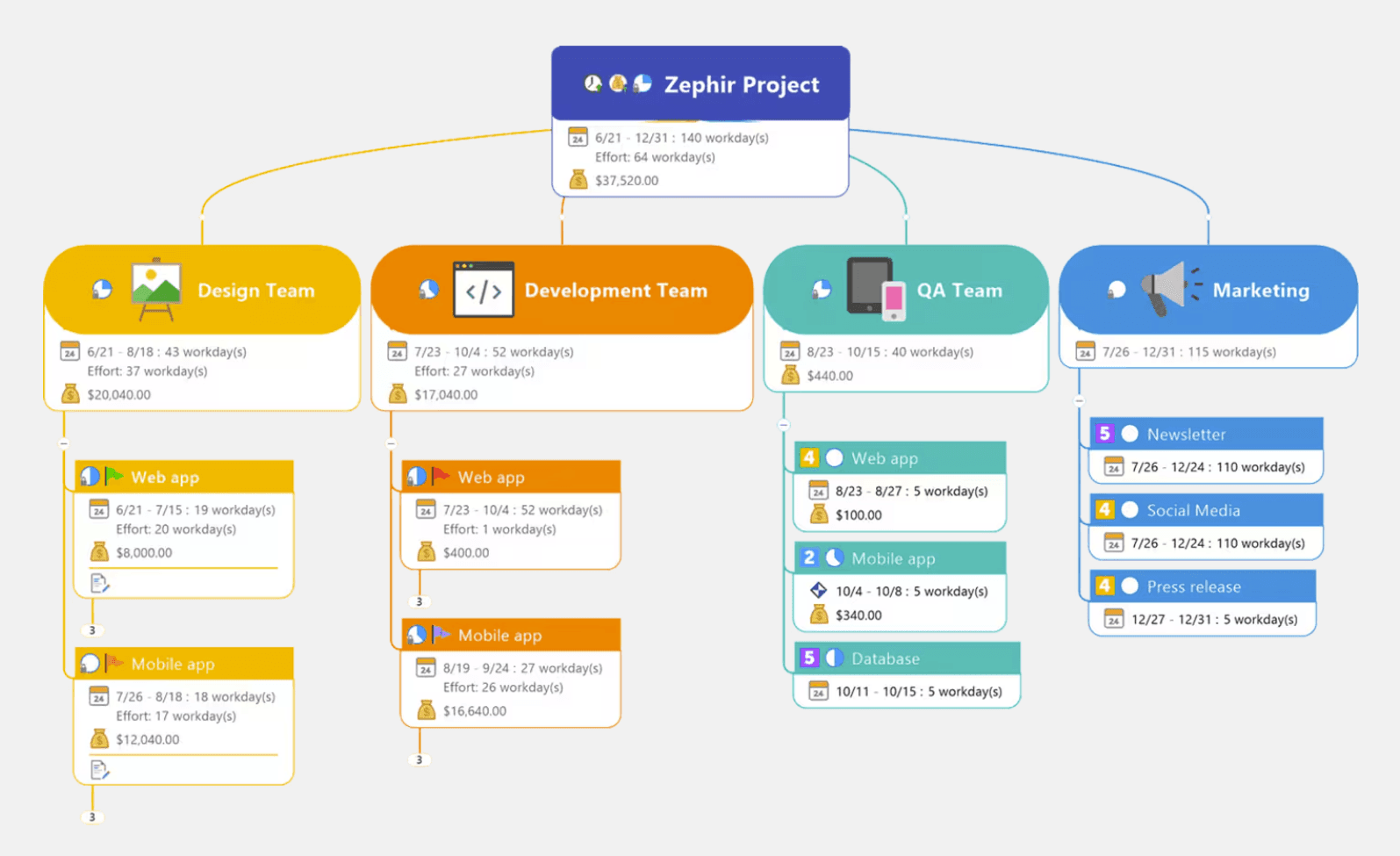
MindManager se encuentra en el extremo de ejecución del espectro de mapeo mental, construido para convertir ideas en planes de trabajo, entregables y resultados de proyectos. La plataforma une la brecha entre la lluvia de ideas y la implementación, haciendo que sea una alternativa a SmartDraw para equipos que necesitan que sus diagramas visuales funcionen como herramientas de gestión de trabajo activas en lugar de documentación estática.
Capacidades avanzadas de diagramación
MindManager soporta una amplia gama de formatos, incluyendo mapas mentales, diagramas de flujo, gráficos de Gantt y diagramas de espina de pescado. Esta variedad permite a los gerentes de proyecto obtener visibilidad profunda sobre costos, asignación de recursos y líneas de tiempo, con la capacidad de publicar o exportar Mapas en HTML5 para acceso fácil a interesados.
El Excel Data Mapper transforma hojas de cálculo complejas en estructuras visuales interactivas sin redibujo manual, mientras que los Map roll-ups te permiten combinar datos de múltiples fuentes en un mapa maestro único para un análisis integral.
Un diferenciador clave es la conexión perfecta de MindManager con el ecosistema de Microsoft 365, incluyendo Teams, Word, SharePoint y Planner. También se integra con Jira para la gestión de tickets y soporta co-edición en tiempo real en servicios en la nube importantes como OneDrive, Google Drive y Dropbox.
El SmartRules formato condicional automatiza procesos al desencadenar cambios basados en fórmulas personalizadas o propiedades de tópico. Combinado con marcadores de prioridad y notas adhesivas, estas características agilizan tanto la colaboración simultánea como asincrónica, asegurando que las tareas críticas siempre destaquen.
Por qué los equipos eligen MindManager para planificación basada en datos
Ecosistema integrado de Microsoft Office MindManager trabaja mejor para equipos que priorizan una integración profunda con Microsoft Office y Excel. La plataforma te permite aprovechar metadatos ricos de tópicos y artefactos de Office, haciendo que sea una elección ideal para consultores y analistas que necesitan transformar mapas en datos comerciales estructurados o resultados compartibles.
Gestión de tareas y proyectos jerárquica La herramienta sobresale en convertir mapas jerárquicos en planes de proyecto livianos. Con campos incorporados para prioridad, progreso, recursos y fechas de vencimiento, MindManager te permite gestionar ejecución directamente dentro de un mapa. Características como gráficos de Gantt y líneas de tiempo ayudan a los equipos a moverse de una lluvia de ideas de visión general a un programa detallado.
Controles de grado empresarial y fusión de mapas Diseñado para organizaciones mayores, MindManager proporciona controles administrativos robustos y almacenamiento compartido. Las características de fusión de mapas te permiten combinar entradas de múltiples contribuyentes en un mapa maestro único, mientras que la edición teclado-conducida y plantillas profesionales aceleran la creación de diagramas complejos.
Filtrado y visualización de datos avanzados Para trabajo abundante en datos, MindManager ofrece capacidades de filtrado superior que te ayudan a navegar a través de la complejidad. Opciones de exportación en formatos PDF, imagen y HTML aseguran que incluso los mapas más densos en información puedan ser entregados a interesados en un formato legible y profesional.
Desafíos que puedes enfrentar
El precio es más alto que herramientas de mapeo mental ligeras o gratuitas, con planes empresariales aumentando el costo total significativamente. El amplio conjunto de características crea una curva de aprendizaje que puede abrumar a nuevos usuarios comparado con aplicaciones de mapeo simple. Características avanzadas como fusión de mapas, resumen de tareas y reglas de filtrado requieren tiempo para dominar.
La edición multi-usuario ha quedado atrás respecto a herramientas nativas de la nube, aunque se han realizado mejoras. Compartir requiere exportaciones específicas o acceso a la nube de MindManager, lo que significa que los destinatarios sin la aplicación reciben resultados estáticos a menos que usen formatos exportados. El enfoque de escritorio primero ofrece apps móviles con funcionalidad limitada comparada con versiones de escritorio. El ecosistema de integración funciona bien para organizaciones centradas en Microsoft pero resulta menos fluido para equipos que usan pilas alternativas como Google Workspace.
Alternativa 5: Mural: un lienzo colaborativo para talleres guiados y diseño estratégico
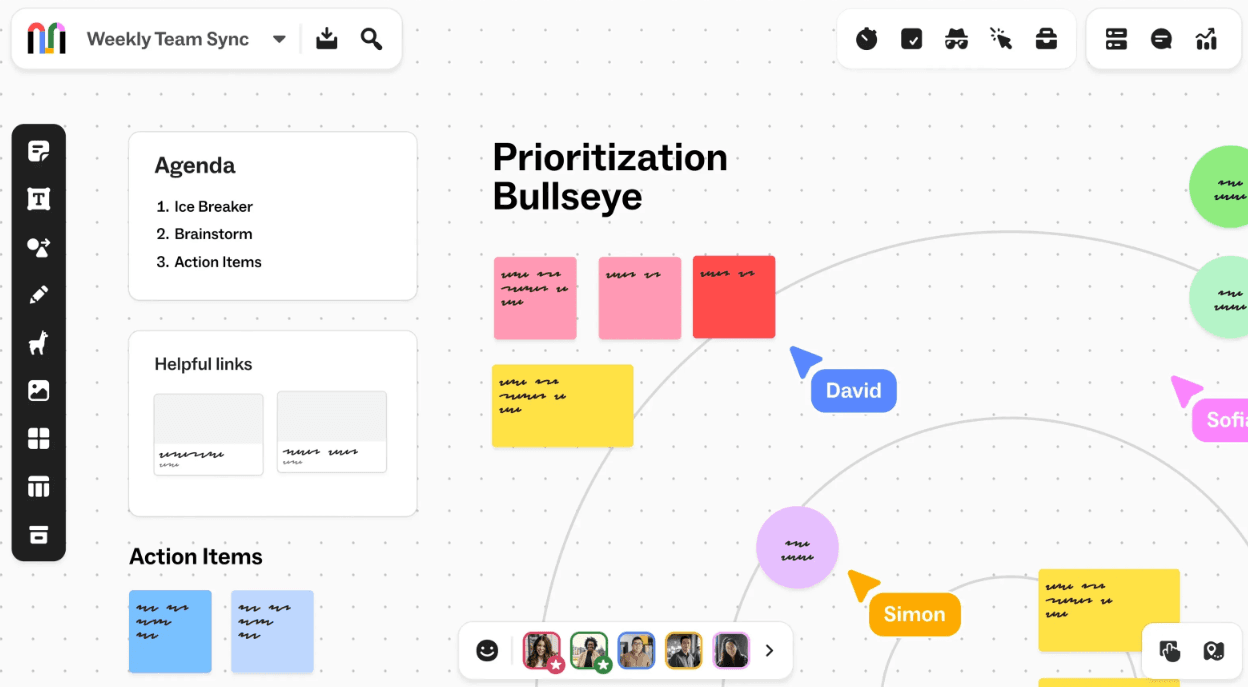
Mural funciona como un espacio de trabajo visual impulsado por IA donde los equipos cooperan a través de lienzos digitales diseñados para lluvias de ideas, talleres y planificación estratégica. La plataforma simplifica los flujos de trabajo de productos desde la idea hasta el lanzamiento y ayuda a los equipos a diseñar de manera más inteligente e iterar más rápido. Los facilitadores ganan herramientas para arreglar interesados y resolver problemas visualmente. Los resultados de los clientes se entregan con mayor efecto.
Enfoque centrado en la cooperación
El diseño de Mural coloca la cooperación en tiempo real en su núcleo. Todos con acceso a lienzo pueden ver y editar al mismo tiempo sin retrasos. La plataforma introduce roles de facilitador con permisos mejorados. Los usuarios designados pueden añadir límites de tiempo a sesiones, crear esquemas o bloquear contenido específico. Los talleres guiados donde la estructura importa se benefician de este control de facilitador.
La integración de IA acelera la generación y organización de ideas. Mural AI ayuda a los equipos a estructurar conceptos más eficazmente y reduce el tiempo dedicado al formateo mientras que mejora la calidad visual de las sesiones de cooperación. La función de Bandeja de Entrada captura tareas de correos electrónicos, mensajes de Slack o notas de voz. La IA las organiza y extrae fechas de vencimiento, tareas y prioridades automáticamente.
Chat en grupo y llamadas de audio funciona directamente dentro de espacios de trabajo. No necesitarás cambiar entre herramientas de comunicación. Los comentarios aparecen como círculos coloreados en el lienzo con etiquetas de nombre y proporcionan notificaciones en tiempo real cuando se resuelven problemas. Las conversaciones permanecen contextuales en lugar de dispersas a través de plataformas de mensajería separadas.
Herramientas visuales y plantillas comprensivas
Amplia biblioteca de plantillas para cada marco: Mural proporciona más de 400 plantillas cubriendo lluvias de ideas, prácticas ágiles y planificación estratégica. Ya sea que estés llevando a cabo un análisis DAFO o construyendo un complejo mapa de viaje de cliente, estas guías preformateadas permiten tanto a principiantes como a expertos acelerar el inicio de proyectos a través de una variedad de casos de uso.
Kit de herramientas visuales versátiles y esbozo: La plataforma ofrece un rico conjunto de notas adhesivas, conectores y miles de iconos. Características de dibujo únicas te permiten esbozar conceptos directamente en el lienzo, mientras que integraciones sin problemas con Bing, Dropbox y Google Drive hacen fácil arrastrar y soltar imágenes o GIFs en tu espacio de trabajo.
Seguridad de grado empresarial y soporte IA: Mural AI aumenta la productividad durante sesiones de lluvia de ideas generando ideas y resumiendo contenido instantáneamente. Construido sobre Microsoft Azure, la plataforma cumple con estándares empresariales con encriptación de datos AES-256 y protocolos de seguridad robustos, asegurando que tus activos creativos permanezcan protegidos.
Integración sin problemas del ecosistema: Capacidades de integración conectan Mural directamente con Microsoft Teams, Copilot, Asana y Jira. La integración de Microsoft Teams es particularmente poderosa, llevando lienzos compartidos a reuniones en vivo y chats para crear flujos de trabajo fluidos para organizaciones ya incrustadas en el ecosistema de Microsoft.
Barreras de suscripción y requisitos de conectividad
Nivel gratuito restrictivo y precios más altos El precio de Mural se sitúa en un premium más alto comparado con muchos competidores. El plan gratuito es notablemente limitado, restringiendo a los usuarios a solo tres tableros editables, lo que se vuelve rápidamente insuficiente para equipos gestionando múltiples proyectos simultáneos o flujos de trabajo complejos.
Dependencia fuerte en conectividad estable a Internet La plataforma carece de capacidades fuera de línea completas, haciéndola difícil de usar en áreas con acceso a red deficiente. Porque Mural es una herramienta centrada en la nube, cualquier problema de conectividad puede llevar a lag o interrupción de flujo durante sesiones de colaboración de alta intensidad.
Limitaciones en herramientas de visualización de datos Mientras Mural sobresale en la colaboración visual libre, enfrente desafíos con datos más estructurados. Los usuarios pueden encontrar limitaciones respecto a gráficos interactivos y tablas, haciéndola menos adecuada para aquellos que necesitan integrar análisis cuantitativo profundo directamente en sus tableros visuales.
Alternativa 6: ClickUp—consolidando planificación visual y ejecución de proyectos en un solo espacio de trabajo
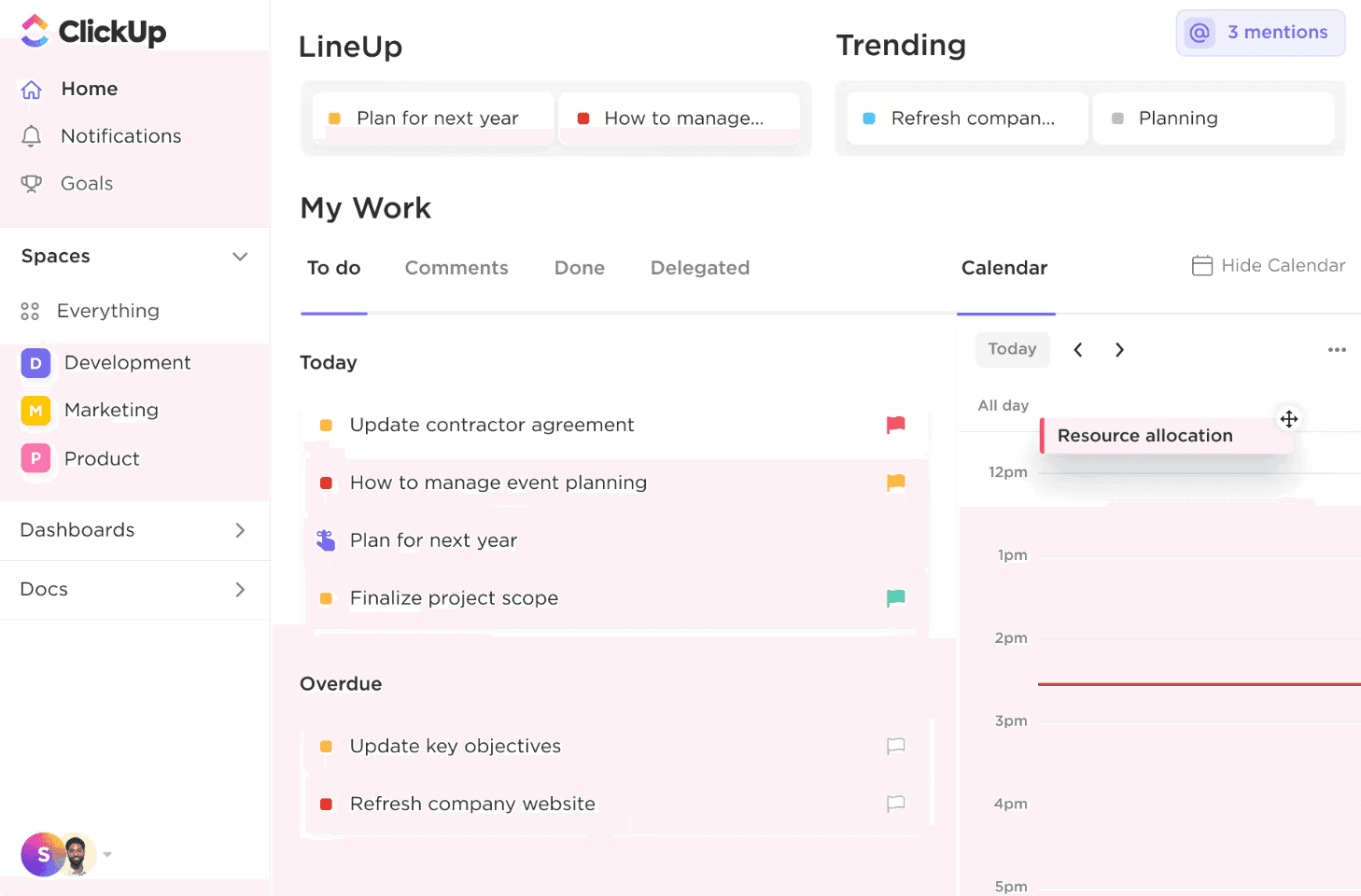
ClickUp redefine lo que una alternativa a SmartDraw puede lograr. Fusiona herramientas de diagramación directamente en una plataforma de productividad a escala completa. El sistema alberga ambas capacidades dentro de un espacio de trabajo unificado donde los diagramas se conectan a tareas reales, conversaciones y documentos—no necesitas mantener aplicaciones separadas para planificación visual y ejecución de proyectos.
Diagramación dentro de la gestión de proyectos
Los mapas mentales descomponen ideas complejas en sub-tareas manejables y muestran relaciones y dependencias visualmente. Puedes crear mapas desde cero o construirlos usando tareas existentes para mejor visualización de flujos de trabajo de proyectos y estructuras de tareas. Esta conexión bidireccional significa que los cambios en tareas mapeadas actualizan el Mapa Mental sin sincronización manual, y la precisión se preserva automáticamente.
Las pizarras ofrecen colaboración en tiempo real en un lienzo compartido donde los equipos hacen lluvias de ideas, planes de propuestas o comparten ideas. Todos ven actualizaciones en vivo, lo que fomenta una mayor eficiencia en gestión de tareas y colaboración en equipo. El lienzo libre soporta esbozos, imágenes, notas adhesivas y contenido escrito que ayuda a los equipos a generar ideas innovadoras durante sesiones de planificación. Estas herramientas visuales permanecen disponibles en cualquier lugar como una solución basada en la nube y sirven como documentación para reuniones o sesiones de planificación.
Conjunto de características y personalización
La plataforma ofrece más de 15 vistas personalizables para organizar el trabajo: vista estilo Kanban Tablero, vista de Lista con dependencias, Gráfico de Gantt, Línea de Tiempo, Calendario y Perspectivas de Carga de Trabajo. Los dashboards ofrecen visibilidad 360° en flujos de trabajo de proyectos a través de estados personalizados, tablas y herramientas de reporte. Puedes añadir widgets para acceder a tiempo rastreado, gráficos de velocidad de sprint y otras métricas específicas.
ClickUp Brain, el asistente IA integrado, genera tableros Kanban desde cero y crea tareas y sub-tareas con campos auto-completados como estado y prioridad. Maneja también procesos rutinarios. La Plantilla del Dashboard de Gestión de Proyectos proporciona un marco pre-construido con métricas incorporadas para seguir estados de tareas, progreso de proyectos y presupuestos.
La personalización se extiende a través de ClickApps que habilitan o deshabilitan características en todo el espacio de trabajo o por Espacio. Opciones notables incluyen AI Notetaker para transcripción automática de reuniones, Automatizaciones para flujos de trabajo recurrentes, Campos Personalizados para consistencia y Rastreo de Tiempo para reportes detallados. La plataforma se integra con más de 1000 apps y mantiene conexiones a través de pilas tecnológicas existentes.
Intercambios estratégicos y brechas funcionales
La abundancia de características crea una curva de aprendizaje pronunciada que puede abrumar a nuevos usuarios. Los equipos que gestionan proyectos a gran escala con datos extensos informan problemas de retraso y problemas de rendimiento. La aplicación móvil carece de paridad de características con versiones de escritorio y crea experiencias inconsistentes. La gestión de notificaciones resulta desafiante con alertas potencialmente excesivas.
Alternativa 7: Miro—el pizarra visual expansiva para equipos distribuidos
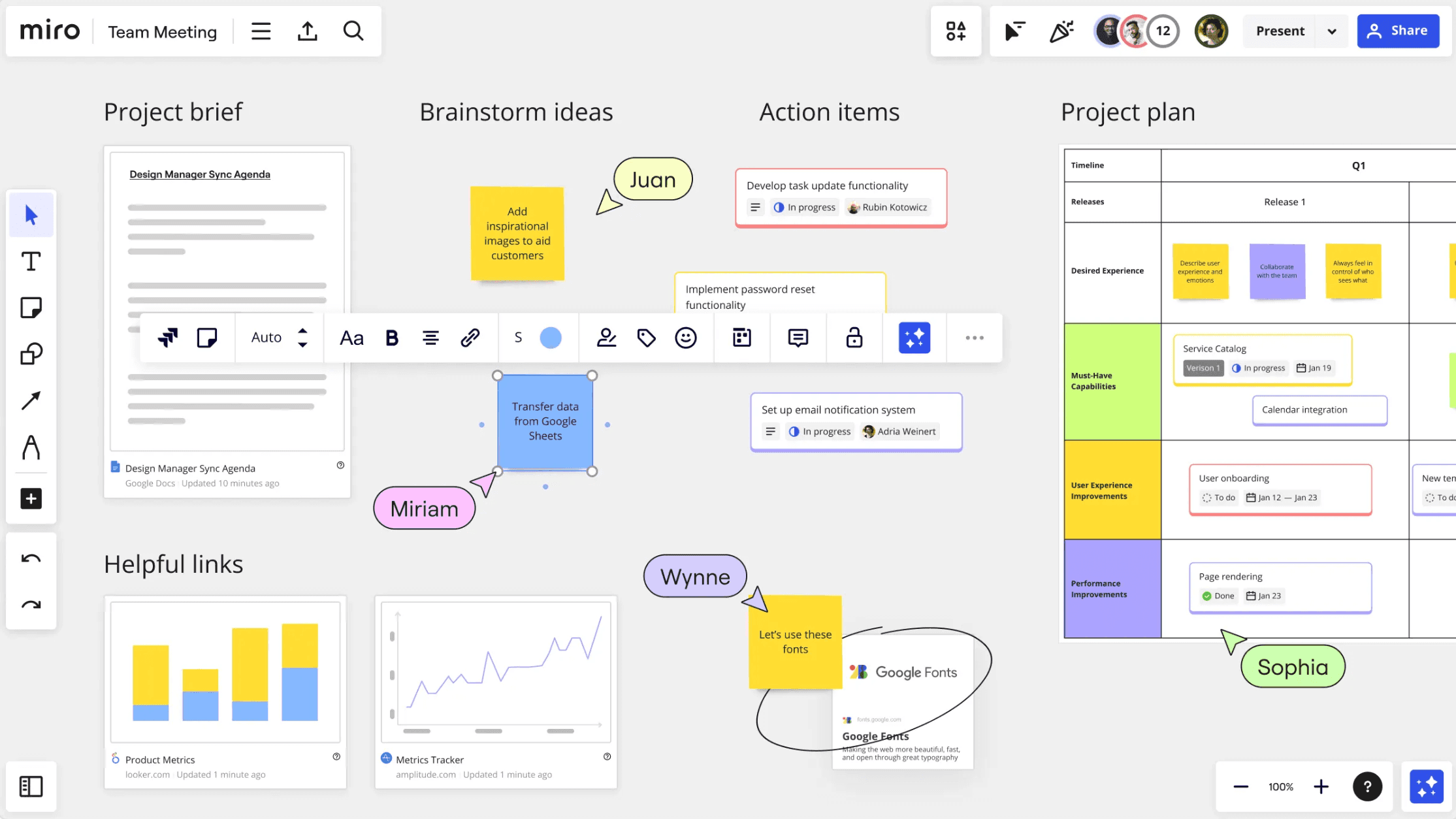
Miro funciona como un espacio de trabajo que combina capacidades de diagramación con colaboración visual en un lienzo infinito y multijugador. Más de 100 millones de usuarios y 250,000 compañías colaboran en la plataforma. Miro sirve a equipos que buscan una opción gratuita de alternativa a SmartDraw que no sacrifica funcionalidad de grado empresarial.
Características de colaboración en tiempo real
El lienzo infinito elimina restricciones espaciales y te permite mapear ideas complejas sin límites. Cursores en vivo muestran ubicaciones de compañeros de equipo al trabajar simultáneamente. Las características asíncronas permiten contribuciones a través de diferentes zonas horarias. TalkTrack graba recorridos interactivos con voces en off y movimiento en pantalla, lo que elimina grabaciones de pantalla tradicionales.
Las videollamadas se integran en tableros y soportan tanto discusiones en tiempo real como explicaciones grabadas para revisión asíncrona. Los comentarios aparecen como elementos interactivos donde los equipos brindan retroalimentación específica. Las notificaciones te alertan cuando los problemas se resuelven. Los marcos organizan flujos de trabajo y crean estructura dentro del espacio de trabajo ilimitado.
Diagramación y biblioteca de plantillas
Miro ofrece más de 2,500 plantillas construidas para equipos remotos. Estas abarcan diagramas de flujo, mapas mentales, mapas de viaje de clientes y diagramas técnicos. La plataforma soporta lenguajes de diagramación BPMN y UML. Una característica de tipo de cambio habilita transformaciones rápidas de objetos dentro de diagramas. La integración con bases de datos de íconos como Iconfinder y Unsplash enriquece las visualizaciones técnicas.
Las capacidades IA aceleran flujos de trabajo a través de Crear con IA para lluvias de ideas y Sidekicks para sintetizar hallazgos de investigación. Los flujos automatizan tareas repetitivas como convertir notas en planes de acción. La IA entiende el contexto de tableros enteros y entrega sugerencias relevantes.
Complejidad de navegación y restricciones de rendimiento
Aprender la plataforma requiere una inversión de tiempo significativa dado su conjunto extenso de herramientas y naturaleza abierta. Los nuevos usuarios a menudo luchan para encontrar un punto de partida en medio de las cientos de plantillas y widgets, lo que puede llevar a abrumo inicial sin introducción estructurada. Mientras el lienzo infinito ofrece libertad, el rendimiento puede notar retraso cuando los tableros se llenan de miles de elementos o imágenes de alta resolución, especialmente para usuarios en hardware más antiguo. Además, a medida que los proyectos crecen en escala, mantener la orientación espacial se vuelve difícil, a menudo causando que los miembros del equipo se pierdan en espacios de trabajo vastos sin uso riguroso de marcos y enlaces internos.
Tabla comparativa
Herramienta | Enfoque central | Características clave | Mejor para |
|---|---|---|---|
Xmind | Plataforma de mapas mentales y pensamiento visual | Lluvia de ideas impulsada por IA, múltiples estructuras de diagramas (diagramas de flujo, espina de pescado, matrices, líneas de tiempo), modo Zen, presentaciones de modo Pitch, colaboración en tiempo real, soporte multiplataforma | Lluvia de ideas, planificación de proyectos, pensamiento visual, educación, mapeo de procesos de negocio |
Asana | Gestión de proyectos con planificación visual | Programación estilo timeline (Gantt), dependencias de tareas, seguimiento de metas, automatización, dashboards, 200+ integraciones | Gestionar proyectos complejos y alinear tareas con metas organizativas |
Trello | Gestión de tareas visual Kanban | Estructura de tableros–listas–tarjetas, flujo de trabajo de arrastrar y soltar, integración de automatización Butler, integraciones Power-Ups, plantillas | Seguimiento de tareas de equipo simple y flujos de trabajo de proyectos ligeros |
MindManager | Mapeo visual basado en datos y ejecución de proyectos | Mapas mentales, gráficos de Gantt, tableros Kanban, Excel Data Mapper, integración del ecosistema de Microsoft, filtrado de datos | Consultores, analistas y empresas gestionando planificación estructurada abundante en datos |
Mural | Pizarra digital para talleres colaborativos | Colaboración en tiempo real, herramientas de facilitador, soporte de lluvia de ideas impulsado por IA, 400+ plantillas, chat/audio integrado | Talleres remotos, pensamiento de diseño, sesiones de lluvia de ideas |
ClickUp | Plataforma de productividad y proyectos todo en uno | Mapas mentales, pizarras, dashboards de tareas, 15+ vistas de trabajo, automatización, asistente IA, integraciones extensivas | Equipos que desean diagramación integrada directamente con ejecución de tareas |
Miro | Espacio de trabajo visual colaborativo infinito | Lienzo infinito, cursores en vivo, videollamadas, 2,500+ plantillas, generación de ideas IA, marcos de diagramación | Equipos grandes distribuidos colaborando visualmente en proyectos complejos |
Conclusión
Entre las muchas alternativas a SmartDraw disponibles hoy en día, Xmind destaca para equipos que priorizan el pensamiento claro y la planificación visual eficiente. Mientras que otras herramientas a menudo se centran fuertemente en la gestión de tareas o características complejas de empresas, Xmind ofrece un entorno simplificado construido específicamente para lluvias de ideas, diagramación y organización de ideas.
Con asistencia impulsada por IA, estructuras versátiles de diagramas y una interfaz intuitiva, Xmind permite a los usuarios moverse rápidamente desde inspiración hasta planes estructurados. Para equipos que buscan una solución de diagramación moderna, flexible y fácil de usar, Xmind proporciona una alternativa potente pero sencilla a SmartDraw.