菜单...

2026年2月3日

Try 5 Miro alternatives to boost your workflow

加载中...

Does Miro's "infinite canvas" sometimes feel a bit overwhelming? You are not alone.

While Miro is great for freeform collaboration, its lack of inherent structure can make it difficult to maintain focus as projects grow. Whether you need rigorous project management, distraction-free mapping, or offline capabilities, sticking with a general whiteboard might be limiting your productivity.

In this guide, we explore five top-tier Miro alternatives to help you move beyond simple whiteboarding and find the perfect fit for your workflow.

Alternative 1: Xmind—a complete workspace for ideas and execution

If your goal is to organize logic rather than just draw pictures, Xmind is the strongest alternative to Miro. While Miro offers an infinite canvas for freeform collaboration, Xmind offers a structured thinking engine. It anchors your thoughts in a logical hierarchy, making it the premier choice for professionals who need to brainstorm, organize, and present complex ideas with precision.

Core features that drive productivity

Xmind builds its features around the "flow of thought," allowing users to focus purely on content while the software handles the structure. Here are the key capabilities that define its workflow:

  • Complex logic made simple with mixed structures

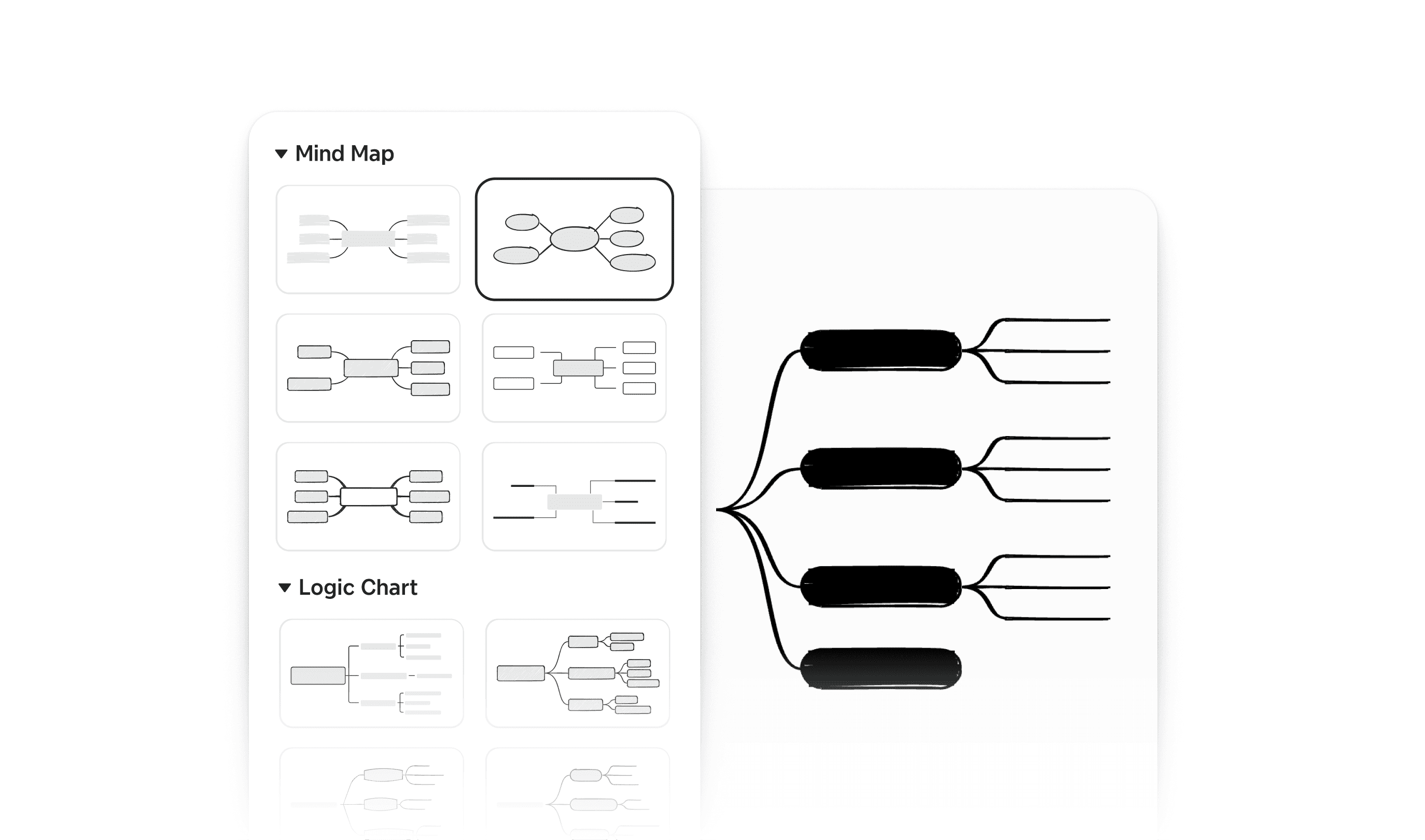
Xmind simplifies diagramming with its multiple structures. You simply type, and the structure aligns automatically, no manual dragging or aligning required. Uniquely, Xmind allows you to combine multiple structures within a single map. You can start with a standard Mind Map for brainstorming, switch a specific branch to a Fishbone diagram for root-cause analysis, and end with a Matrix to compare options—all on one cohesive canvas without breaking the logical flow.

Xmind structure selection menu displaying various Mind Map and Logic Chart templates for a fast start.
  • Intuitive task management

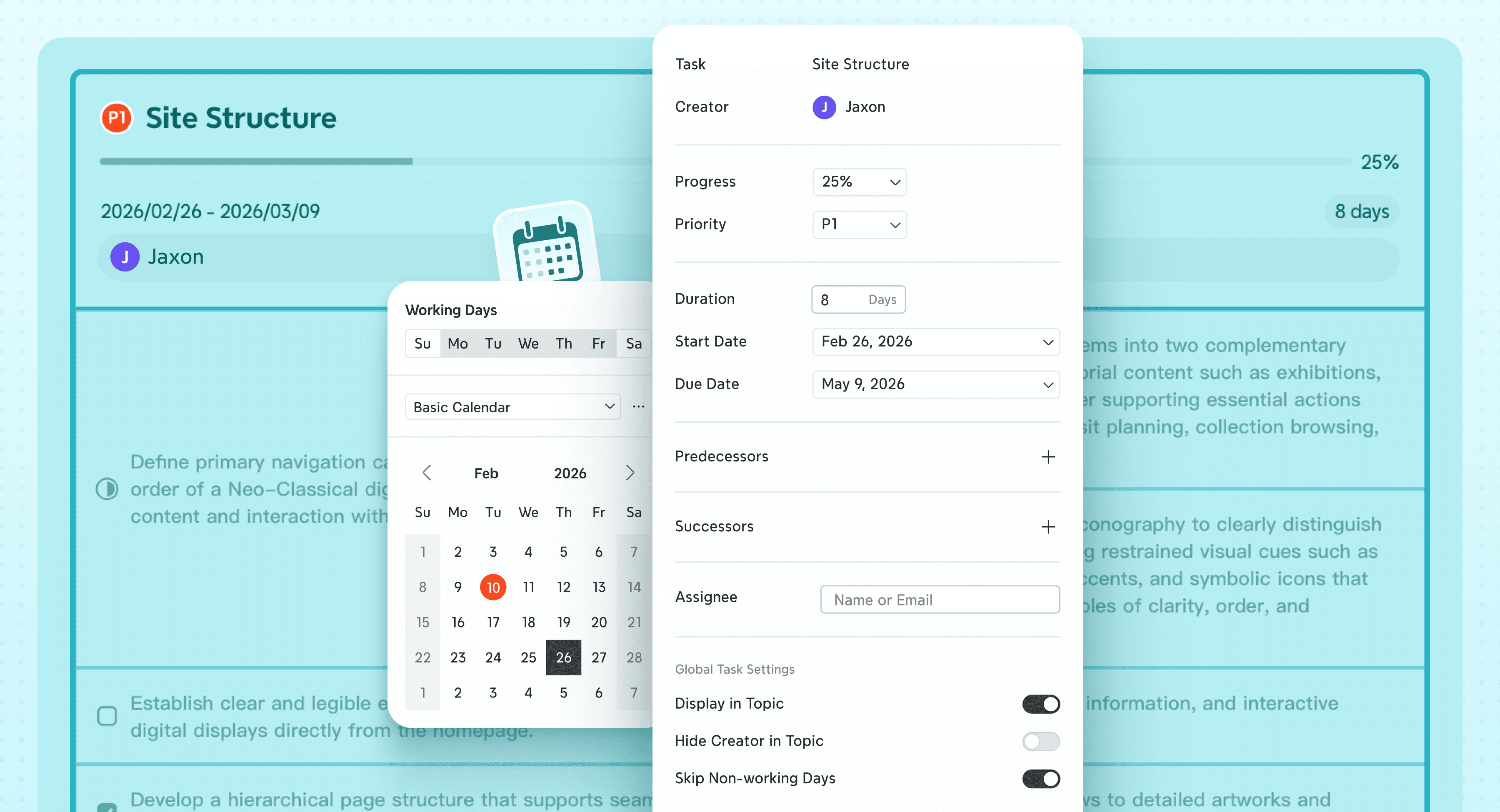
Xmind bridges the gap between brainstorming and execution. You can instantly turn any topic into a trackable task by adding assignees, priority, and deadlines via the Task panel. With a single click, your visual structure transforms into a professional Gantt Chart. This allows you to track project progress, timelines, and dependencies visually, ensuring that great ideas translate into finished projects.

Xmind task management panel displaying project details including progress tracking, priority settings, start/due dates, and assignee options.
  • Supercharge ideation with AI assistance

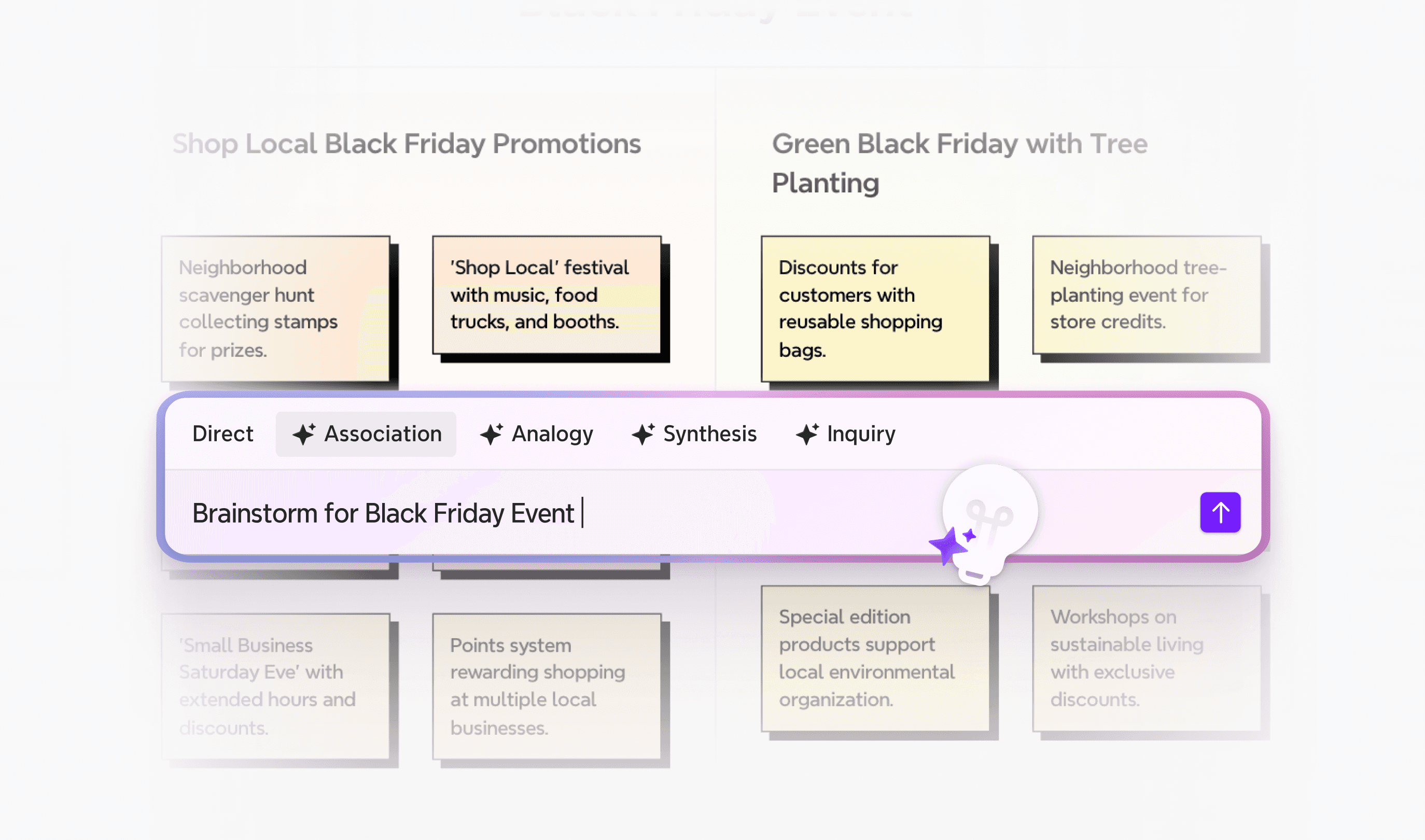
Don't let a blank page slow you down. Xmind’s AI-Powered Brainstorming acts as your intelligent co-pilot. Whether you are stuck on a concept or need to outline a report fast, simply ask the AI to expand a branch, generate a full mind map from a one-line prompt, or convert scattered notes into a structured to-do list. It helps you generate and organize ideas significantly faster than manual typing.

Xmind AI features inside a mind map, showing brainstorming feature with AI.
  • Seamless workflow with versatile exports

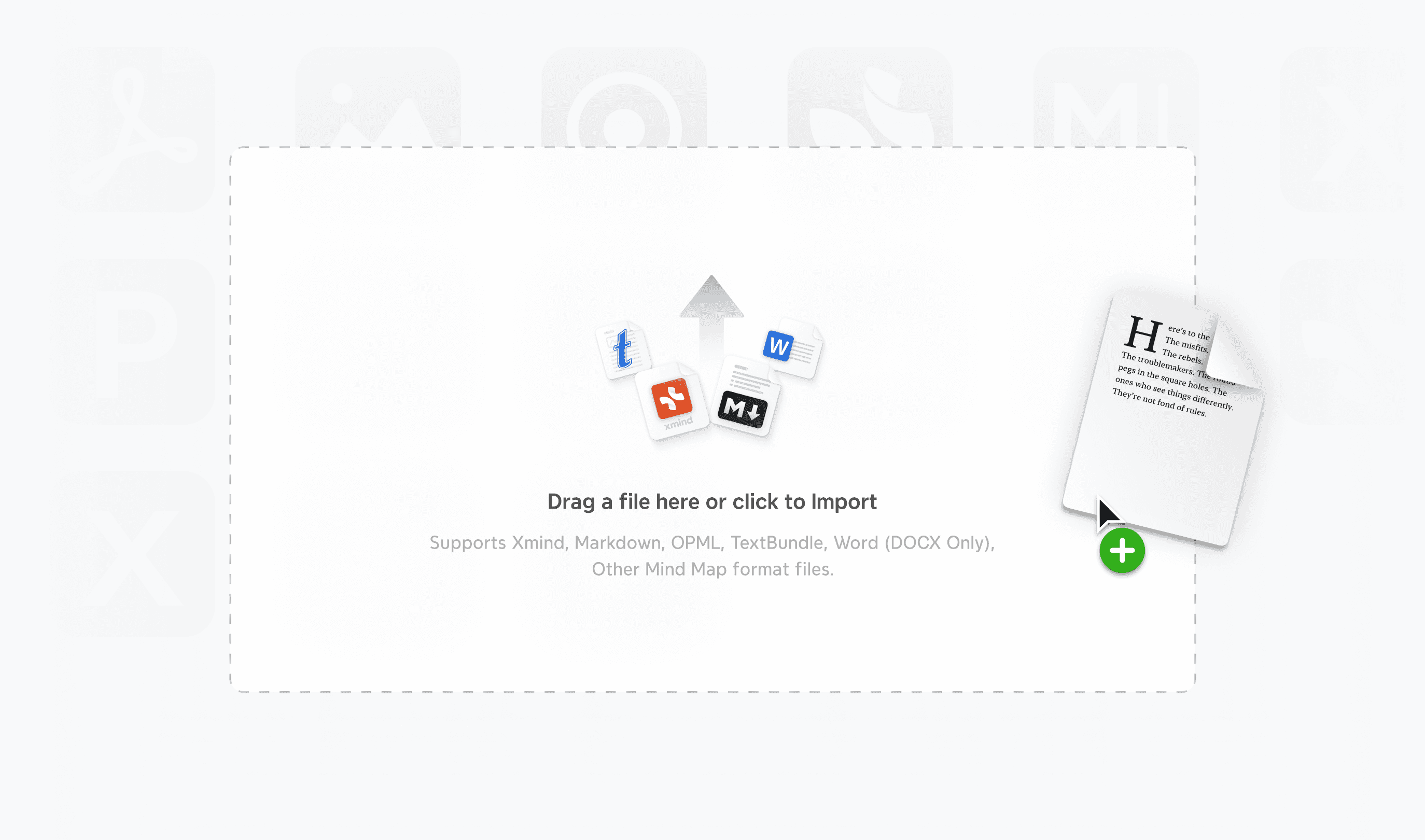
Your ideas shouldn't be trapped in your mapping tool. Xmind ensures your work integrates perfectly into your broader workflow. It supports deep structure exports, allowing you to transfer your logic directly to Markdown for writing, Excel for data analysis, or editable PowerPoint/Word files for reporting. This ensures that your brainstorming session instantly becomes a deliverable document.

Xmind file import interface showing the drag-and-drop zone for compatible formats including Markdown, OPML, TextBundle, and Microsoft Word.

Where Xmind excels

  • Visual problem solving & analysis

Don't just list problems; dissect them. Product managers can utilize the Fishbone to trace a bug's root cause back to specific departments—Design, Dev, or QA. Executives can leverage the Matrix to conduct rigorous SWOT analyses, comparing "Strengths" against "Opportunities" side-by-side on a single canvas. This allows teams to visualize the entire strategic landscape and make data-backed decisions faster.

  • Project execution & tracking

Ideal for managing complex launches, such as a marketing campaign or a software release. Start by breaking down the project into granular tasks using a standard mind map (WBS). Then, use the Task Info panel to assign owners and deadlines. With one click, switch to Gantt View to instantly visualize the critical path, spot scheduling conflicts, and track milestones—turning a static plan into a dynamic roadmap.

  • Research synthesis & information architecture

For researchers synthesizing hundreds of papers or HR teams building Standard Operating Procedures (SOPs), linear documents often fail. Xmind’s Tree Table is the solution. It allows you to organize dense information—like literature reviews or employee handbooks—into a nested, spreadsheet-like structure. This lets you compare data points horizontally without losing the hierarchical context of the main topic.

  • Content structuring & outlining

For writers, marketers, and content creators, staring at a blank document can be paralyzing. Xmind solves this with its seamless Outline Mode. You can rapid-fire ideas in a linear list to get thoughts down quickly, then instantly toggle to the map view to spot logical gaps or structural imbalances. Once the structure is solid, export it directly to Markdown or Word to flesh out the draft—saving hours of rewriting time.

Why Xmind is a valuable alternative for Miro

Teams looking for Miro competitors will find several unique advantages in Xmind. Here is why it stands out:

  1. AI-powered efficiency: Xmind's AI capabilities give it a distinct edge. Users who need help generating ideas or organizing information will save valuable time with features like AI-powered brainstorming and instant to-do list generation.

  2. 100% offline capability: Unlike web-based whiteboards, you can work offline with Xmind. The tool allows you to work on maps without an internet connection and sync later, which is a game-changer for professionals who travel or work in secure environments.

  3. Easier learning curve: New users often find Xmind easier to learn than many free Miro alternatives. The intuitive interface helps you create your first mind map in minutes, while still offering advanced depth for experienced users.

  4. All-in-one planning: Recent additions include task management features with assignees and calendar/Excel export options. This makes Xmind more competitive as a comprehensive planning tool, rather than just a simple visualization platform.

Still weighing your options? Visit comparison between Xmind and Miro to see exactly how Xmind stacks up against Miro in every category.

When you are ready to turn chaos into clarity, give Xmind a try. We look forward to becoming your go-to partner for deep thinking and organized planning.

Alternative 2: Trello—the Kanban specialist for task management

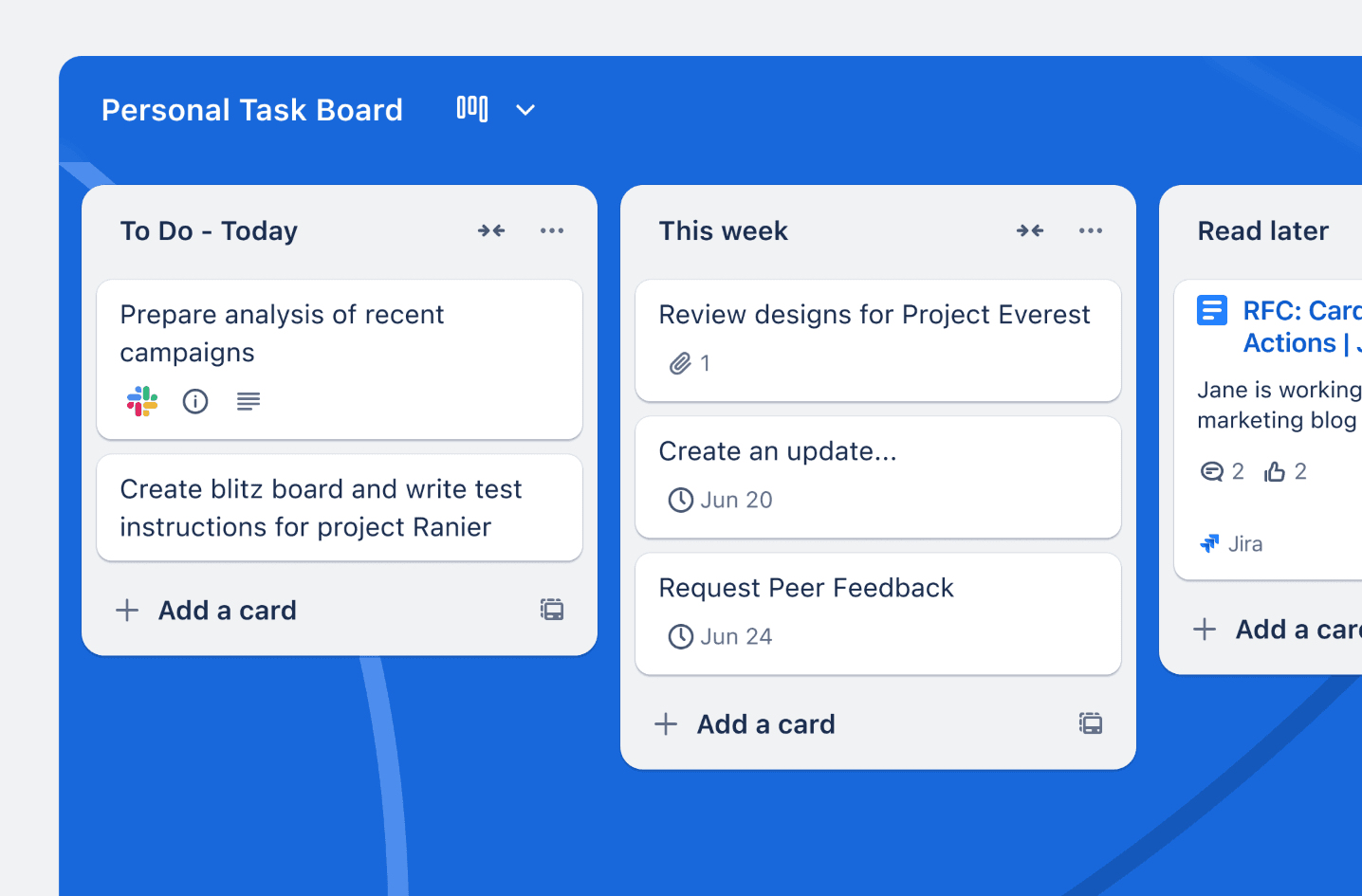
Trello Personal Task Board showing drag-and-drop cards arranged in a classic Kanban workflow.

If Miro’s lack of structured process frustrates you, Trello offers a regimented, card-based antidote. It abandons the whiteboard concept entirely in favor of a strict, column-based Kanban system that excels at tracking progress and defining "who is doing what."

Trello’s key features

Trello’s core strength lies in its visual simplicity. Its Kanban-style boards visualize work stages (e.g., To Do, Doing, Done) clearly, forcing teams to define their workflow steps. The Card system acts as a centralized hub for every task, holding descriptions, checklists, attachments, and due dates in one neat container.

Beyond the basics, Trello offers powerful tools to streamline project management:

  • Built-in automation: Automate repetitive tasks without coding. For example, you can set rules to automatically move a card to "Done" when a checklist is completed or assign a member when a card moves to a specific list.

  • Power-ups ecosystem: Connect with over 200 external apps. You can integrate Slack for communication, Google Drive for file management, or Salesforce for CRM data directly into your cards.

  • Advanced views: While the free plan focuses on boards, Premium users unlock Timeline, Calendar, and Dashboard views, allowing teams to visualize deadlines and workload distribution beyond the standard column layout.

Why teams prefer the Kanban approach

Trello is often the first choice for teams that value speed and simplicity over complex features.

  • Zero learning curve: It is incredibly intuitive. Even non-tech team members can understand the "drag-and-drop" interface in minutes, making onboarding painless.

  • Visual status tracking: The board layout provides instant visibility into project status. You can see bottlenecks (e.g., too many cards in the "Review" column) at a glance.

  • Generous free plan: The free version is robust, offering unlimited cards, up to 10 boards per workspace, and unlimited storage (10MB/file), which is enough for many small teams to operate effectively.

Limitations for creative & complex work

While excellent for tasks, Trello has distinct boundaries compared to a whiteboard tool like Miro.

  • Lack of creative freedom: You lose the free-form canvas. You cannot draw arrows between unrelated tasks, sketch ideas, or create diagrams. It is strictly for linear task management.

  • Struggles with complexity: Trello is not built for large-scale project management. It lacks native features for dependency tracking (e.g., preventing Task B from starting until Task A finishes) or advanced resource management.

  • Visual clutter: As projects grow, boards can become overwhelmed. Having hundreds of cards in a single list can make it difficult to spot high-priority items without strict filtering discipline.

Alternative 3: Milanote—a "visual board" for creative design

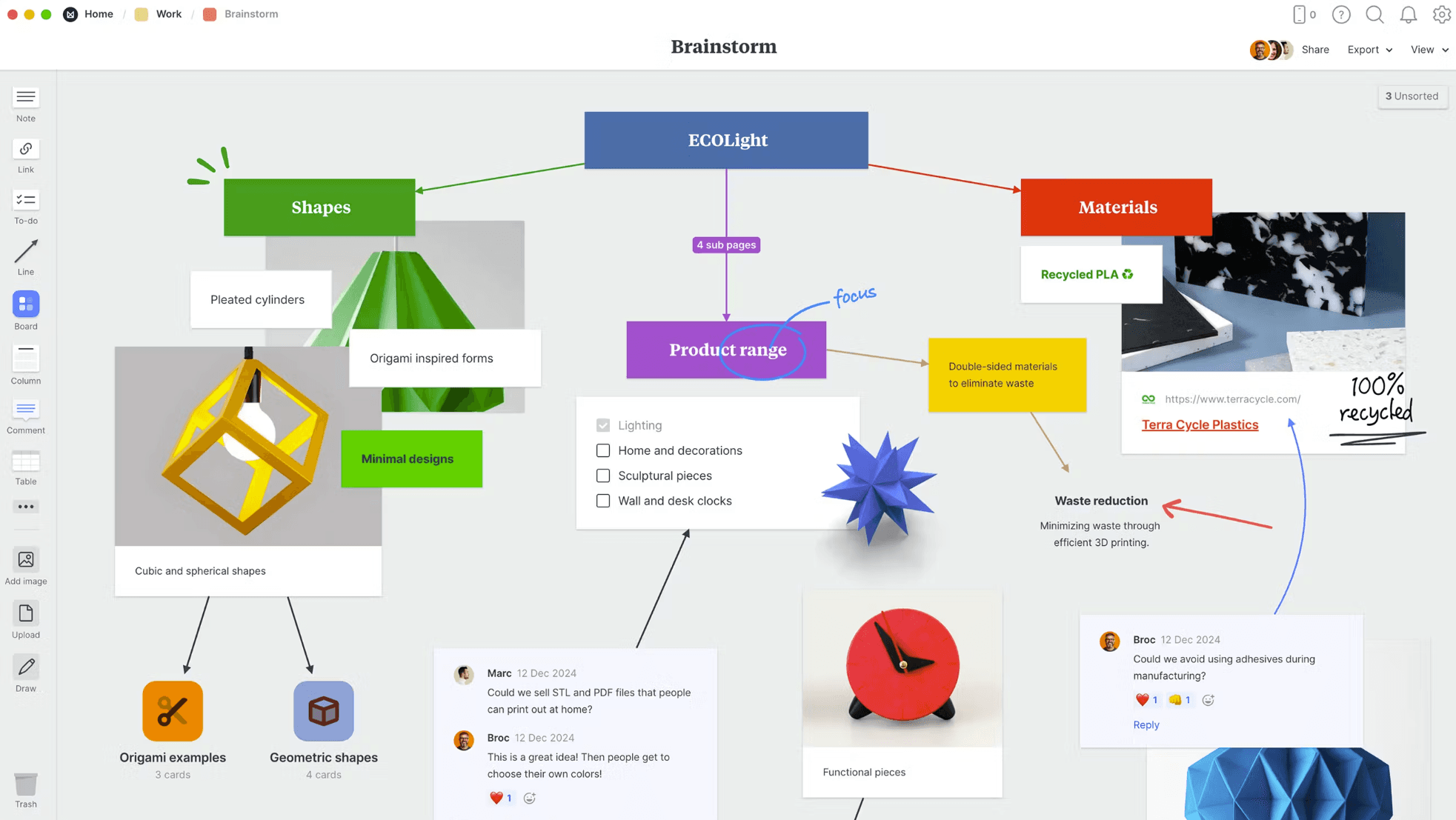
Milanote visual interface for organizing creative projects with notes, images, and diagrams.

For design-led teams who find Miro too "corporate" and Xmind too "logic-focused," Milanote offers a visually rich middle ground. It positions itself not as a standard whiteboard, but as a "studio for your work"—perfect for organizing creative projects into beautiful, gallery-style boards.

A studio-style interface for creatives

Milanote feels less like a diagramming tool and more like a flexible digital scrapbook. Its endless canvas allows you to arrange notes, images, links, and files side-by-side without worrying about running out of space. Unlike rigid grids, the drag-and-drop functionality feels tactile and natural, mimicking the experience of moving photos around on a physical wall.

To support the creative process, Milanote offers several standout capabilities:

  • The Web clipper: Instantly save inspiration from the internet—images, videos, or text—directly to your board with one click. It is an essential tool for building mood boards and research libraries.

  • Nested boards: This is a key structural advantage over Miro. You can organize projects in deep hierarchies (visual folders inside folders), keeping your top-level workspace clean while allowing for deep dives into specific topics.

  • Mixed media support: It handles diverse content types effortlessly. You can use markdown for text formatting, upload raw design files, and sketch directly on the canvas with built-in drawing tools.

Why creative teams love it

Milanote hits the sweet spot for users who need a space that looks as good as the work they produce.

  • Intuitive "scrapbook" feel: The interface is visually oriented and requires almost no learning curve. It feels like a natural extension of the design process rather than a complex software tool.

  • Flexible organization: You aren't forced into a specific structure. You can create custom layouts that fit your project's unique needs, from storyboards to interior design plans.

  • Cross-platform (mostly): Your work is stored in the cloud and accessible via browser or desktop apps, ensuring your inspiration library is always available.

Where it falls short

While beautiful, Milanote prioritizes aesthetics over heavy-duty functionality.

  • Lacks data tools: It is not built for complex data handling. You won't find advanced features like spreadsheets, tables, or pivot charts here—if you need to manage budgets or databases, you will need another tool.

  • Mobile limitations: Surprisingly for a creative tool, the mobile experience is limited, and it lacks a dedicated, fully-featured iPad app for drawing.

  • Online only: Like Miro, Milanote requires an internet connection to view or edit boards. There is no offline mode, which can be a hindrance for creatives who want to disconnect to focus.

  • Card locking: Real-time collaboration has a quirk: only one person can edit a specific card at a time, which can sometimes slow down fast-paced team brainstorming.

Alternative 4: Asana—a command center for complex projects

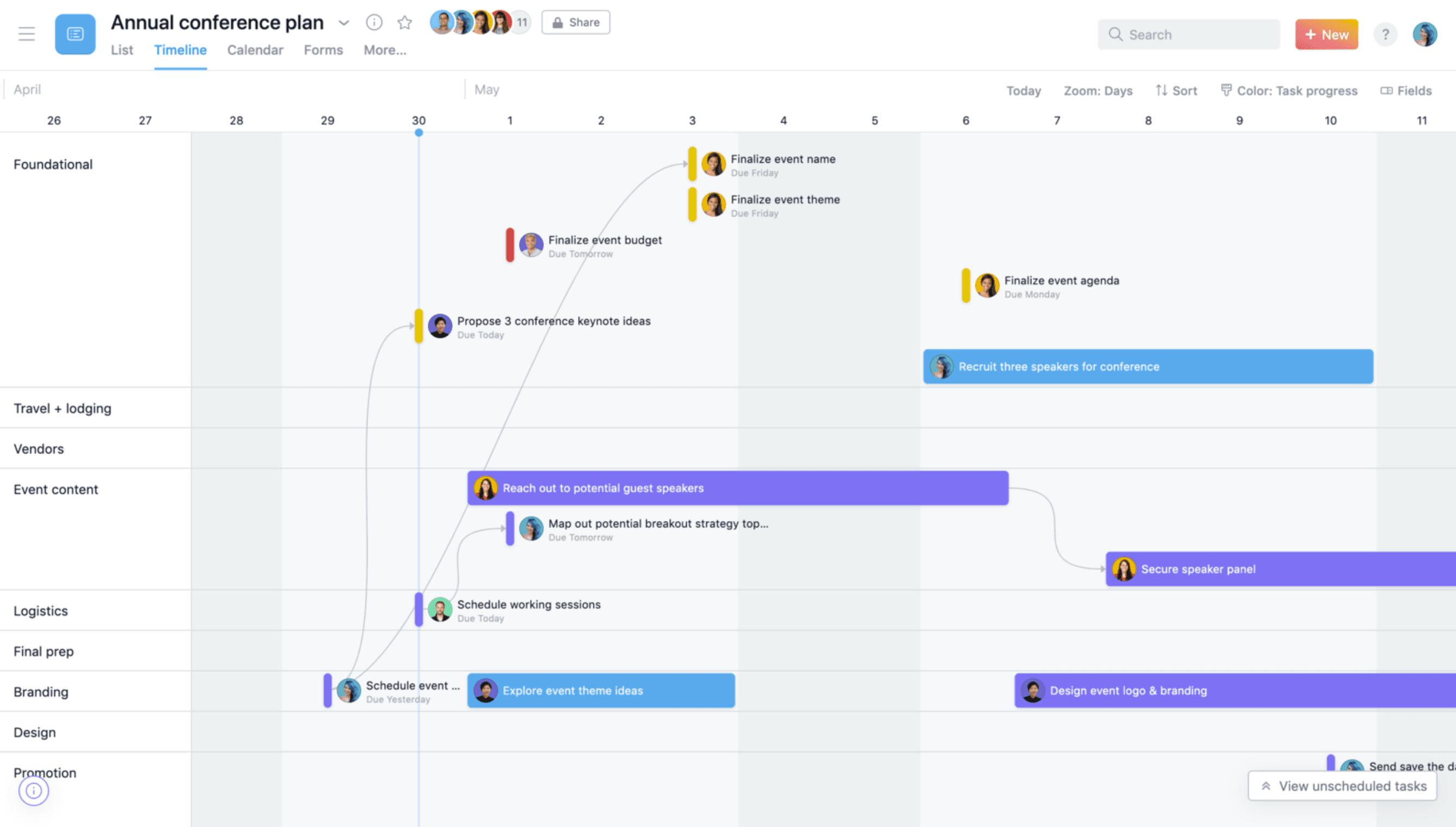
Asana Gantt chart view displaying task dependencies and project timelines.

If you are looking for a Miro competitor because you need more control, not less, Asana is the answer.

Moving from visualization to action

Asana’s power lies in its intelligent structure, which links every single task to high-level company objectives. This ensures that everyone knows not just what they are doing, but why it matters.

  • Versatile view options: Visualize the same project data as a List, Board, Calendar, or Timeline (Gantt). This flexibility lets developers see bugs in a list while managers track the roadmap on a timeline.

  • Workflow automation: Reduce "work about work" by creating self-running processes. You can automate assignments, due dates, and handoffs, ensuring no task falls through the cracks.

  • Resource management: A distinct advantage over Miro. Asana allows managers to balance workloads across the team, spotting burnout risks before they happen by visualizing capacity.

Why enterprise teams rely on it

Asana is designed for clarity and alignment in large groups.

  • Strategic alignment: It is one of the few tools that effectively connects daily tasks to strategic goals, providing immediate progress updates to leadership.

  • Structured "my tasks": For individual contributors, the "My Tasks" view organizes personal work items intelligently, cutting through the noise of large projects.

  • Integration ecosystem: It plays well with others, connecting seamlessly with hundreds of enterprise tools including Slack, Google Drive, and Microsoft Teams.

The trade-off for power

With great power comes a steeper learning curve and some structural rigidity.

  • Complexity overload: For simple projects, Asana can feel like overkill. The sheer number of features and fields might overwhelm users who just want a simple checklist.

  • Strict ownership: Asana enforces a "one assignee per task" philosophy to ensure accountability. While logical, this can be frustrating for collaborative teams used to Miro's "anyone can edit" approach.

  • Cost: As a heavy-duty tool, the price point—especially for the Premium and Business tiers needed to unlock timelines and portfolios—is significantly higher than many lightweight alternatives.

Alternative 5: MindMeister—a cloud-native mapping tool

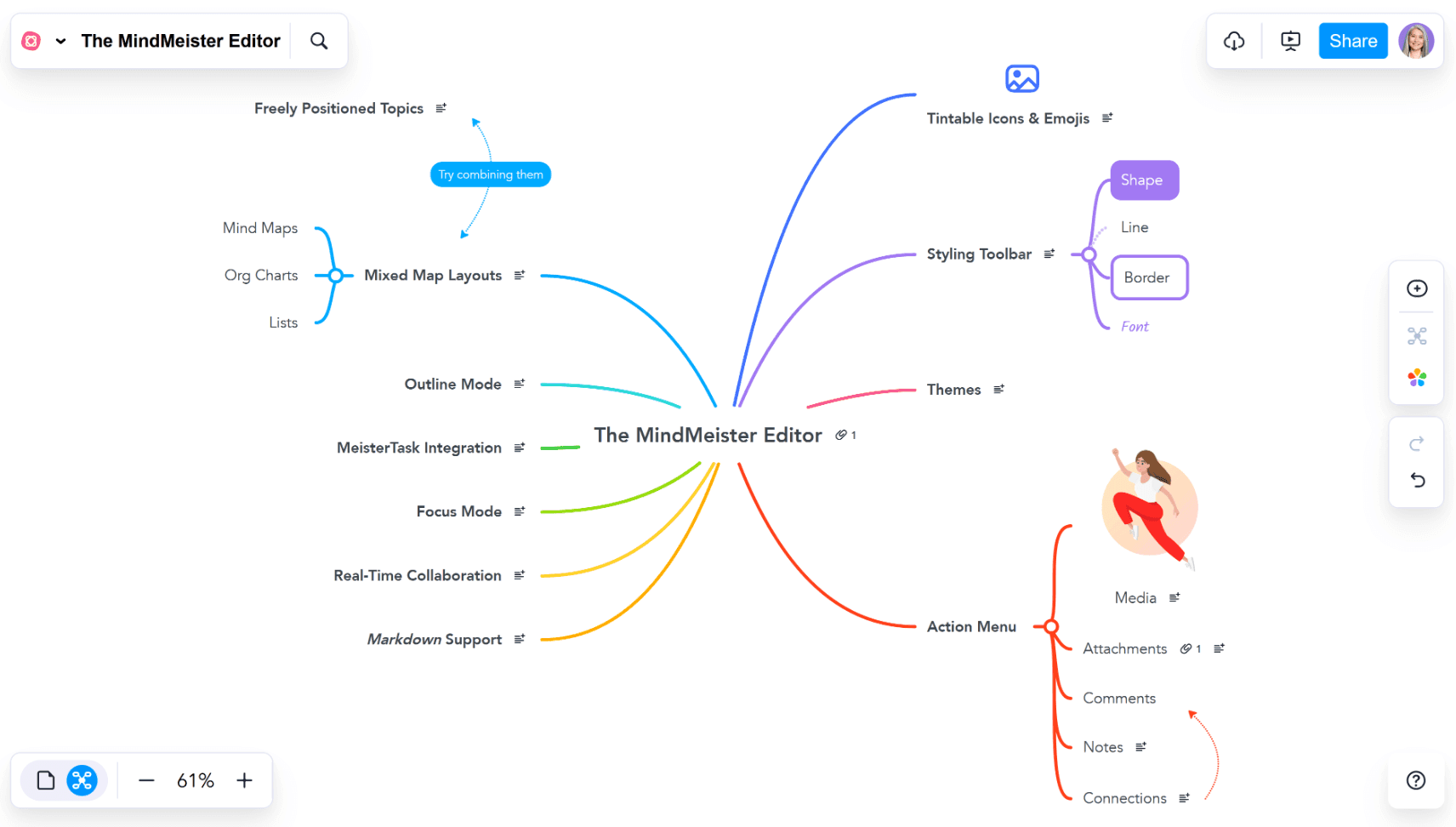
MindMeister editor view displaying a mind map with customization and layout options.

For teams that specifically want mind mapping but require a purely cloud-based solution similar to Miro's accessibility, MindMeister is a solid, lightweight option. It strips away the complexity of heavy software, living entirely in your browser for instant access on any device.

Collaborate anywhere instantly

MindMeister’s main selling point is its low barrier to entry. There is no software to download or install—it works flawlessly on Mac, Windows, Chromebooks, and mobile devices. This makes it ideal for quick, ad-hoc collaboration sessions with external clients or students who might not have specialized software installed.

Its core capabilities focus on seamless connectivity:

  • Real-time co-editing: Like Google Docs for mind maps, unlimited team members can brainstorm simultaneously, seeing each other’s changes instantly.

  • Task management integration: It pairs tightly with its sibling app, MeisterTask. You can drag and drop a node in your mind map to turn it into an actionable task, bridging the gap between ideas and execution.

  • Built-in presentation mode: You can turn your map branches into slideshow frames, allowing you to broadcast your ideas online or embed them in a website without exporting.

Why teams choose MindMeister

It is the tool of choice for users who prioritize accessibility and simplicity over depth.

  • Zero-friction onboarding: Because it’s browser-based, you can invite anyone via a link, and they can start contributing immediately.

  • Education-friendly: Its intuitive, colorful design is widely used in schools. It is particularly helpful for students with learning differences (like dyslexia), offering a visual way to organize thoughts without the intimidation of a blank page.

  • Automated safety: Your work saves automatically to the cloud, tracking full version history so you can revert changes or see who added what at any time.

Limitations for power users

Simplicity comes with trade-offs. MindMeister is a "light" tool compared to dedicated desktop engines.

  • Restrictive free plan: The free version is strictly limited to three mind maps. Once you hit this cap, you must pay to create more, which can be a bottleneck for active users.

  • Online dependency: It relies entirely on an internet connection. If you are offline, you cannot access or edit your maps.

  • Limited diagram types: It is strictly a mind mapping tool. It lacks the ability to create complex process flow diagrams or mix different structures (like fishbones and matrices) in the same view, which limits its utility for advanced strategic planning.

Comparison table


Xmind

Trello

Milanote

Asana

MindMeister

Best for

Deep thinking & planning

Task tracking & workflows

Moodboards & creative notes

Team project execution

Online brainstorming

Native mind mapping

Multiple structures

100% offline access

One-click pitch mode

Switch map to Gantt view

Task management

Learning curve

Low

Low

Medium

High

Low

Conclusion

Your specific workflow needs should guide your choice of visual collaboration tools. Each Miro alternative brings different strengths to the table. Trello shines with its easy-to-use Kanban system, and Milanote gives creative teams a flexible canvas to organize visually. Asana comes with strong project tracking features, while MindMeister makes brainstorming simple and available to everyone.

Xmind emerges as the top choice for teams that need advanced mind mapping capabilities. Its mix of AI-powered brainstorming, multiple mapping structures, and smooth presentation features makes it versatile for creative thinking and structured planning.

Want to change your visual workflow? Try Xmind today and find out why millions of users trust this detailed tool. From quick brainstorming sessions to complex project planning, it improves your team's productivity in ways other tools can't match.

更多选择

Xmind logo - mind map and brainstorming tool

功能

解决方案

资源

Xmind logo - mind map and brainstorming tool