Prueba 5 alternativas a Miro para mejorar tu flujo de trabajo

¿A veces el "lienzo infinito" de Miro te resulta un poco abrumador? No estás solo.
Aunque Miro es excelente para la colaboración libre, su falta de estructura inherente puede dificultar el enfoque a medida que los proyectos crecen. Ya sea que necesites una gestión de proyectos rigurosa, una planificación sin distracciones o capacidades fuera de línea, apegarse a una pizarra general puede estar limitando tu productividad.
En esta guía, exploramos cinco de las mejores alternativas a Miro para ayudarte a ir más allá de la simple pizarra y encontrar el ajuste perfecto para tu flujo de trabajo.
Alternativa 1: Xmind—un espacio de trabajo completo para ideas y ejecución
Si tu objetivo es organizar la lógica en lugar de solo dibujar imágenes, Xmind es la alternativa más fuerte a Miro. Mientras Miro ofrece un lienzo infinito para la colaboración libre, Xmind ofrece un motor de pensamiento estructurado. Ancla tus pensamientos en una jerarquía lógica, convirtiéndolo en la opción preferida para profesionales que necesitan desarrollar, organizar y presentar ideas complejas con precisión.
Características principales que impulsan la productividad
Xmind desarrolla sus características en torno al "flujo de pensamiento", permitiendo a los usuarios enfocarse puramente en el contenido mientras el software maneja la estructura. Aquí están las capacidades clave que definen su flujo de trabajo:
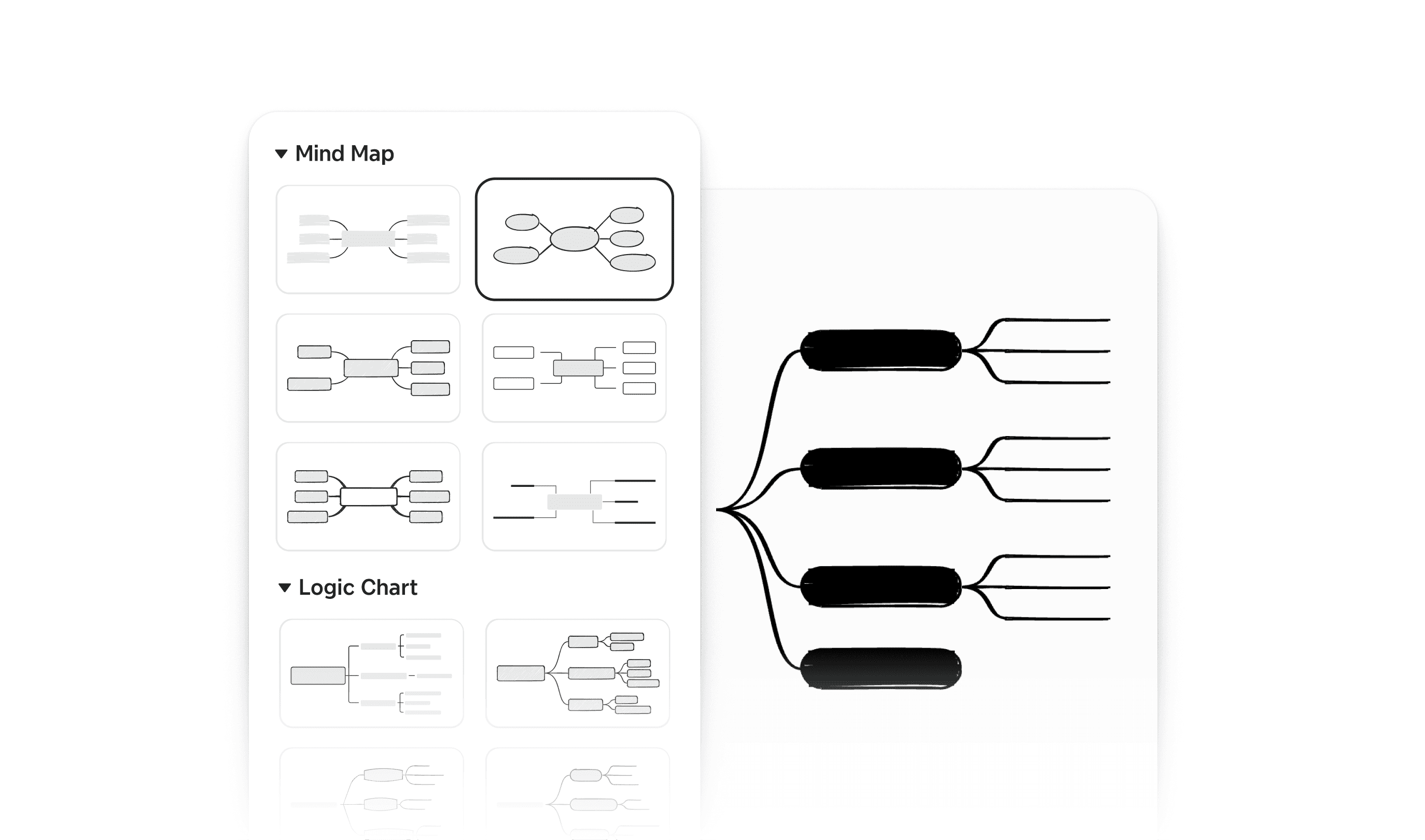
Lógica compleja simplificada con estructuras mixtas
Xmind simplifica el diagramado con sus múltiples estructuras. Simplemente escribe y la estructura se alinea automáticamente, sin necesidad de arrastrar o alinear manualmente. Unicamente, Xmind te permite combinar múltiples estructuras dentro de un solo Mapa. Puedes comenzar con un mapa mental estándar para generar ideas, cambiar una rama específica a un diagrama de espina de pescado para el análisis de causa raíz y terminar con una matriz para comparar opciones, todo en un lienzo cohesivo sin romper el flujo lógico.
Gestión de tareas intuitiva
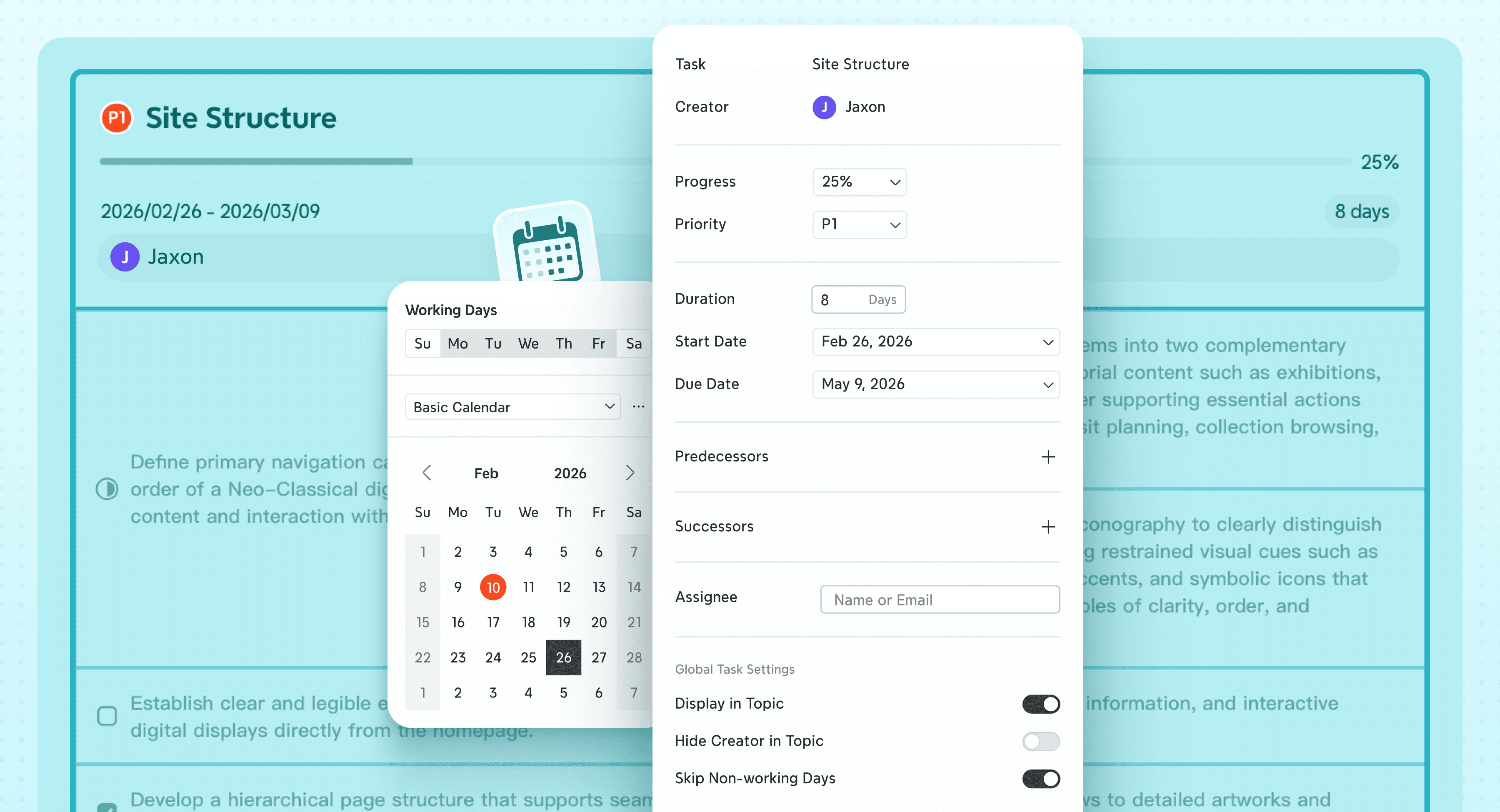
Xmind cierra la brecha entre la lluvia de ideas y la ejecución. Puedes convertir instantáneamente cualquier tema en una tarea rastreable añadiendo responsables, prioridades y plazos a través del panel de Tareas. Con un solo clic, tu estructura visual se transforma en un diagrama de Gantt profesional. Esto te permite rastrear el progreso del proyecto, las líneas de tiempo y las dependencias visualmente, asegurando que las grandes ideas se traduzcan en proyectos terminados.
Impulsa la ideación con asistencia de IA
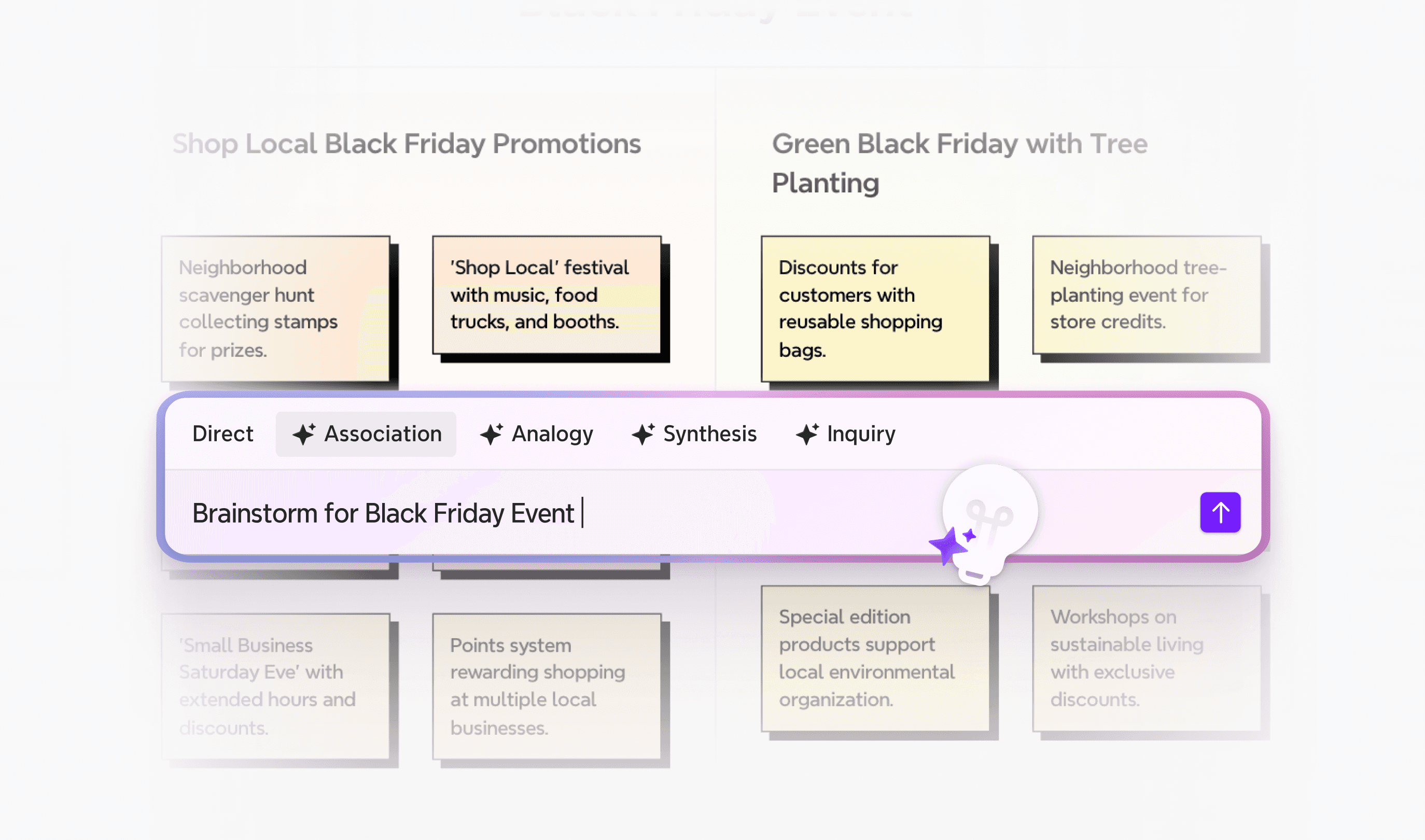
No dejes que una página en blanco te detenga. La lluvia de ideas potenciada por IA de Xmind actúa como tu copiloto inteligente. Ya sea que estés atascado en un concepto o necesites describir un informe rápidamente, simplemente pide a la IA que expanda una rama, genere un mapa mental completo a partir de un solo mensaje o convierta notas dispersas en una lista de tareas estructurada. Te ayuda a generar y organizar ideas mucho más rápido que escribiendo manualmente.
Flujo de trabajo fluido con exportaciones versátiles
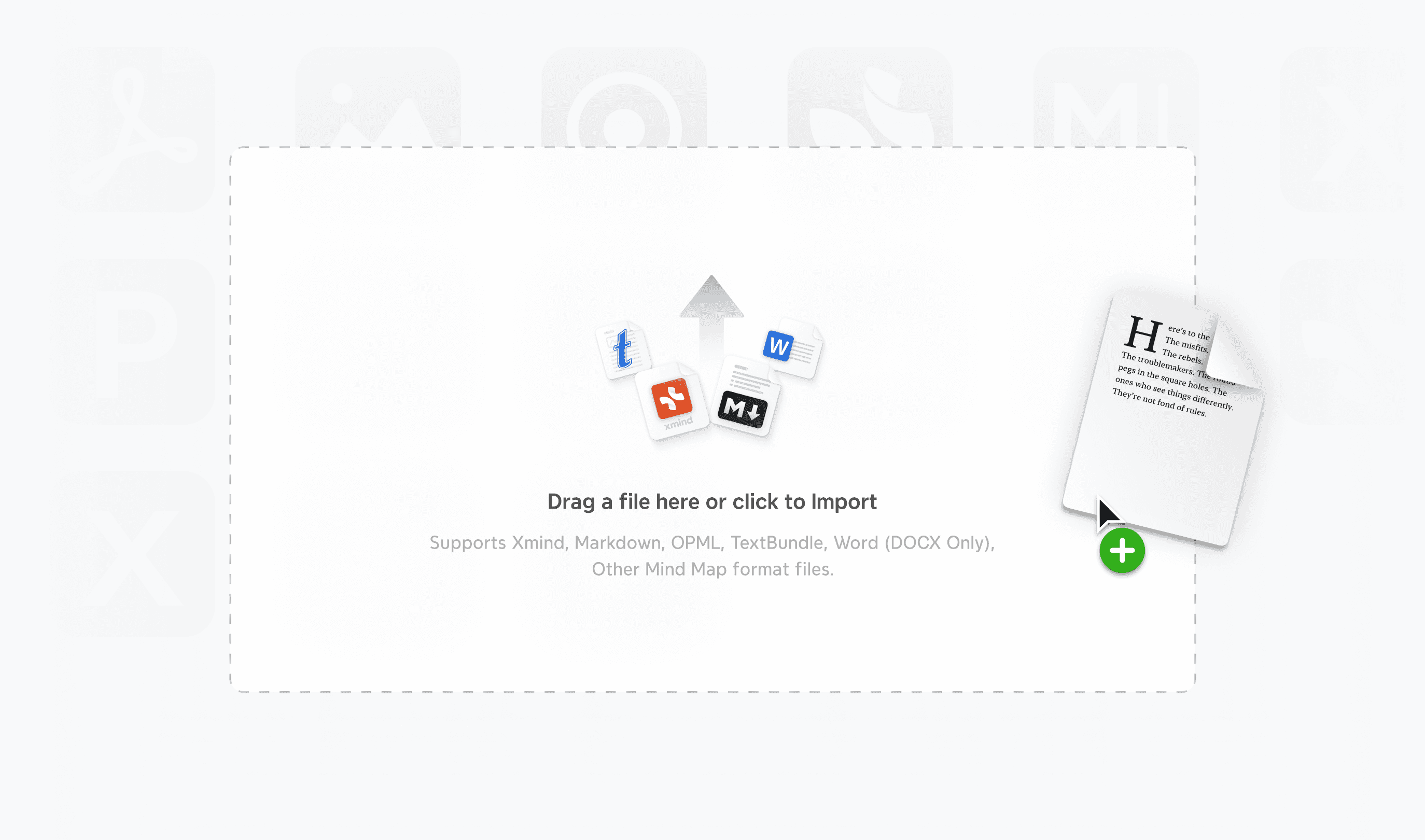
Tus ideas no deben quedar atrapadas en tu herramienta de mapeo. Xmind asegura que tu trabajo se integre perfectamente en tu flujo de trabajo más amplio. Admite exportaciones de estructuras profundas, permitiéndote transferir tu lógica directamente a Markdown para escribir, Excel para análisis de datos, o archivos PowerPoint/Word editables para informes. Esto asegura que tu sesión de brainstorming se convierta instantáneamente en un documento entregable.
Dónde sobresale Xmind
Solución visual de problemas y análisis
No solo lista problemas; desmenúzalos. Los gerentes de producto pueden utilizar el diagrama de espina de pescado para rastrear la causa raíz de un error hasta departamentos específicos: Diseño, Desarrollo o QA. Los ejecutivos pueden aprovechar la Matriz para realizar análisis SWOT rigurosos, comparando "Fortalezas" con "Oportunidades" lado a lado en un solo lienzo. Esto permite a los equipos visualizar todo el panorama estratégico y tomar decisiones basadas en datos más rápido.
Ejecución de proyectos y seguimiento
Ideal para gestionar lanzamientos complejos, como una campaña de marketing o el lanzamiento de un software. Comienza desglosando el proyecto en tareas granulares utilizando un mapa mental estándar (WBS). Luego, usa el panel de Información de Tareas para asignar responsables y plazos. Con un clic, cambia a la Vista Gantt para visualizar instantáneamente el camino crítico, detectar conflictos de programación y seguir hitos, convirtiendo un plan estático en un mapa de ruta dinámico.
Síntesis de investigación y arquitectura de información
Para investigadores que sintetizan cientos de artículos o equipos de RRHH que elaboran Procedimientos Operativos Estándar (SOPs), los documentos lineales suelen fallar. El Árbol de Tabla de Xmind es la solución. Permite organizar información densa, como revisiones de literatura o manuales de empleados, en una estructura similar a una hoja de cálculo. Esto te permite comparar puntos de datos horizontalmente sin perder el contexto jerárquico del tema principal.
Estructuración y delineado de contenido
Para escritores, mercadólogos y creadores de contenido, mirar un documento en blanco puede ser paralizante. Xmind resuelve esto con su Modo Esquema fluido. Puedes lanzar ideas rápidamente en una lista lineal para plasmar pensamientos con rapidez, luego alternar instantáneamente a la vista de mapa para detectar brechas lógicas o desequilibrios estructurales. Una vez que la estructura esté sólida, expórtala directamente a Markdown o Word para desarrollar el borrador, ahorrando horas de reescritura.
Por qué Xmind es una alternativa valiosa para Miro
Los equipos que buscan competidores de Miro encontrarán varias ventajas únicas en Xmind. Aquí es donde destaca:
Eficiencia potenciada por IA: Las capacidades de IA de Xmind le dan una ventaja distintiva. Los usuarios que necesitan ayuda para generar ideas u organizar información ahorrarán tiempo valioso con funciones como la lluvia de ideas potenciada por IA y la generación instantánea de listas de tareas.
Capacidad 100% offline: A diferencia de las pizarras basadas en web, puedes trabajar sin conexión con Xmind. La herramienta te permite trabajar en mapas sin conexión a internet y sincronizar después, lo que es un cambio de juego para profesionales que viajan o trabajan en entornos seguros.
Curva de aprendizaje más fácil: A los nuevos usuarios a menudo les resulta más fácil aprender Xmind que muchas alternativas gratuitas a Miro. La interfaz intuitiva te ayuda a crear tu primer mapa mental en minutos, mientras sigue ofreciendo profundidad avanzada para usuarios experimentados.
Planificación todo en uno: Las adiciones recientes incluyen características de gestión de tareas con responsables y opciones de exportación a calendarios/Excel. Esto hace que Xmind sea más competitivo como una herramienta de planificación integral, en lugar de solo una plataforma de visualización simple.
¿Aún estás pesando tus opciones? Visita comparación entre Xmind y Miro para ver exactamente cómo Xmind se compara con Miro en cada categoría.
Cuando estés listo para convertir el caos en claridad, prueba Xmind. Esperamos convertirnos en tu socio de confianza para el pensamiento profundo y la planificación organizada.
Alternativa 2: Trello—el especialista Kanban para la gestión de tareas
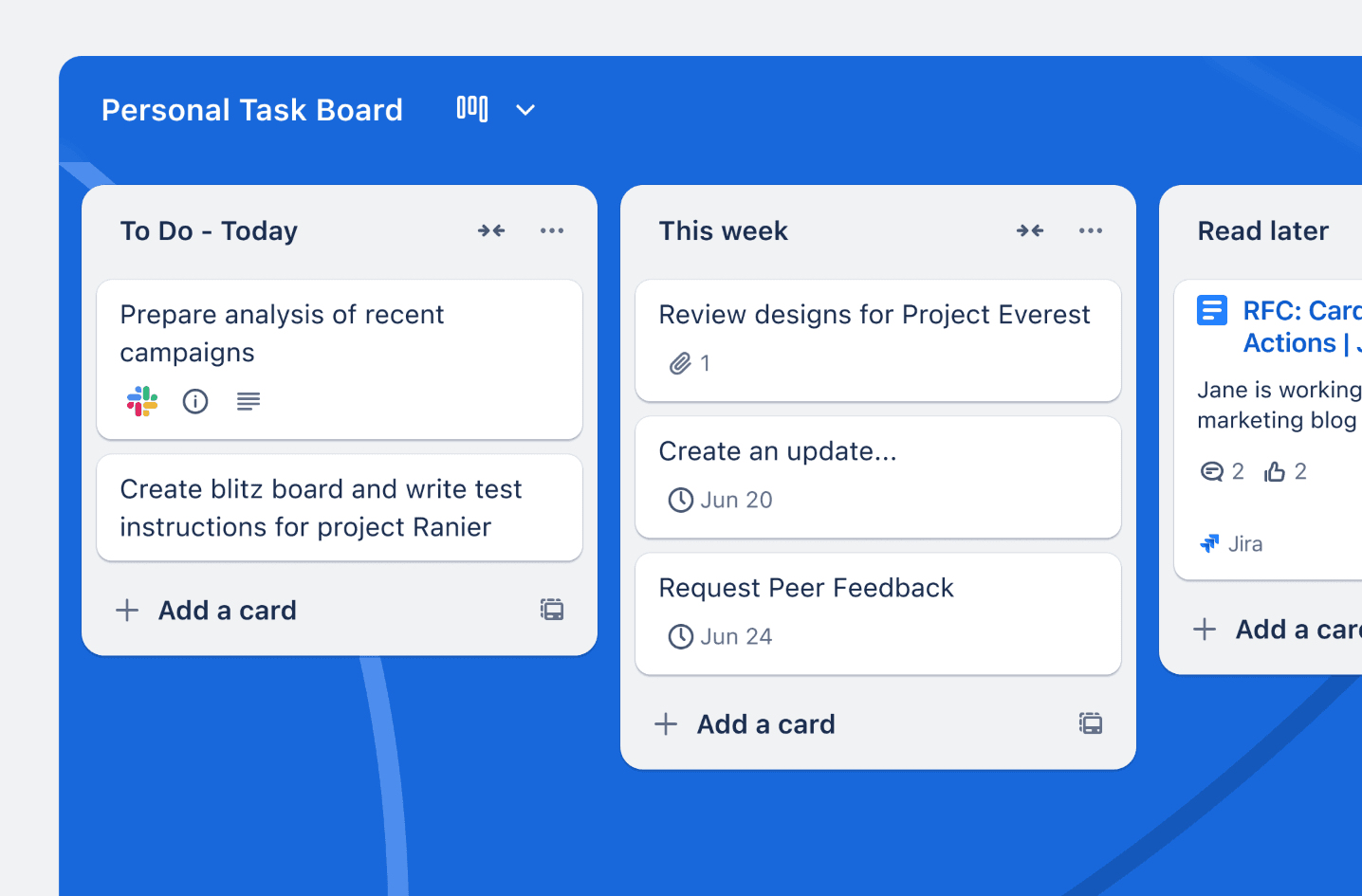
Si la falta de procesos estructurados de Miro te frustra, Trello ofrece un antídoto regimentado, basado en tarjetas. Abandona el concepto de pizarra por completo en favor de un sistema Kanban estricto, basado en columnas que sobresale en el seguimiento del progreso y la definición de "quién hace qué".
Características clave de Trello
La fortaleza principal de Trello reside en su simplicidad visual. Sus tableros de estilo Kanban visualizan claramente las etapas de trabajo (por ejemplo, Por Hacer, Haciendo, Hecho), obligando a los equipos a definir sus pasos de flujo de trabajo. El sistema de Tarjetas actúa como un centro centralizado para cada tarea, conteniendo descripciones, listas de verificación, archivos adjuntos y fechas de vencimiento en un solo contenedor ordenado.
Más allá de lo básico, Trello ofrece herramientas poderosas para agilizar la gestión de proyectos:
Automatización incorporada: Automatiza tareas repetitivas sin codificación. Por ejemplo, puedes establecer reglas para mover automáticamente una tarjeta a "Hecho" cuando se complete una lista de verificación o asignar a un miembro cuando una tarjeta se mueve a una lista específica.
Ecosistema de Power-ups: Conéctate con más de 200 aplicaciones externas. Puedes integrar Slack para comunicación, Google Drive para gestión de archivos o Salesforce para datos CRM directamente en tus tarjetas.
Vistas avanzadas: Mientras que el plan gratuito se centra en tableros, los usuarios Premium desbloquean Vistas de Cronograma, Calendario y Panel, permitiendo a los equipos visualizar plazos y distribución de carga de trabajo más allá del diseño de columnas estándar.
Por qué los equipos prefieren el enfoque Kanban
Trello es a menudo la primera opción para equipos que valoran la velocidad y simplicidad sobre características complejas.
Curva de aprendizaje cero: Es increíblemente intuitivo. Incluso los miembros del equipo no técnicos pueden entender la interfaz de "arrastrar y soltar" en minutos, haciendo que la incorporación sea indolora.
Seguimiento visual del estado: El diseño del tablero proporciona visibilidad instantánea del estado del proyecto. Puedes ver cuellos de botella (por ejemplo, demasiadas tarjetas en la columna "Revisión") de un vistazo.
Plan gratuito generoso: La versión gratuita es robusta, ofrece tarjetas ilimitadas, hasta 10 tableros por espacio de trabajo y almacenamiento ilimitado (10 MB por archivo), lo que es suficiente para que muchos equipos pequeños operen eficazmente.
Limitaciones para trabajos creativos y complejos
Aunque excelente para tareas, Trello tiene límites distintos en comparación con una herramienta de pizarra como Miro.
Falta de libertad creativa: Pierdes el lienzo de forma libre. No puedes dibujar flechas entre tareas no relacionadas, esbozar ideas ni crear diagramas. Está estrictamente para gestión de tareas lineal.
Lucha con la complejidad: Trello no está diseñado para la gestión de grandes proyectos. Carece de características nativas para el seguimiento de dependencias (por ejemplo, evitar que la Tarea B comience hasta que termine la Tarea A) o gestión avanzada de recursos.
Saturación visual: A medida que los proyectos crecen, los tableros pueden verse abrumados. Tener cientos de tarjetas en una sola lista puede dificultar la detección de elementos de alta prioridad sin una disciplina de filtrado estricta.
Alternativa 3: Milanote—un "tablero visual" para diseño creativo
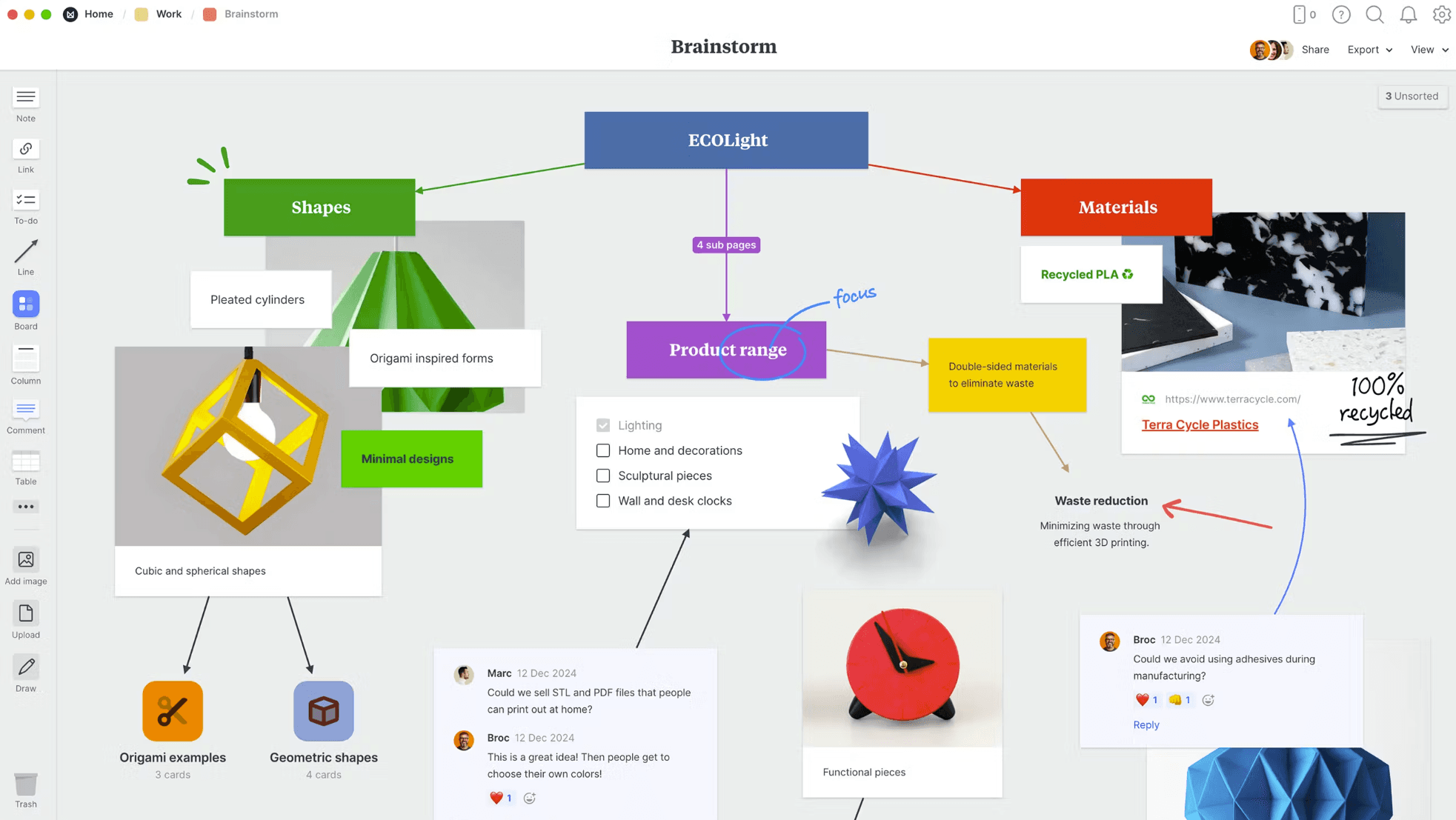
Para equipos orientados al diseño que consideran Miro demasiado "corporativo" y Xmind demasiado "enfocado en la lógica", Milanote ofrece un término medio visualmente rico. Se posiciona no como una pizarra estándar, sino como un "estudio para tu trabajo", perfecto para organizar proyectos creativos en tablones estilo galería.
Una interfaz estilo estudio para creativos
Milanote se siente menos como una herramienta de diagramación y más como un álbum de recortes digital flexible. Su lienzo infinito te permite organizar notas, imágenes, enlaces y archivos lado a lado sin preocuparte por quedarte sin espacio. A diferencia de las cuadrículas rígidas, la funcionalidad de arrastrar y soltar se siente táctil y natural, imitando la experiencia de mover fotos en una pared física.
Para apoyar el proceso creativo, Milanote ofrece varias capacidades destacadas:
Clipper web: Guarda inspiración de internet al instante—imágenes, videos o texto—directamente en tu tablero con un clic. Es una herramienta esencial para construir tablones de inspiración y bibliotecas de investigación.
Tableros anidados: Esta es una ventaja estructural clave sobre Miro. Puedes organizar proyectos en jerarquías profundas (carpetas visuales dentro de carpetas), manteniendo tu espacio de trabajo de nivel superior limpio mientras permites inmersiones profundas en temas específicos.
Soporte para medios mixtos: Maneja tipos de contenido diversos sin esfuerzo. Puedes usar markdown para formato de texto, subir archivos de diseño en bruto y dibujar directamente en el lienzo con herramientas de dibujo integradas.
Por qué a los equipos creativos les encanta
Milanote encuentra el punto óptimo para usuarios que necesitan un espacio que luzca tan bien como el trabajo que producen.
Sensación intuitiva de "álbum de recortes": La interfaz está orientada visualmente y requiere casi nula curva de aprendizaje. Se siente como una extensión natural del proceso de diseño en lugar de una herramienta de software complejo.
Organización flexible: No estás obligado a una estructura específica. Puedes crear diseños personalizados que se ajusten a las necesidades únicas de tu proyecto, desde guiones gráficos hasta planes de diseño de interiores.
Multiplataforma (en su mayoría): Tu trabajo se almacena en la nube y es accesible a través de aplicaciones de navegador o de escritorio, asegurando que tu biblioteca de inspiración esté siempre disponible.
Dónde se queda corto
Aunque hermoso, Milanote prioriza la estética sobre la funcionalidad pesada.
Falta de herramientas de datos: No está diseñado para manejar datos complejos. No encontrarás características avanzadas como hojas de cálculo, tablas o gráficos dinámicos aquí; si necesitas gestionar presupuestos o bases de datos, necesitarás otra herramienta.
Limitaciones móviles: Sorprendentemente para una herramienta creativa, la experiencia móvil es limitada y carece de una aplicación completa y dedicada para iPad para dibujar.
Solo en línea: Al igual que Miro, Milanote requiere conexión a internet para ver o editar tableros. No hay modo offline, lo que puede ser un obstáculo para creativos que desean desconectarse para concentrarse.
Bloqueo de tarjetas: La colaboración en tiempo real tiene una peculiaridad: solo una persona puede editar una tarjeta específica a la vez, lo que a veces puede ralentizar la lluvia de ideas rápida en equipo.
Alternativa 4: Asana—un centro de mando para proyectos complejos
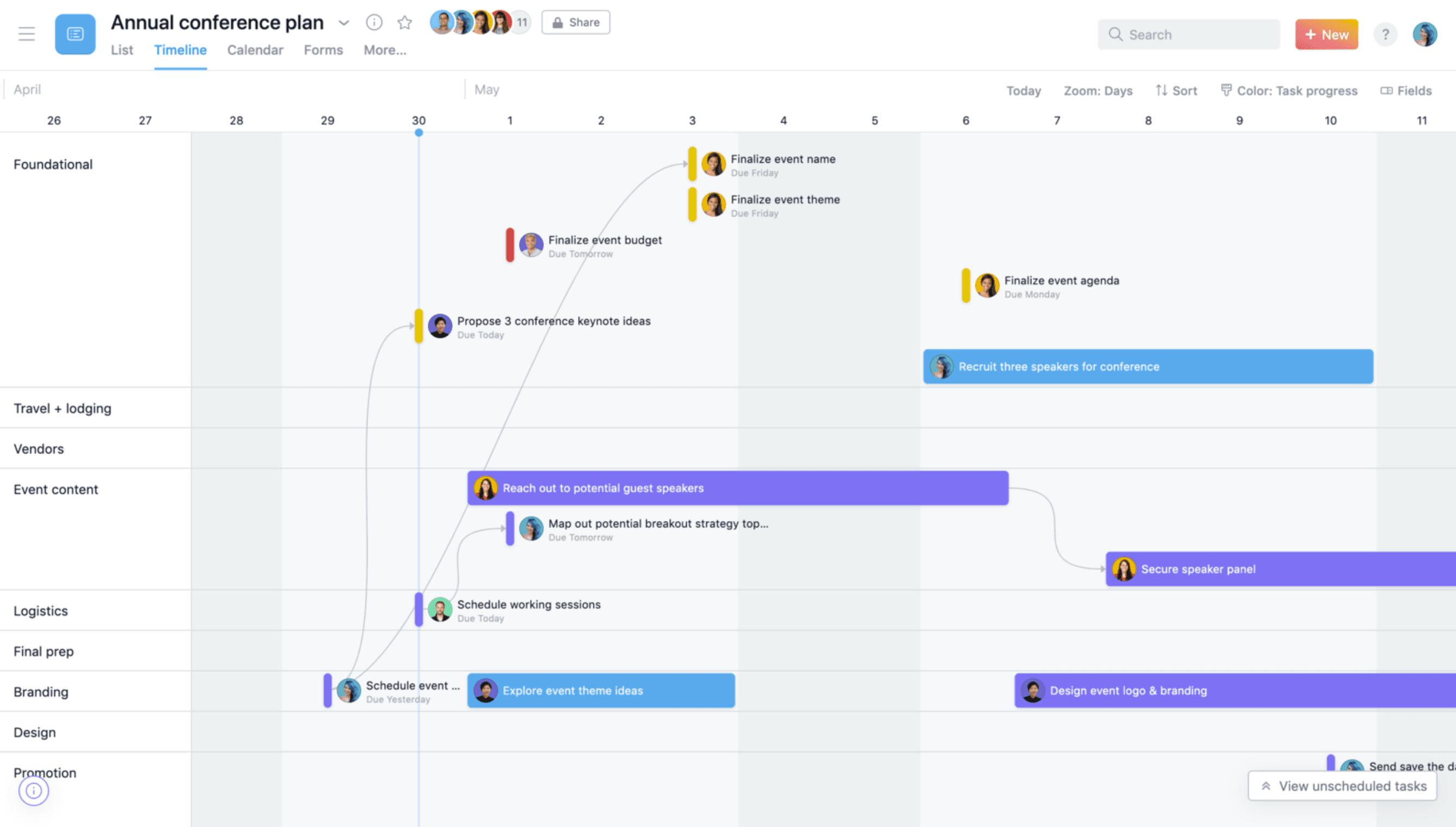
Si buscas un competidor para Miro porque necesitas más control, no menos, Asana es la respuesta.
Pasando de la visualización a la acción
El poder de Asana reside en su estructura inteligente, que vincula cada tarea a objetivos de alto nivel de la empresa. Esto asegura que todos sepan no solo qué están haciendo, sino por qué importa.
Opciones de vista versátiles: Visualiza los mismos datos del proyecto como una Lista, Tablero, Calendario o Cronograma (Gantt). Esta flexibilidad permite a los desarrolladores ver errores en una lista mientras los gerentes siguen la hoja de ruta en un cronograma.
Automatización de flujos de trabajo: Reduce "trabajo sobre trabajo" creando procesos automáticos. Puedes automatizar asignaciones, fechas de vencimiento y entregas, asegurando que ninguna tarea se pase por alto.
Gestión de recursos: Una ventaja distintiva sobre Miro. Asana permite a los gerentes equilibrar las cargas de trabajo en el equipo, detectando riesgos de agotamiento antes de que ocurran visualizando la capacidad.
Por qué los equipos empresariales confían en él
Asana está diseñado para claridad y alineación en grupos grandes.
Alineación estratégica: Es una de las pocas herramientas que conecta efectivamente las tareas diarias con objetivos estratégicos, proporcionando actualizaciones de progreso inmediatas a la dirección.
"Mis tareas" estructuradas: Para colaboradores individuales, la vista "Mis Tareas" organiza los elementos de trabajo personal de manera inteligente, cortando el ruido de los grandes proyectos.
Ecosistema de integraciones: Se integra bien con otras herramientas, conectándose perfectamente con cientos de herramientas empresariales, incluyendo Slack, Google Drive y Microsoft Teams.
La compensación por el poder
Con gran poder viene una curva de aprendizaje más pronunciada y algunas rigideces estructurales.
Sobrecarga de complejidad: Para proyectos simples, Asana puede parecer excesivo. El gran número de características y campos podría abrumar a los usuarios que solo quieren una lista de verificación simple.
Propiedad estricta: Asana aplica una filosofía de "un responsable por tarea" para asegurar responsabilidad. Aunque lógico, esto puede ser frustrante para equipos colaborativos acostumbrados al enfoque de "cualquiera puede editar" de Miro.
Coste: Como una herramienta de alto rendimiento, el precio—especialmente para los niveles Premium y Business necesarios para desbloquear cronogramas y carteras—es significativamente más alto que muchas alternativas ligeras.
Alternativa 5: MindMeister—una herramienta de mapeo en la nube
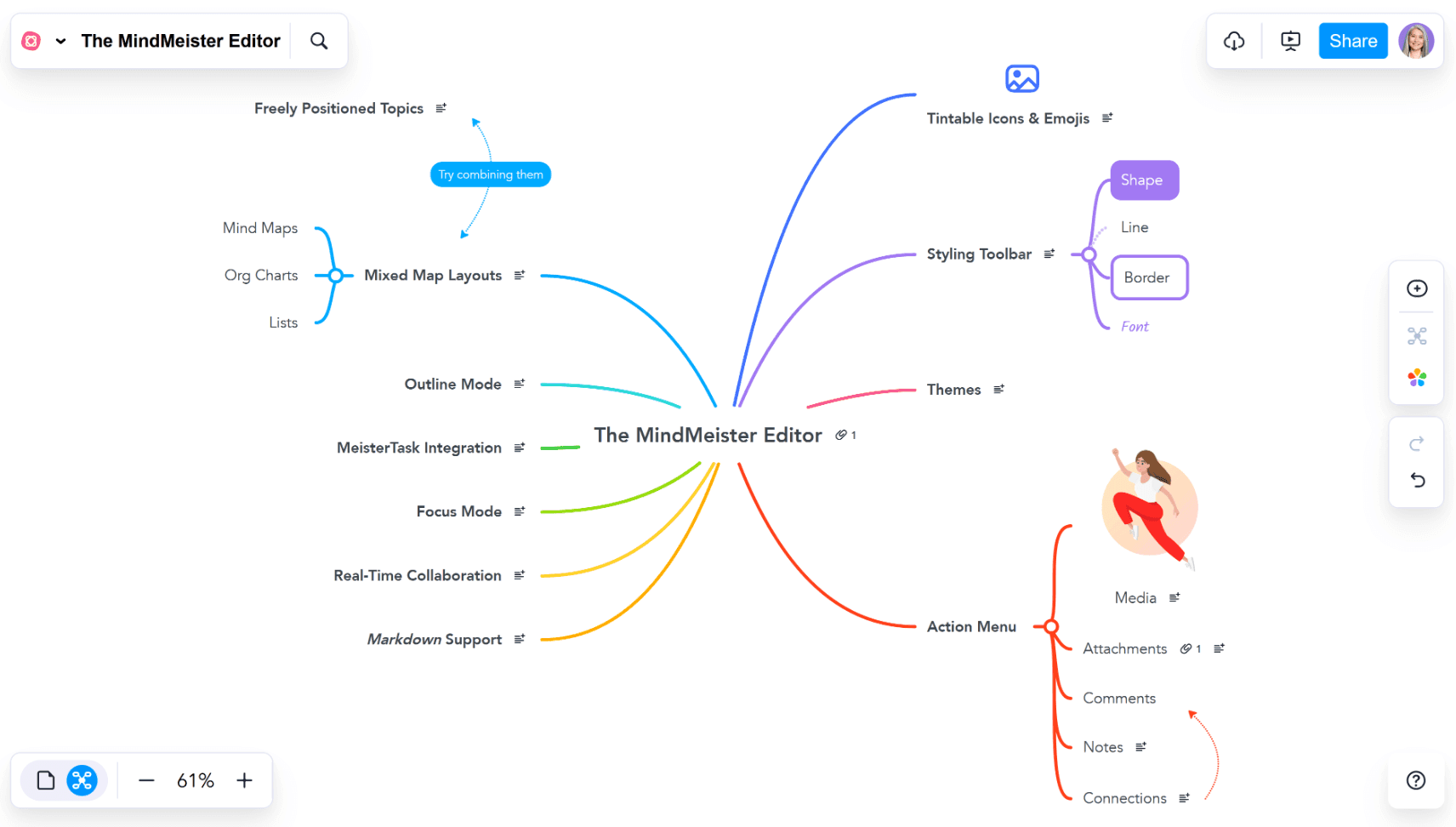
Para equipos que buscan específicamente mapas mentales pero requieren una solución puramente basada en la nube similar a la accesibilidad de Miro, MindMeister es una opción ligera y sólida. Elimina la complejidad del software pesado, viviendo completamente en tu navegador para acceso instantáneo en cualquier dispositivo.
Colabora en cualquier lugar al instante
El principal punto de venta de MindMeister es su baja barrera de entrada. No hay software para descargar o instalar: funciona a la perfección en Mac, Windows, Chromebooks y dispositivos móviles. Esto lo hace ideal para sesiones de colaboración rápidas y ad hoc con clientes externos o estudiantes que podrían no tener software especializado instalado.
Sus capacidades principales se centran en la conectividad sin fisuras:
Edición colaborativa en tiempo real: Como Google Docs para mapas mentales, miembros del equipo ilimitados pueden hacer lluvias de ideas simultáneamente, viendo los cambios de los demás al instante.
Integración de gestión de tareas: Se integra estrechamente con su aplicación hermana, MeisterTask. Puedes arrastrar y soltar un nodo en tu mapa mental para convertirlo en una tarea accionable, cerrando la brecha entre ideas y ejecución.
Modo de presentación integrado: Puedes convertir las ramas de tu mapa en diapositivas, permitiéndote transmitir tus ideas en línea o incrustarlas en un sitio web sin necesidad de exportarlas.
Por qué los equipos eligen MindMeister
Es la herramienta de elección para usuarios que priorizan la accesibilidad y la simplicidad sobre la profundidad.
Incorporación sin fricción: Debido a que es basado en navegador, puedes invitar a cualquier persona a través de un enlace y pueden comenzar a contribuir de inmediato.
Amigable para la educación: Su diseño intuitivo y colorido se usa ampliamente en escuelas. Es particularmente útil para estudiantes con diferencias de aprendizaje (como dislexia), ofreciendo una manera visual de organizar pensamientos sin la intimidación de una página en blanco.
Seguridad automatizada: Tu trabajo se guarda automáticamente en la nube, rastreando todo el historial de versiones para que puedas revertir cambios o ver quién agregó qué en cualquier momento.
Limitaciones para usuarios avanzados
La simplicidad viene con compensaciones. MindMeister es una herramienta "ligera" en comparación con motores de escritorio dedicados.
Plan gratuito restrictivo: La versión gratuita está estrictamente limitada a tres mapas mentales. Una vez que alcanzas este límite, debes pagar para crear más, lo cual puede ser un cuello de botella para usuarios activos.
Dependencia en línea: Se basa completamente en una conexión a internet. Si estás desconectado, no puedes acceder o editar tus mapas.
Tipos de diagramas limitados: Es estrictamente una herramienta de mapas mentales. Carece de la capacidad para crear diagramas de flujo de procesos complejos o mezclar diferentes estructuras (como espinas de pescado y matrices) en la misma vista, lo que limita su utilidad para planificación estratégica avanzada.
Tabla comparativa
Xmind | Trello | Milanote | Asana | MindMeister | |
Mejor para | Pensamiento profundo y planificación | Seguimiento de tareas y flujos de trabajo | Tableros de inspiración y notas creativas | Ejecución de proyectos en equipo | Lluvias de ideas en línea |
Mapeo mental nativo | ✓ | ✗ | ✗ | ✗ | ✓ |
Múltiples estructuras | ✓ | ✗ | ✗ | ✗ | ✗ |
Acceso 100% fuera de línea | ✓ | ✗ | ✗ | ✗ | ✗ |
Modo de presentación en un clic | ✓ | ✗ | ✗ | ✗ | ✓ |
Cambiar mapa a vista Gantt | ✓ | ✗ | ✗ | ✗ | ✗ |
Gestión de tareas | ✓ | ✓ | ✗ | ✓ | ✗ |
Curva de aprendizaje | Baja | Baja | Media | Alta | Baja |
Conclusión
Tus necesidades específicas de flujo de trabajo deben guiar tu elección de herramientas de colaboración visual. Cada alternativa a Miro ofrece diferentes fortalezas. Trello destaca con su sistema Kanban fácil de usar, y Milanote ofrece a los equipos creativos un lienzo flexible para organizar visualmente. Asana viene con fuertes características de seguimiento de proyectos, mientras que MindMeister simplifica la lluvia de ideas y la hace accesible para todos.
Xmind emerge como la mejor opción para equipos que necesitan capacidades avanzadas de mapeo mental. Su mezcla de lluvia de ideas potenciada por IA, múltiples estructuras de mapeo y funciones de presentación fluida lo hace versátil para el pensamiento creativo y la planificación estructurada.
¿Quieres cambiar tu flujo de trabajo visual? Prueba Xmind hoy y descubre por qué millones de usuarios confían en esta detallada herramienta. Desde sesiones de brainstorming rápidas hasta la planificación de proyectos complejos, mejora la productividad de tu equipo de maneras que otras herramientas no pueden igualar.