메뉴...

2026. 3. 2.

Best 5 Lucidchart alternatives for more productive thinking

로딩 중...

Lucidchart has long been a staple for professional diagramming, particularly for those documenting complex, static business processes. However, it often comes with a "manual labor" feel that can stifle real-time innovation, where dragging boxes and aligning connectors becomes a distraction from the actual work: thinking.

While it excels at standardized documentation, it can feel too rigid and slow when you need to capture a flash of inspiration. If you find yourself wrestling with canvas coordinates rather than exploring your concept, it is time to discover alternatives that prioritize logic, speed, and a seamless creative flow.

Xmind: the ultimate logic engine for high-speed minds

While Lucidchart is a tool for documenting a finished process, Xmind is a tool for the process of discovery. It is designed for those who need to move from a spark of inspiration to a structured plan without the friction of manual charting.

Why choose Xmind over Lucidchart?

Xmind flips the script on diagramming. Instead of treating the canvas as a drawing board, Xmind treats it as a living structure. The biggest shift is the reduction of cognitive load. In Xmind, the structure grows with your thoughts—no manual alignment, no overlapping lines, and no wasted clicks. It’s not just a diagramming tool; it’s a high-performance environment for your brain.

Powerful capabilities to fuel your workflow

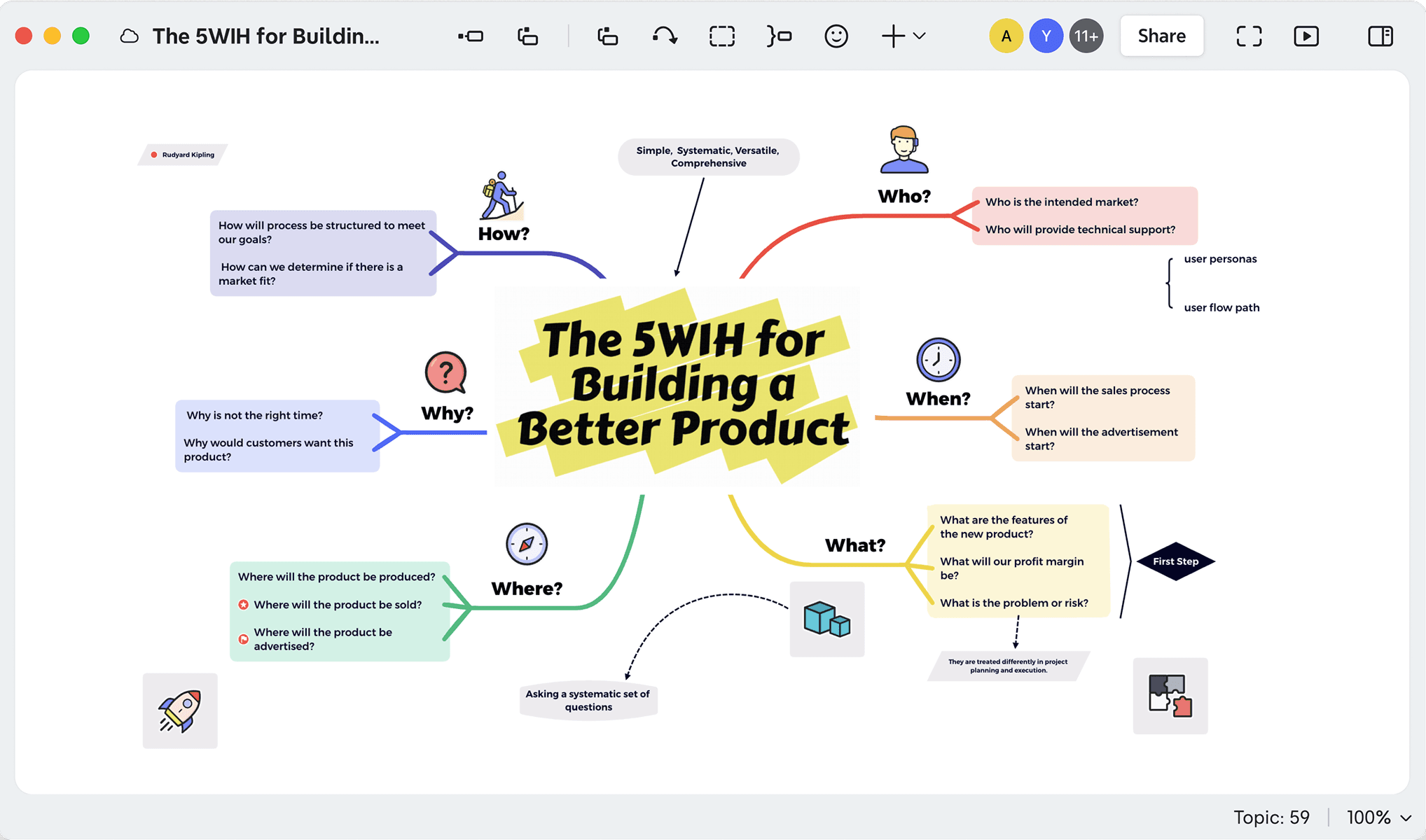
  • Intuitive mind mapping and versatile multi-structures: Beyond basic flowcharts, Xmind provides a rich toolkit of specialized structures tailored for complex problem-solving. Use the Fishbone Chart for deep-dive root-cause analysis, the Matrix for side-by-side feature comparisons, or Tree Tables to transform nested branches into organized, spreadsheet-like views. These diverse layouts allow you to visualize information from every angle, ensuring your logic remains sound no matter how complex the data becomes.

Xmind mind map titled “The 5W1H for Building a Better Product” with branches for Who, What, When, Where, Why, and How.
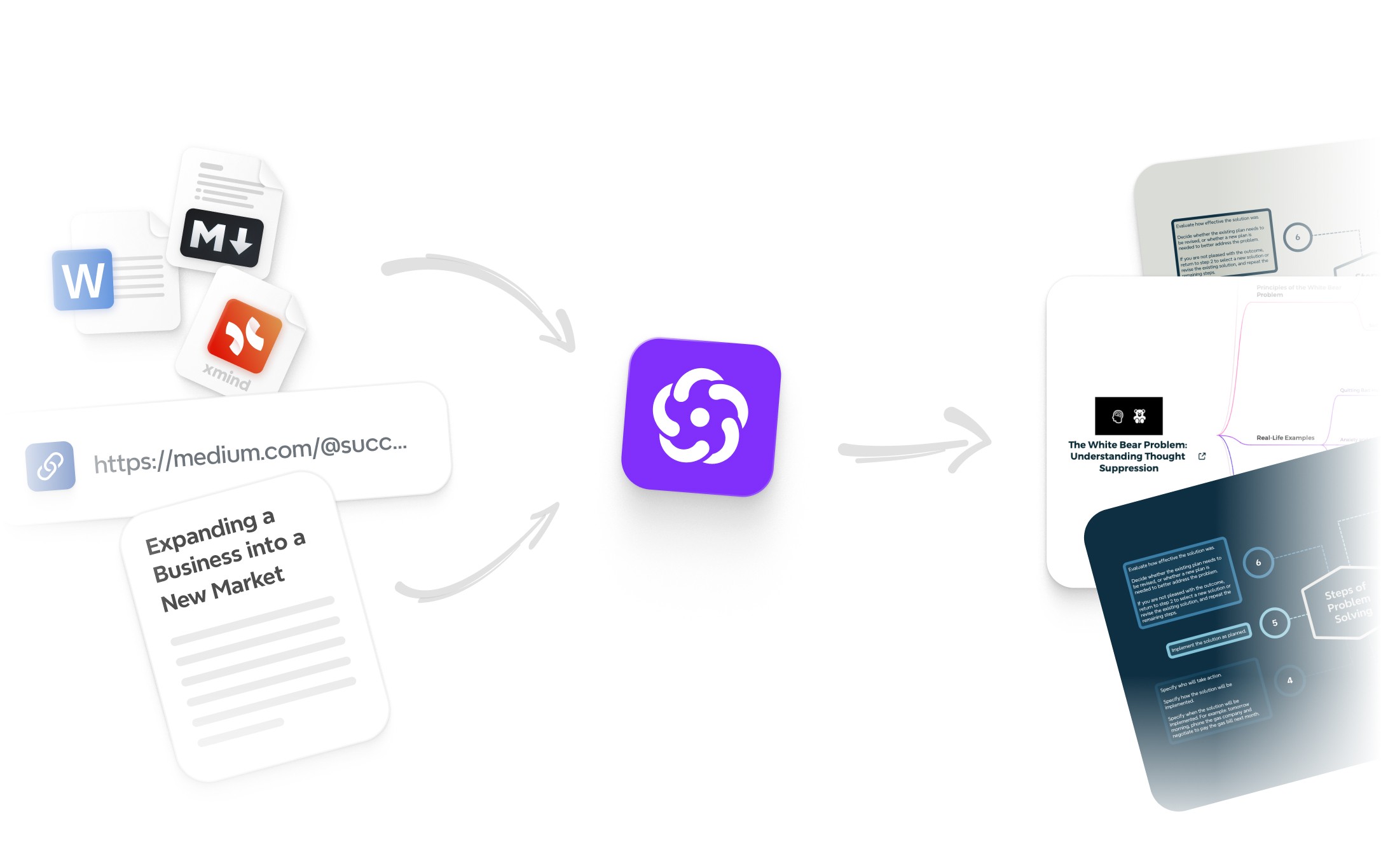
  • Intelligent AI co-pilot for accelerated thinking: Experience a generative engine that acts as a collaborative partner rather than just a drawing tool. Xmind AI can instantly expand on a single node to spark new ideas, summarize massive documents into digestible maps, or even generate actionable to-do lists from your brainstorming session in seconds. It moves you from a blank page to a structured plan faster than any manual diagramming tool.

An infographic showing Xmind AI transforming various inputs like Word documents, Markdown files, and web links into structured mind maps and actionable plans.
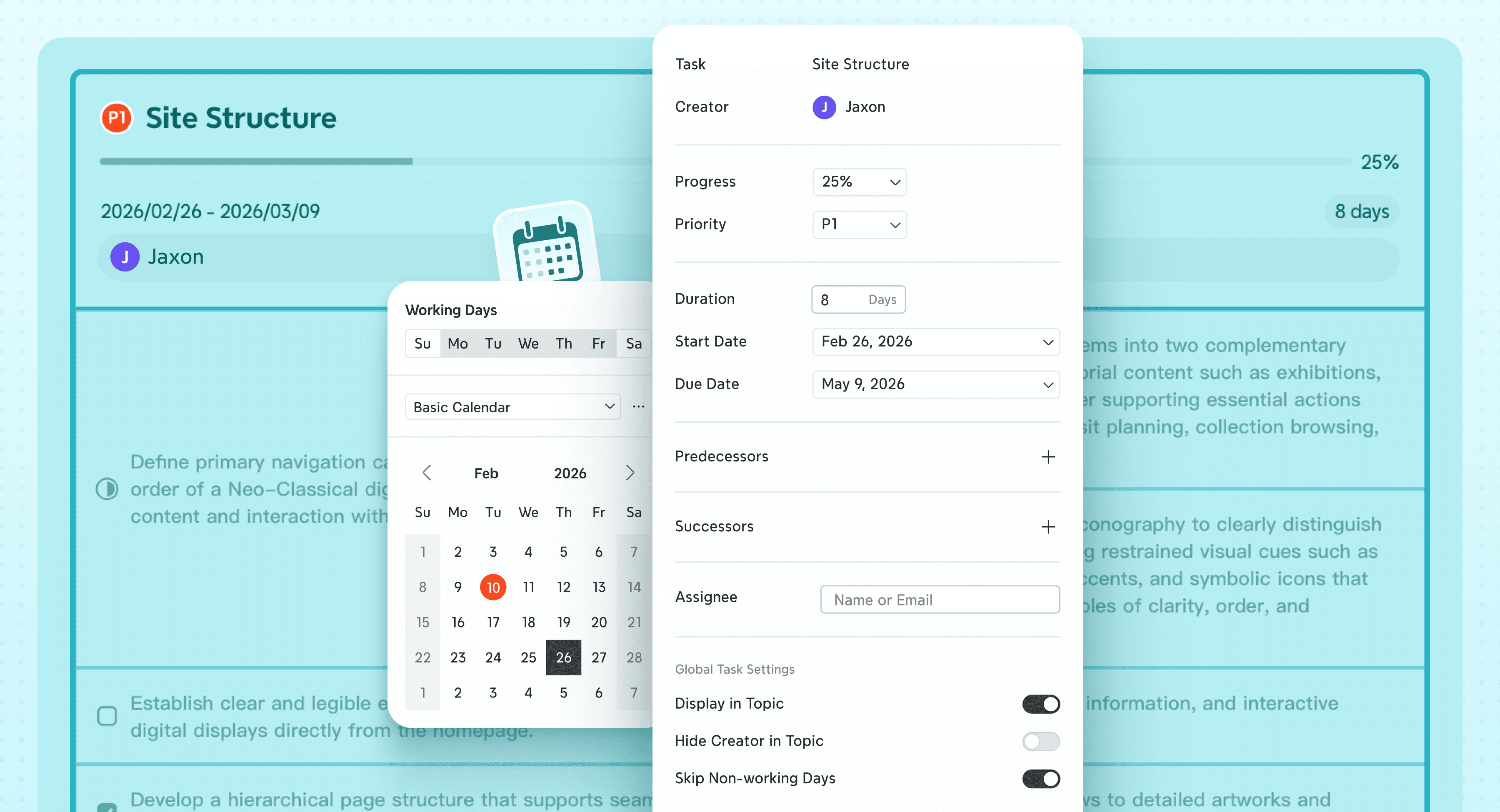
  • Seamless transition to integrated task management: Bridge the gap between ideation and execution without switching apps. With the built-in Gantt chart view, you can assign priorities, track progress, and add deadlines directly to your map. A single click transforms your brainstorming nodes into a professional project timeline, allowing you to manage resources and milestones within a unified logical framework.

Xmind’s integrated Gantt Chart interface showing task progress, priorities, and deadline scheduling directly on a mind map.
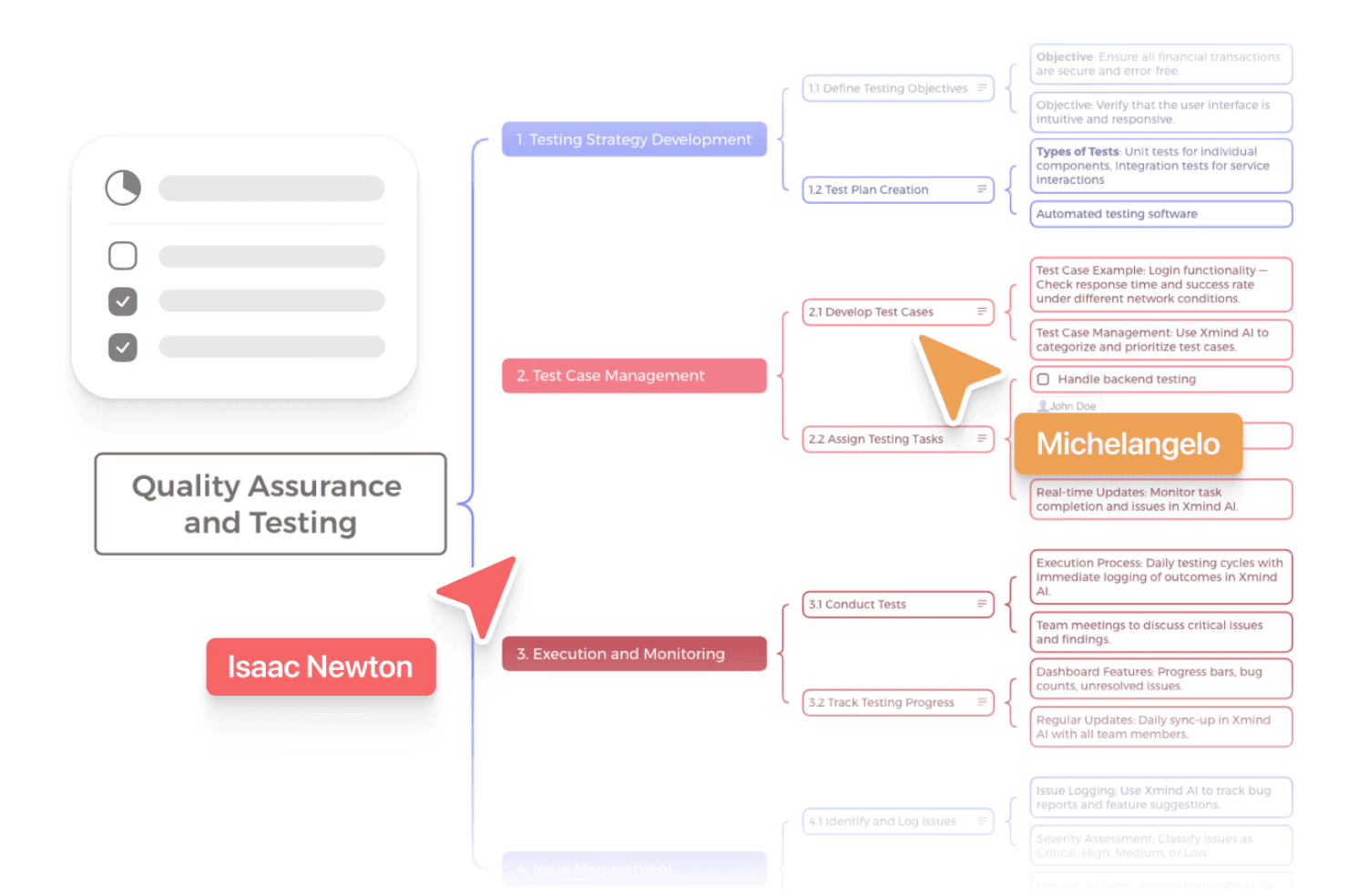
  • Real-time collaboration for unified team synergy: Break down silos with a workspace built for collective intelligence. Xmind supports real-time collaboration, allowing multiple team members to brainstorm, edit, and refine the same map simultaneously across different platforms. With instant syncing and cross-device support, your team stays aligned on the same page—whether you are working from a desktop, tablet, or mobile device.

Real-time team collaboration in Xmind, showing multiple users simultaneously editing a

Perfect scenarios for Xmind

  • Comprehensive product planning and roadmap development

Transform abstract product visions into detailed, executable blueprints. Xmind allows you to break down complex feature sets into a logical hierarchy, ensuring every user story and technical requirement is accounted for. By visualizing the entire product ecosystem in one view, you can identify dependencies and prioritize development cycles more effectively than with fragmented flowcharts.

  • AI-enhanced strategic brainstorming and market research

Use the power of generative AI to break through creative blocks and explore new market angles. Whether you are searching for fresh content ideas or analyzing competitor strategies, Xmind AI acts as a collaborative partner that can instantly expand a single branch into a multi-dimensional plan. This accelerates the move from a blank canvas to a data-driven strategy, allowing you to visualize opportunities in seconds.

  • Dynamic knowledge management and information synthesis

Master the art of information organization by summarizing massive amounts of data into a navigable, visual map. Xmind is the ideal tool for condensing lengthy research papers, meeting notes, or project documentation into a structured format that is easy to recall and share. Instead of digging through endless text documents, you can create a "second brain" that keeps your most critical insights accessible and interconnected.

For a deeper dive into how these two powerhouses stack up side-by-side, including a detailed feature breakdown and workflow comparison, check out our full guide on Xmind vs. Lucidchart.

Smartdraw: automated enterprise diagramming at scale

If your work requires the technical depth of Lucidchart but you want more "CAD-like" automation for complex charts, SmartDraw is the power-user's choice. It functions as a sophisticated formatting engine designed for technical precision across various industries.

Built-in intelligence for complex diagramming

SmartDraw specializes in handling intricate layouts that would be tedious to draw manually. It offers over 70 different diagram types, ranging from standard flowcharts to specialized architectural floor plans and electrical schematics. The platform is deeply integrated with cloud ecosystems like AWS and Azure, allowing IT professionals to automatically generate and visualize infrastructure directly from environment data.

Distinct advantages for technical workflows

  • Effortless reformatting and layout automation: SmartDraw’s intelligent engine does the heavy lifting of spatial organization. As you add or remove shapes, the entire diagram automatically re-adjusts its layout and snaps connectors into place, ensuring a professional, polished result even as the project grows in complexity. This eliminates the tedious manual "pixel-pushing" often required in more static tools.

  • Unmatched technical and industry breadth: Beyond basic flowcharts, the platform supports highly specialized diagramming needs that most web-based competitors cannot handle. From detailed CAD-like floor plans and site blueprints to intricate electrical schematics and emergency exit routes, SmartDraw provides the precise toolsets and industry-standard symbols required by architects and engineers.

  • Enterprise-grade scalability and data synchronization: The platform is built to manage massive, high-stakes charts that stay dynamically linked to your data. By synchronizing with external sources like SQL databases, Google Sheets, or Excel, your diagrams can reflect real-time changes automatically. This makes it an ideal "source of truth" for large-scale organizational charts and complex project roadmaps across global enterprises.

Notable limitations to consider

Despite its powerful automation, SmartDraw often feels more like a legacy engineering tool than a modern creative workspace. The user interface can feel dated and "clunky" compared to modern productivity apps, which may deter non-technical users from engaging. Furthermore, its highly structured nature makes it difficult to use for fluid, free-form brainstorming, and mastering its more advanced enterprise features requires a significant time investment.

Miro: the infinite whiteboard for collaborative synergy

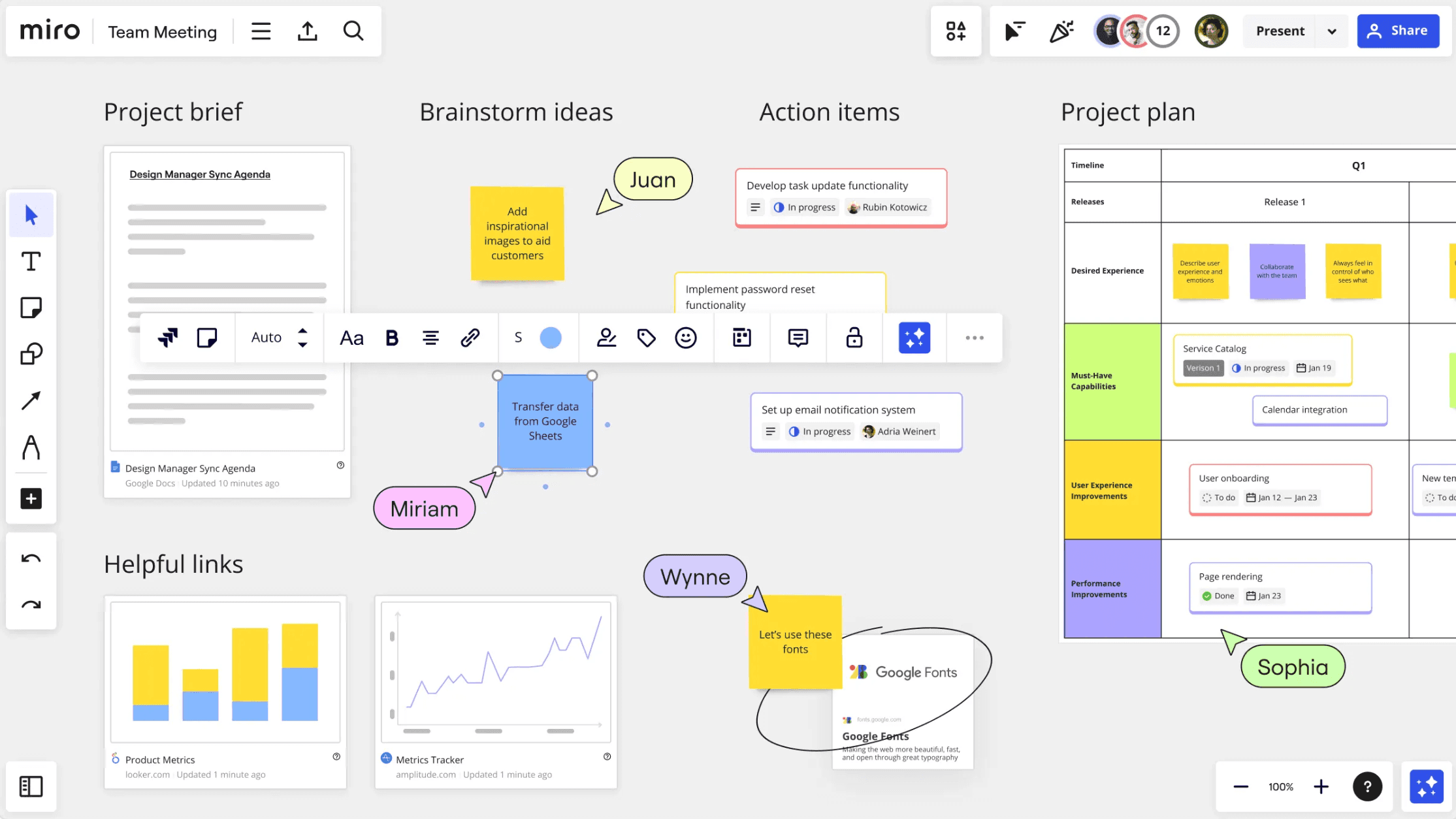
Miro’s infinite whiteboard interface for team collaboration, featuring sticky notes, project briefs, and a visual project plan grid for real-time brainstorming.

Miro is the best choice when the goal is a messy, high-energy workshop rather than a rigid, standardized technical document. It provides a vast, digital space where remote teams can co-create and visualize ideas in real-time.

A boundless workspace for collective intelligence

Miro moves away from the traditional grid to offer an infinite virtual whiteboard that serves as a hub for team activity. It provides a non-linear canvas that allows for sketching, mind mapping, and diagramming all in one place, supported by a rich interactive toolkit including digital sticky notes, live voting, and integrated timers.

Key benefits for remote teams

Miro’s real-time synergy is undoubtedly its greatest strength, offering a high-performance engine that allows dozens of team members to interact on the same board simultaneously without any noticeable lag. This seamless performance is crucial for high-stakes, synchronous workshops where live cursors and instant updates create a sense of shared presence, bridging the physical gap for remote teams and maintaining the momentum of a live session.

To further accelerate the creative process, Miro provides access to the "Miroverse"—a massive, ever-growing library of community-generated templates that covers every imaginable workshop scenario. Instead of starting from scratch, teams can leverage proven frameworks used by industry leaders, ranging from quick creative icebreakers to sophisticated lean canvas models for business strategy. These templates serve as a professional foundation, allowing users to focus on generating ideas rather than formatting the board.

Beyond mere drawing, the platform acts as a powerful, centralized "source of truth" by supporting live, interactive embeds from essential tools like Jira, Slack, and Trello. This integration ensures that all project assets, research data, and live task cards are brought together into one cohesive visual space. By consolidating fragmented information onto a single canvas, Miro allows stakeholders to track progress and make data-driven decisions without ever having to switch between multiple browser tabs or applications.

Potential drawbacks in practice

  • Absence of automated logical hierarchy: Unlike dedicated mapping tools, Miro does not automatically enforce structured logic or "as-you-type" speed. This means users must manually move objects to maintain order, which can break the creative "flow" when trying to organize complex thoughts into a hierarchy.

  • Disorganization and navigation fatigue: On an infinite canvas, it is incredibly easy for boards to become cluttered and overwhelming. Without strict facilitation, teams often suffer from "canvas lostness," where finding specific information among hundreds of sticky notes and images becomes a time-consuming chore.

  • Insufficient for high-spec technical documentation: Miro is built for speed and collaboration, not precision. It lacks the automated formatting engines, precise measurement tools, and industry-specific shape libraries (like CAD or network topology) required for engineering-grade technical specifications.

Microsoft Visio: industry-standard precision for technical experts

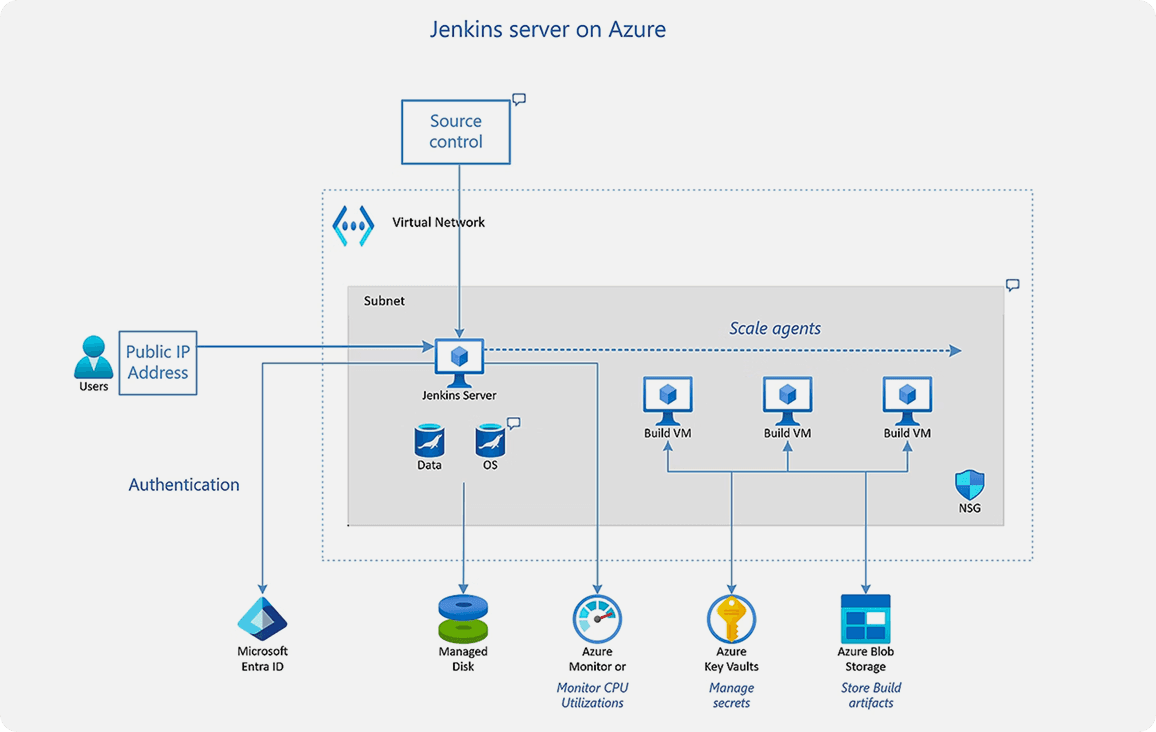
Microsoft Visio technical architecture diagram illustrating a Jenkins server deployment on Azure with integrated security and networking components.

For those deeply embedded in the Microsoft ecosystem, Visio remains the robust, legacy alternative for IT and engineering documentation where security and technical standards are paramount.

The gold standard for technical documentation

Visio is built for professional-grade accuracy, offering specialized tools for network topology and circuit diagrams. Because it works natively with the Office suite, users can embed live diagrams into Word reports or Teams channels, ensuring that technical documentation is always up to date and easily accessible to stakeholders.

Core strengths for enterprise users

  • Unrivaled technical precision: Visio stands as the most trusted platform for complex infrastructure documentation that must adhere strictly to international standards such as ISO, IEEE, and IEC. It provides an exhaustive library of specialized, industry-standard symbols that ensure technical clarity across global engineering teams. This level of precision is vital for high-stakes projects in electrical engineering, network architecture, and industrial design, where any ambiguity in documentation could lead to costly errors.

  • Enterprise-level security: As a core component of the Microsoft 365 ecosystem, Visio benefits from world-class compliance and administrative security protocols. This makes it the primary choice for government agencies, financial institutions, and large corporations that handle sensitive data within highly regulated environments. The deep integration with Microsoft Teams and SharePoint ensures that sensitive diagrams are stored, shared, and co-authored within a secure, governed corporate perimeter.

  • Dynamic data linking: Beyond static drawing, Visio’s most powerful differentiator is its ability to link diagram shapes directly to live data sources like SQL Server, Excel, or Azure. This enables the creation of "living diagrams" where colors, icons, and data bars update automatically based on real-time metrics. This functionality is essential for IT managers and project leads who need to visualize live network status or supply chain health within a professional graphical interface.

Common pain points

The biggest hurdle for many users is Visio’s steep cost of entry, as it often requires an expensive standalone license or premium subscription that sits outside the standard Microsoft 365 package. Its interface can feel notoriously complex and "old-school," necessitating significant training to master compared to more modern, intuitive alternatives. Finally, it lacks the generative AI features and fluid "flow" of mind-mapping tools, which makes it feel sluggish for initial ideation and creative exploration where speed is essential.

Milanote: a visual sanctuary for creative professionals

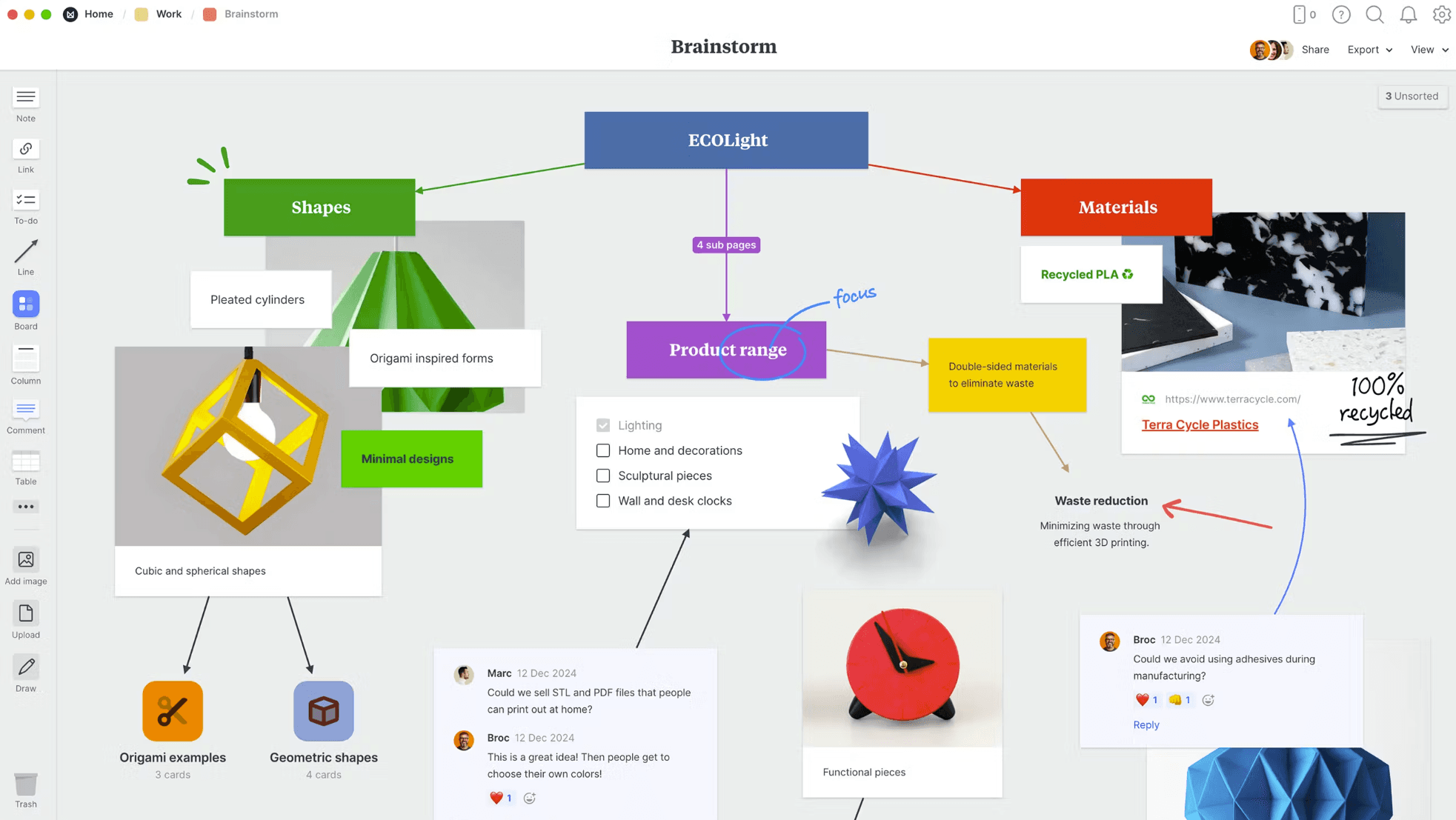
A visual brainstorm board in Milanote titled

Milanote is the alternative for those who find the "industrial" look of traditional diagramming tools uninspiring. It is designed specifically for visual thinkers who need to organize inspiration and research.

A digital scrapbook for creative research

Milanote functions more like a professional moodboard than a technical tool. It treats every element—images, links, videos, and swatches—as a visual block that can be moved freely on a modular board structure. This makes it a favorite for directors, designers, and writers who need to "see" their story evolve in a spatial layout.

Why creatives prefer this platform

The interface is beautiful and minimalist, specifically designed to spark inspiration and creative flow rather than enforce rigid technical rules or complex grid systems. It provides a sanctuary for visual thinkers, allowing ideas to breathe without the industrial aesthetics or overwhelming toolbars found in traditional diagramming software.

It is unbeatable for moodboarding and visual research, offering a flexible environment where designers can see high-resolution visual assets, color swatches, and experimental text side-by-side. This spatial organization allows art directors and creative leads to establish a project's aesthetic direction or narrative arc with a level of clarity that standard flowcharts simply cannot provide.

Additionally, the drag-and-drop interface is so intuitive that anyone—from copywriters to project stakeholders—can start organizing a complex project in minutes without ever opening a tutorial. This frictionless experience is further enhanced by a powerful web clipper, which allows users to instantly save images, links, and snippets from across the internet directly onto their boards as rich visual cards, ensuring that every spark of inspiration is captured in real-time.

Functional gaps to keep in mind

  • Inadequate for complex logic: Lacks the automated connectors and mapping engines needed for technical flowcharts.

  • No project management depth: Missing native Gantt charts, advanced task-tracking, or resource management features.

  • Scale limitations: Boards can become visually cluttered and difficult to parse if repurposed for technical enterprise documentation.

Comparison table

Feature

Xmind

Miro

SmartDraw

Visio

Milanote

Core identity

Logic & Mind Mapping

Collaborative Whiteboard

Automated Diagramming

Technical Precision

Visual Organization

Best for

Structured thinking & AI-assisted planning.

Real-time workshops & team brainstorming.

Scalable enterprise & technical charts.

Industrial standards & IT infrastructure.

Creative research & moodboarding.

Automation

High: Auto-layout & "as-you-type" mapping.

Low: Mostly manual free-form canvas.

High: "CAD-like" auto-formatting.

Medium: Template-based with data links.

Low: Human-centric visual curation.

AI capabilities

Advanced: Expands nodes & generates tasks.

Moderate: Assists with sticky notes & frames.

Limited: Focuses on data-driven visuals.

Limited: Focused on technical templates.

Minimal: Prioritizes manual aesthetic flow.

Collaboration

Real-time co-editing & cross-platform sync.

Unbeatable: Live voting, timers, & video.

Project sharing & administrative controls.

Deep integration with MS Teams/SharePoint.

Shared boards with real-time commenting.

Structure type

Logical hierarchy: Fishbone, Matrix, Tree.

Infinite canvas: Non-linear & free-form.

Enterprise grids: 70+ technical types.

Technical specs: ISO/IEEE standard shapes.

Modular boards: Flexible "scrapbook" style.

Conclusion

Choosing the right alternative depends on your destination. If you need technical precision for engineering or infrastructure, Visio or SmartDraw are your anchors. If you need free-form, high-energy team collaboration, Miro is your whiteboard.

But if you want to master your logic and turn ideas into action faster than ever before, Xmind is the tool built to keep up with your brain. It bridges the gap between raw inspiration and structured execution, ensuring your thoughts never lose their momentum.

Try Xmind today and start building your ideas with absolute clarity.