De la réflexion à la masterpiece : Donnez vie à vos idées avec Make Image

Xmind élimine la distraction liée à la recherche de graphiques en intégrant le contrôle créatif directement dans votre Schéma. La fonction Make Image analyse intelligemment le contexte de votre sujet pour générer des invites précises à votre place, vous permettant de transformer vos pensées en visuels professionnels sans jamais interrompre votre flux créatif.
Conçus pour une intégration fluide, ces autocollants générés par l'IA disposent d'un retrait automatique de l'arrière-plan pour se fondre parfaitement dans votre toile. Que vous soyez en phase de brainstorming ou de présentation, vous pouvez désormais éviter la recherche d'icônes et découvrir dès aujourd'hui l'avenir de la pensée visuelle avec Xmind.
La lutte cachée pour trouver les visuels parfaits pour vos idées
Trouver le bon visuel est souvent un défi de traduction. Nous savons fréquemment à quoi doit ressembler un concept, mais le décrire dans une barre de recherche semble presque impossible. Ce décalage crée un obstacle majeur : lorsque vous ne pouvez pas transformer une idée visuelle en une requête précise, vous finissez par vous contenter d'un résultat « assez proche » plutôt que de ce que vous aviez réellement imaginé. Cette frustration est confirmée par des recherches montrant que 59% des personnes accordent plus d'importance aux informations visuelles qu'au texte, principalement parce que notre cerveau traite 90% de toutes les informations par la vue.
Au-delà de la difficulté de la recherche, les photos de stock traditionnelles créent souvent de nouveaux problèmes. Elles ont tendance à sembler artificielles, avec des poses peu naturelles et des émotions génériques qui manquent d'exclusivité. Lorsque vous et vos concurrents utilisez les mêmes images de stock, votre travail perd sa touche unique. Ces graphiques de « remplissage », comme les scènes de bureau génériques, occupent souvent de l'espace sans clarifier votre message réel, échouant à créer la communication rapide et efficace dont le cerveau humain a besoin.
Même pour ceux qui sont déterminés à créer des visuels personnalisés, le processus est incroyablement inefficace. De nombreux créateurs se retrouvent à jongler entre plusieurs outils de conception juste pour visualiser une seule idée, ajoutant des heures à leur flux de travail. À cela s'ajoute la complexité des droits d'auteur ; même avec une licence, vous pouvez manquer des autorisations spécifiques nécessaires pour recolorer ou manipuler une image afin de l'adapter à votre contexte. Cette friction entre avoir une idée et la voir sur la toile est l'obstacle créatif ultime.
Pourquoi Make Image dans Xmind est la réponse à vos limites visuelles
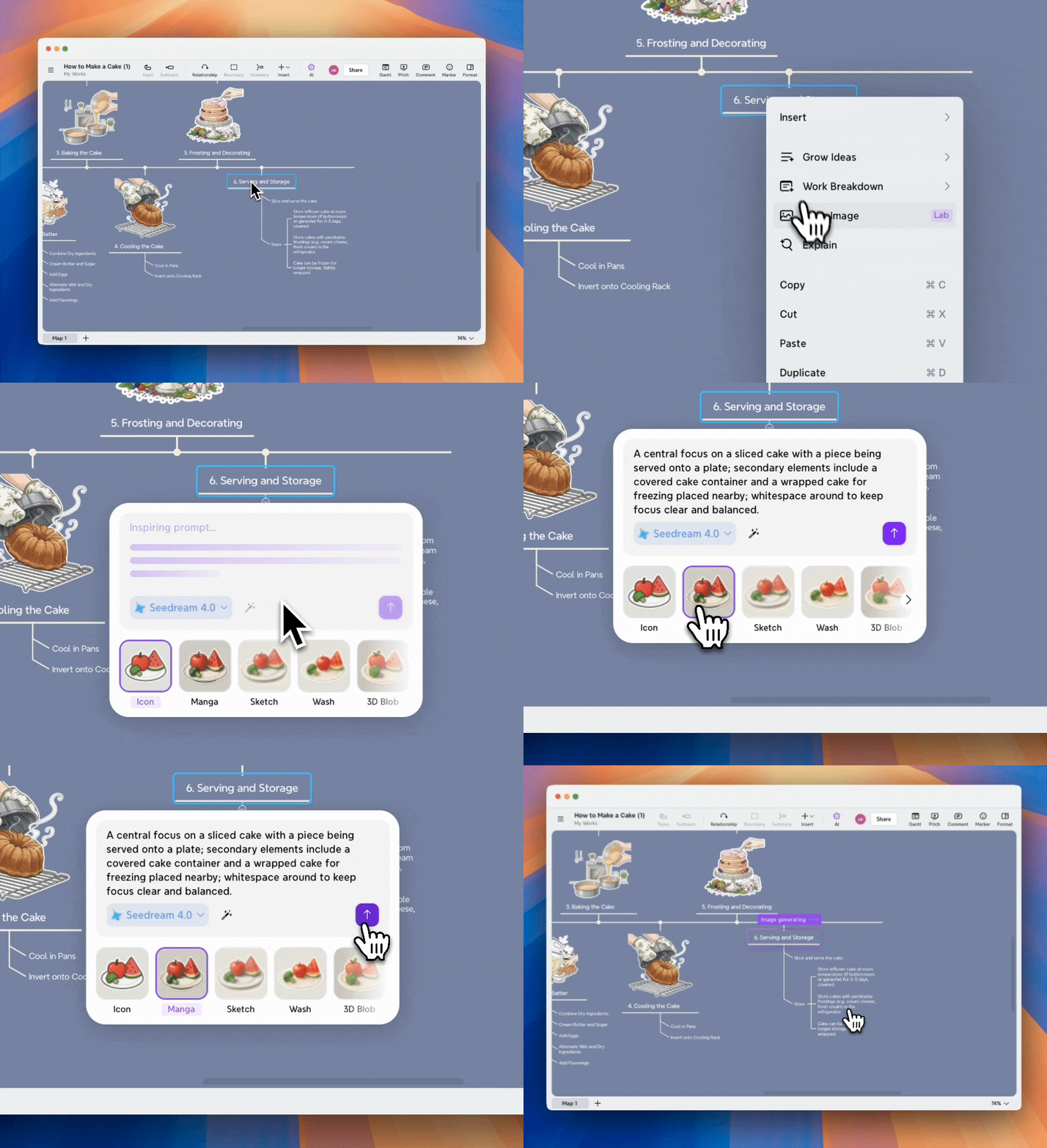
Make Image résout le problème de l'acquisition de visuels au sein de votre flux de travail. L'IA de Xmind génère des invites d'images basées sur le sujet sélectionné et son contexte environnant. Le système analyse l'ensemble de la structure de votre Schéma pour suggérer des styles visuels qui correspondent à votre travail existant.
Cohérence stylistique à travers votre Schéma
La cohérence visuelle distingue les présentations professionnelles des tentatives amateurs. L'IA de Xmind suggère un style visuel qui s'adapte à votre carte mentale et maintient la cohérence tout au long de votre projet. Vous pouvez choisir Style personnalisé pour des exigences spécifiques et décrire le style d'image dans l'invite pour des résultats plus précis. Les styles prédéfinis incluent la suppression de l'arrière-plan. Les autocollants générés se fondent dans votre carte mentale sans bordures gênantes ni arrière-plans dépareillés.
Visualisation instantanée sans frais de conception
Cette fonctionnalité élimine les outils externes et les coûts de designer. Vous cliquez et générez. Vous gardez le contrôle sans avoir à rédiger vous-même les invites. Les visuels comme les icônes et les images jouent un rôle majeur dans les présentations et les rapports. L'outil de suppression d'arrière-plan nettoie les images importées. Vous pouvez produire des cartes mentales avec vos propres styles visuels. Cet outil de carte mentale xmind ai offre des résultats professionnels. Vous n'avez pas besoin de passer d'une application à l'autre ni de payer des frais de conception pour des images personnalisées.
Si vous souhaitez explorer plus de détails, vous pouvez lire notre Guide de l'utilisateur pour Make Image.
Étape par étape : D'un sujet simple à un visuel personnalisé
Visualiser vos idées ne devrait pas être une corvée. Voyons comment utiliser Make Image pour améliorer une partie spécifique de votre carte mentale, en utilisant un projet de « Ville éco-futuriste » comme exemple.
Étape 1 : Sélectionnez votre sujet cible
Ouvrez votre carte mentale et cliquez sur le sujet spécifique que vous souhaitez visualiser, par exemple, « Ferme verticale urbaine ». Cette sélection est cruciale car l'IA de Xmind ne se contente pas de regarder les mots ; elle analyse le contexte environnant de votre Schéma pour comprendre quel type de visuel conviendrait le mieux.
Étape 2 : Activez l'outil Make Image
Il existe deux manières rapides d'afficher l'interface de l'IA :
Depuis la barre d'outils : Cliquez sur le bouton IA dans la barre supérieure et sélectionnez Make Image.
Depuis le menu : Faites simplement un clic droit sur le sujet sélectionné et choisissez Make Image dans le menu contextuel.
Étape 3 : Laissez l'IA concevoir votre invite
Dès que l'outil s'ouvre, vous remarquerez que vous n'avez pas à partir de zéro. Xmind génère automatiquement une invite descriptive basée sur votre sujet. Pour notre « Ferme verticale urbaine », l'IA pourrait suggérer une invite telle que : « Un gratte-ciel futuriste avec des terrasses vertes intégrées et des systèmes hydroponiques, éclairage cinématographique. » Vous pouvez la conserver ou cliquer sur Inspire pour laisser l'IA générer une nouvelle suggestion.
Étape 4 : Choisissez votre style artistique
Avant de générer, sélectionnez un style qui correspond à l'ambiance de votre Schéma. Vous pouvez choisir parmi des préréglages comme 3D, Croquis ou Peinture à l'huile. For un projet professionnel, un style 3D ou Réaliste fait des merveilles. Si vous avez une idée précise en tête, sélectionnez Style personnalisé et décrivez l'esthétique directement dans l'invite.
Étape 5 : Générez et intégrez
Cliquez sur le bouton Générer. En quelques secondes, Xmind produira un autocollant de haute qualité. Si vous avez choisi un style prédéfini, le système supprime automatiquement l'arrière-plan, garantissant que le graphique final s'intègre naturellement à la toile de votre carte mentale.
Étape 6 : Affinez si nécessaire
Si le résultat ne correspond pas exactement à vos attentes, ne vous inquiétez pas. Cliquez sur Réessayer pour ajuster l'invite, changer de modèle d'IA ou modifier le style. Une fois satisfait, l'image est prête à inspirer votre équipe et à donner vie à vos idées.
Conclusion
Make Image transforme votre façon de créer des présentations avec les fonctionnalités xmind ai 2025. Cette fonction résout vos défis de recherche visuelle et génère des autocollants contextuels. Vous éliminez les frais de designer et maintenez une cohérence stylistique tout en restant concentré sur vos idées plutôt que de chercher des graphiques. Vos cartes mentales deviennent des présentations soignées qui communiquent efficacement. Commencez à créer avec Xmind dès aujourd'hui et découvrez une narration visuelle sans effort dans votre flux de travail.