





Designers
From design strategy to collaboration, Xmind helps designers visualize ideas and manage workflows efficiently.
Xmind for


Designers
From design strategy to collaboration, Xmind helps designers visualize ideas and manage workflows efficiently.
Xmind for


Designers
From design strategy to collaboration, Xmind helps designers visualize ideas and manage workflows efficiently.
Xmind for


What challenges do designer face today?

Aligning creative vision across distributed teams
Remote design teams struggle to align on vision and goals across time zones and tools, causing confusion and misaligned deliverables. Mind maps help clarify shared objectives visually.

Aligning creative vision across distributed teams
Remote design teams struggle to align on vision and goals across time zones and tools, causing confusion and misaligned deliverables. Mind maps help clarify shared objectives visually.

Aligning creative vision across distributed teams
Remote design teams struggle to align on vision and goals across time zones and tools, causing confusion and misaligned deliverables. Mind maps help clarify shared objectives visually.

Aligning creative vision across distributed teams
Remote design teams struggle to align on vision and goals across time zones and tools, causing confusion and misaligned deliverables. Mind maps help clarify shared objectives visually.

Aligning creative vision across distributed teams
Remote design teams struggle to align on vision and goals across time zones and tools, causing confusion and misaligned deliverables. Mind maps help clarify shared objectives visually.

Maintaining spark in remote collaboration
Designers report loss of spontaneous creativity and decreased team cohesion when working remotely. Real-time visual collaboration helps boost engagement and rebuilds creative sparks.

Maintaining spark in remote collaboration
Designers report loss of spontaneous creativity and decreased team cohesion when working remotely. Real-time visual collaboration helps boost engagement and rebuilds creative sparks.

Maintaining spark in remote collaboration
Designers report loss of spontaneous creativity and decreased team cohesion when working remotely. Real-time visual collaboration helps boost engagement and rebuilds creative sparks.

Maintaining spark in remote collaboration
Designers report loss of spontaneous creativity and decreased team cohesion when working remotely. Real-time visual collaboration helps boost engagement and rebuilds creative sparks.

Maintaining spark in remote collaboration
Designers report loss of spontaneous creativity and decreased team cohesion when working remotely. Real-time visual collaboration helps boost engagement and rebuilds creative sparks.

Organizing design thinking processes
Capturing complex design thinking steps—research, ideation, prototyping—can be overwhelming. Designers need structured visual frameworks to keep projects on track.

Organizing design thinking processes
Capturing complex design thinking steps—research, ideation, prototyping—can be overwhelming. Designers need structured visual frameworks to keep projects on track.

Organizing design thinking processes
Capturing complex design thinking steps—research, ideation, prototyping—can be overwhelming. Designers need structured visual frameworks to keep projects on track.

Organizing design thinking processes
Capturing complex design thinking steps—research, ideation, prototyping—can be overwhelming. Designers need structured visual frameworks to keep projects on track.

Organizing design thinking processes
Capturing complex design thinking steps—research, ideation, prototyping—can be overwhelming. Designers need structured visual frameworks to keep projects on track.
Why Xmind is the best tool for designers
STRUCTURE
Use ui and ux design tools in one place
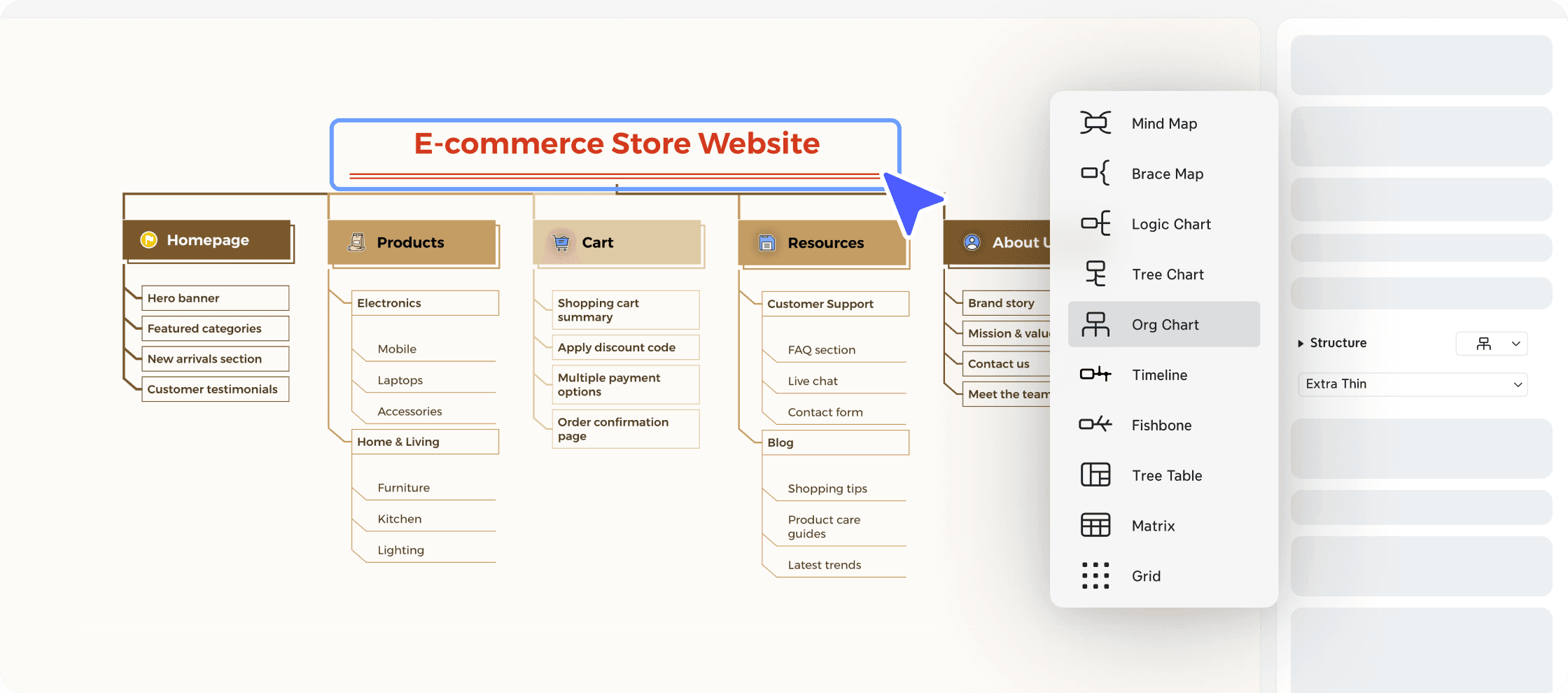
Create structured idea maps, design plans, and mood boards with ease. Xmind helps you visualize and communicate your design thinking more clearly, from concept to delivery.
Use ui and ux design tools in one place
Create structured idea maps, design plans, and mood boards with ease. Xmind helps you visualize and communicate your design thinking more clearly, from concept to delivery.


STRUCTURE
Use ui and ux design tools in one place
Create structured idea maps, design plans, and mood boards with ease. Xmind helps you visualize and communicate your design thinking more clearly, from concept to delivery.
Use ui and ux design tools in one place
Create structured idea maps, design plans, and mood boards with ease. Xmind helps you visualize and communicate your design thinking more clearly, from concept to delivery.

Use ui and ux design tools in one place
Create structured idea maps, design plans, and mood boards with ease. Xmind helps you visualize and communicate your design thinking more clearly, from concept to delivery.

Build design processes collaboratively
Collaborate with your team or clients in real time. Use Xmind’s visual workspace to organize feedback, manage design sprints, and align goals across distributed teams.
COLLABORATION

Build design processes collaboratively
Collaborate with your team or clients in real time. Use Xmind’s visual workspace to organize feedback, manage design sprints, and align goals across distributed teams.

Build design processes collaboratively
Collaborate with your team or clients in real time. Use Xmind’s visual workspace to organize feedback, manage design sprints, and align goals across distributed teams.
COLLABORATION

Build design processes collaboratively
Collaborate with your team or clients in real time. Use Xmind’s visual workspace to organize feedback, manage design sprints, and align goals across distributed teams.

Build design processes collaboratively
Collaborate with your team or clients in real time. Use Xmind’s visual workspace to organize feedback, manage design sprints, and align goals across distributed teams.

Manage assets with AI assistance
Capture early ideas and refine them using AI-assisted structure. Xmind’s smart features speed up brainstorming and help you turn raw concepts into polished design direction.
ARTIFICIAL INTELLIGENCE

Manage assets with AI assistance
Capture early ideas and refine them using AI-assisted structure. Xmind’s smart features speed up brainstorming and help you turn raw concepts into polished design direction.

Manage assets with AI assistance
Capture early ideas and refine them using AI-assisted structure. Xmind’s smart features speed up brainstorming and help you turn raw concepts into polished design direction.
ARTIFICIAL INTELLIGENCE

Manage assets with AI assistance
Capture early ideas and refine them using AI-assisted structure. Xmind’s smart features speed up brainstorming and help you turn raw concepts into polished design direction.

Manage assets with AI assistance
Capture early ideas and refine them using AI-assisted structure. Xmind’s smart features speed up brainstorming and help you turn raw concepts into polished design direction.

Streamline your creative workflow
Keep all creative assets, research links, and project references in one visual map. Xmind helps reduce fragmentation and keeps everything in sync.
INTEGRATION

Streamline your creative workflow
Keep all creative assets, research links, and project references in one visual map. Xmind helps reduce fragmentation and keeps everything in sync.

Streamline your creative workflow
Keep all creative assets, research links, and project references in one visual map. Xmind helps reduce fragmentation and keeps everything in sync.
INTEGRATION

Streamline your creative workflow
Keep all creative assets, research links, and project references in one visual map. Xmind helps reduce fragmentation and keeps everything in sync.

Streamline your creative workflow
Keep all creative assets, research links, and project references in one visual map. Xmind helps reduce fragmentation and keeps everything in sync.

Templates to support your creative flow
Web design process
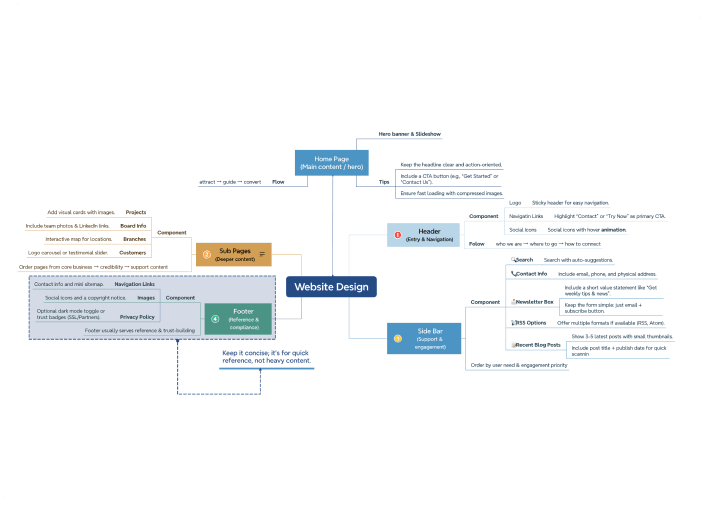
Use this template to plan UX journeys, organize research findings, and create design sprints. It helps keep every stakeholder aligned and informed.
Web design process
Use this template to plan UX journeys, organize research findings, and create design sprints. It helps keep every stakeholder aligned and informed.

Web design process
Use this template to plan UX journeys, organize research findings, and create design sprints. It helps keep every stakeholder aligned and informed.

Web design process
Use this template to plan UX journeys, organize research findings, and create design sprints. It helps keep every stakeholder aligned and informed.

Web design process
Use this template to plan UX journeys, organize research findings, and create design sprints. It helps keep every stakeholder aligned and informed.

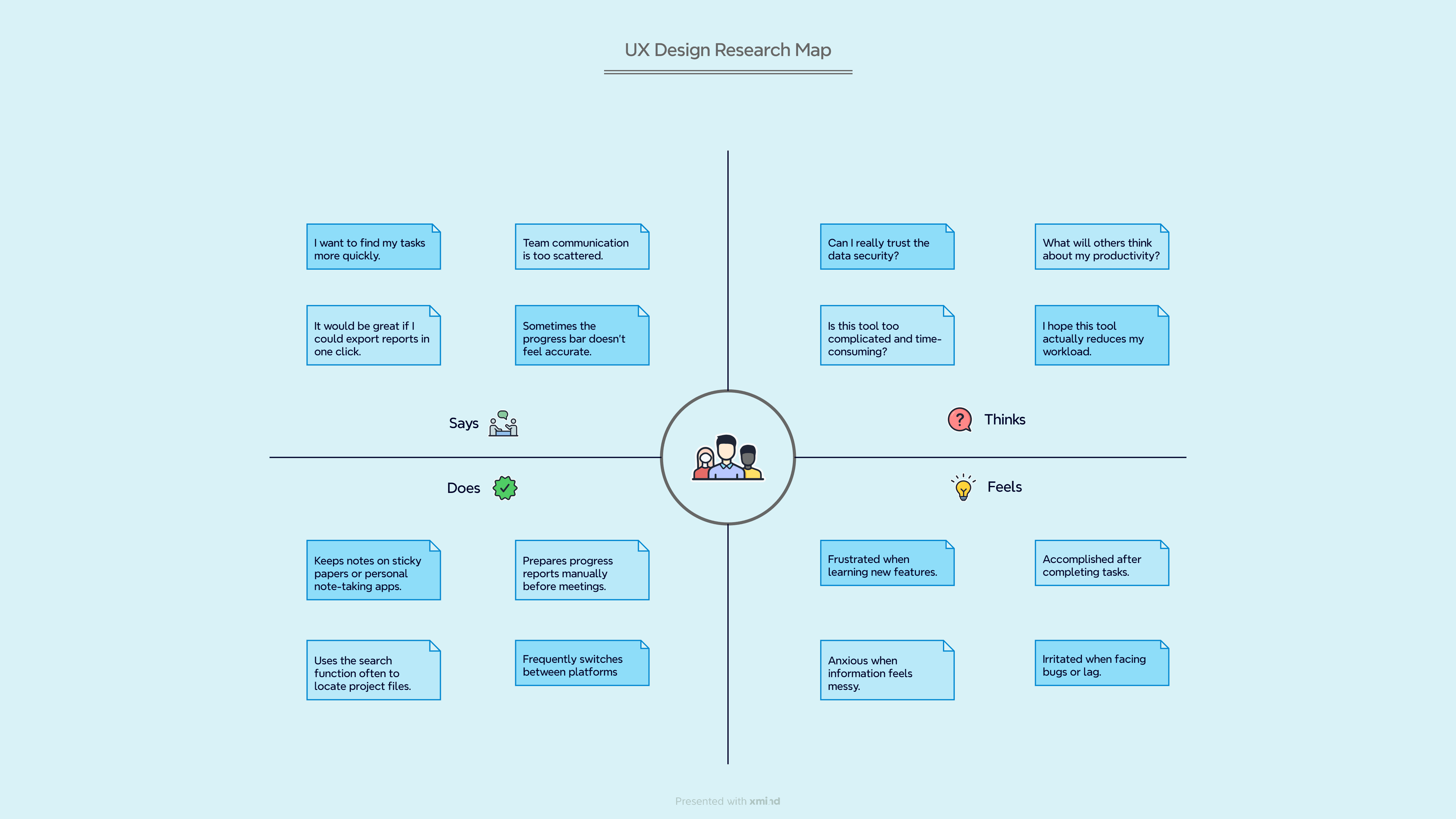
UX design research
Quickly structure brainstorming sessions, concept iterations, and creative reviews. Ideal for collaborative ideation or solo planning.

UX design research
Quickly structure brainstorming sessions, concept iterations, and creative reviews. Ideal for collaborative ideation or solo planning.

UX design research
Quickly structure brainstorming sessions, concept iterations, and creative reviews. Ideal for collaborative ideation or solo planning.

UX design research
Quickly structure brainstorming sessions, concept iterations, and creative reviews. Ideal for collaborative ideation or solo planning.

UX design research
Quickly structure brainstorming sessions, concept iterations, and creative reviews. Ideal for collaborative ideation or solo planning.

Design doc for developers
Manage your creative pipeline visually with a content calendar view. This helps design teams track progress across multiple channels and formats.


Design doc for developers
Manage your creative pipeline visually with a content calendar view. This helps design teams track progress across multiple channels and formats.

Design doc for developers
Manage your creative pipeline visually with a content calendar view. This helps design teams track progress across multiple channels and formats.

Design doc for developers
Manage your creative pipeline visually with a content calendar view. This helps design teams track progress across multiple channels and formats.

Design doc for developers
Manage your creative pipeline visually with a content calendar view. This helps design teams track progress across multiple channels and formats.
Insights for designers
Explore more solutions

Design visually. Collaborate seamlessly.
Turn your creative process into a structured visual journey with Xmind.

Design visually. Collaborate seamlessly.
Turn your creative process into a structured visual journey with Xmind.

Design visually. Collaborate seamlessly.
Turn your creative process into a structured visual journey with Xmind.

Design visually. Collaborate seamlessly.
Turn your creative process into a structured visual journey with Xmind.

Design visually. Collaborate seamlessly.
Turn your creative process into a structured visual journey with Xmind.
Frequently asked questions
What is web design?
Web design is the practice of creating and organizing digital interfaces for usability and aesthetics. It includes layout design, user experience, typography, and responsiveness. A well-designed website aligns business goals with user needs while offering intuitive navigation, fast performance, and engaging content.
What tools are essential for UX designers?
Essential tools for UX designers include wireframing tools like Figma, mind mapping software like Xmind, prototyping platforms, and research documentation tools. These help designers build user flows, communicate design logic, and manage insights across the entire design process.
How can Xmind support the UX design process?
Xmind supports the UX process by offering visual tools to map out user flows, structure personas, and define IA. Its AI and collaboration features improve early-stage planning and help align stakeholders on design decisions. It works well across teams and remote setups.
What is the difference between UI and UX design tools?
UI design focuses on the look, feel, and interactivity of a product, such as buttons, color schemes, and spacing. UX design deals with the user's journey through the product, including structure, satisfaction, and problem-solving. Both are critical and often work together.
Can I collaborate with clients using Xmind?
Yes, Xmind offers real-time collaboration and sharing options that make it easy to work with clients. You can co-edit mind maps, leave comments, and keep all design input in one place, helping to avoid feedback silos and streamline communication.
Frequently asked questions
What is web design?
Web design is the practice of creating and organizing digital interfaces for usability and aesthetics. It includes layout design, user experience, typography, and responsiveness. A well-designed website aligns business goals with user needs while offering intuitive navigation, fast performance, and engaging content.
What tools are essential for UX designers?
Essential tools for UX designers include wireframing tools like Figma, mind mapping software like Xmind, prototyping platforms, and research documentation tools. These help designers build user flows, communicate design logic, and manage insights across the entire design process.
How can Xmind support the UX design process?
Xmind supports the UX process by offering visual tools to map out user flows, structure personas, and define IA. Its AI and collaboration features improve early-stage planning and help align stakeholders on design decisions. It works well across teams and remote setups.
What is the difference between UI and UX design tools?
UI design focuses on the look, feel, and interactivity of a product, such as buttons, color schemes, and spacing. UX design deals with the user's journey through the product, including structure, satisfaction, and problem-solving. Both are critical and often work together.
Can I collaborate with clients using Xmind?
Yes, Xmind offers real-time collaboration and sharing options that make it easy to work with clients. You can co-edit mind maps, leave comments, and keep all design input in one place, helping to avoid feedback silos and streamline communication.
Frequently asked questions
What is web design?
Web design is the practice of creating and organizing digital interfaces for usability and aesthetics. It includes layout design, user experience, typography, and responsiveness. A well-designed website aligns business goals with user needs while offering intuitive navigation, fast performance, and engaging content.
What tools are essential for UX designers?
Essential tools for UX designers include wireframing tools like Figma, mind mapping software like Xmind, prototyping platforms, and research documentation tools. These help designers build user flows, communicate design logic, and manage insights across the entire design process.
How can Xmind support the UX design process?
Xmind supports the UX process by offering visual tools to map out user flows, structure personas, and define IA. Its AI and collaboration features improve early-stage planning and help align stakeholders on design decisions. It works well across teams and remote setups.
What is the difference between UI and UX design tools?
UI design focuses on the look, feel, and interactivity of a product, such as buttons, color schemes, and spacing. UX design deals with the user's journey through the product, including structure, satisfaction, and problem-solving. Both are critical and often work together.
Can I collaborate with clients using Xmind?
Yes, Xmind offers real-time collaboration and sharing options that make it easy to work with clients. You can co-edit mind maps, leave comments, and keep all design input in one place, helping to avoid feedback silos and streamline communication.
Frequently asked questions
What is web design?
Web design is the practice of creating and organizing digital interfaces for usability and aesthetics. It includes layout design, user experience, typography, and responsiveness. A well-designed website aligns business goals with user needs while offering intuitive navigation, fast performance, and engaging content.
What tools are essential for UX designers?
Essential tools for UX designers include wireframing tools like Figma, mind mapping software like Xmind, prototyping platforms, and research documentation tools. These help designers build user flows, communicate design logic, and manage insights across the entire design process.
How can Xmind support the UX design process?
Xmind supports the UX process by offering visual tools to map out user flows, structure personas, and define IA. Its AI and collaboration features improve early-stage planning and help align stakeholders on design decisions. It works well across teams and remote setups.
What is the difference between UI and UX design tools?
UI design focuses on the look, feel, and interactivity of a product, such as buttons, color schemes, and spacing. UX design deals with the user's journey through the product, including structure, satisfaction, and problem-solving. Both are critical and often work together.
Can I collaborate with clients using Xmind?
Yes, Xmind offers real-time collaboration and sharing options that make it easy to work with clients. You can co-edit mind maps, leave comments, and keep all design input in one place, helping to avoid feedback silos and streamline communication.