Xmind MCP

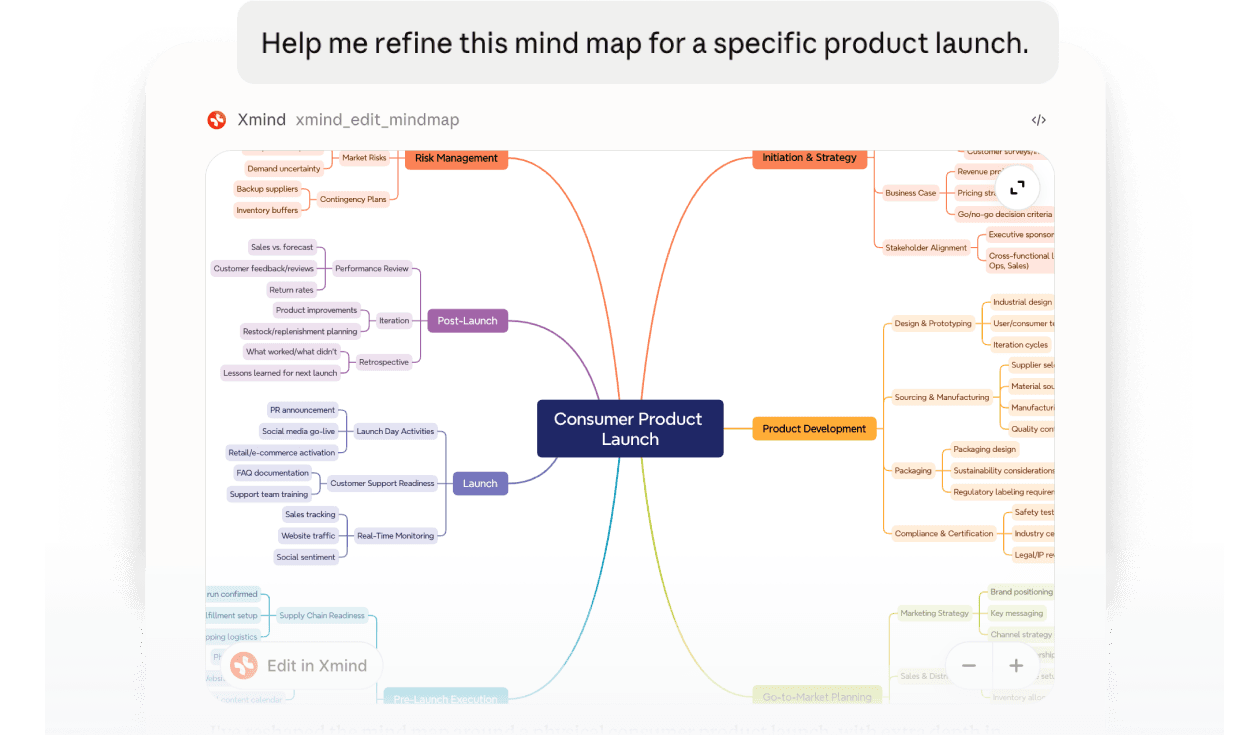
Connect Xmind to Claude, Codex, and other compatible AI tools through MCP. Create and edit mind maps directly in your conversations.


Mind map maker

How to use Xmind MCP in 3 simple steps?

Add the MCP Server

Enter the Server URL in any MCP-compatible client — or simply hand the URL to your agent and it connects on its own.

Step 1

Mind map starting from a central idea with branches expanding outward

Add the MCP Server

Enter the Server URL in any MCP-compatible client — or simply hand the URL to your agent and it connects on its own.

Step 1

Mind map starting from a central idea with branches expanding outward

Authorize

A browser window opens the Xmind authorization page — sign in with your Xmind account, choose the workspace to authorize, and click Approve.

Step 2

Online mind map maker showing structured branches as ideas expand

Authorize

A browser window opens the Xmind authorization page — sign in with your Xmind account, choose the workspace to authorize, and click Approve.

Step 2

Online mind map maker showing structured branches as ideas expand

Work in natural language

Just ask — create maps, read maps, summarize structure, add or remove topics, add relationships and boundaries. The assistant picks the tools and reads results back.

Step 3

Sharing and exporting a completed mind map using an online tool

Work in natural language

Just ask — create maps, read maps, summarize structure, add or remove topics, add relationships and boundaries. The assistant picks the tools and reads results back.

Step 3

Sharing and exporting a completed mind map using an online tool

Install & connect

Send the address below to an MCP-compatible agent such as Claude Code / Cursor / ChatGPT and just say “connect to this MCP.” It will handshake automatically and open a browser for you to authorize.

https://app.xmind.com/api/mcp

Or, send this whole message to your agent:

Connect me to the Xmind MCP server at https://app.xmind.com/api/mcp, transport streamable HTTP, auth via OAuth (no API key needed; a browser window will open for me to pick a workspace). Once connected, list the tools you got.

Create richer maps with Xmind

Your Xmind plan shapes what MCP can create. Upgrade to add advanced styling, links, attachments, tasks, and more.

AI-powered suggestions helping generate and expand ideas in a mind map

Essential map

Clean and intuitive interface designed for creating mind maps online

Professional map

What you can do with Xmind MCP

AI-powered suggestions helping generate and expand ideas in a mind map

Read

List recently opened maps, read a whole map as Markdown, get a single topic's full content, and summarize structure.

Clean and intuitive interface designed for creating mind maps online

Write

Turn brainstorms, research notes, and meeting discussions into structured maps; write back changes, add or remove topics, and set notes, links, labels, icons, and images.

Free online mind map maker offering essential tools to get started quickly

Connect

Add relationships, boundaries, and summaries, connect topics, add or remove sheets, and rearrange ideas while preserving the original layout and visual style.

Mind map maker supporting multiple layouts and visual styles

Plan

Add to-dos and manage task dates, durations, progress, and priorities.

Sharing and exporting mind maps using an online mind map tool

Style

Change map structures, apply color themes, and customize the appearance of individual topics.

Trusted by millions worldwide

App store icon

4.8/5

App Store rating of 4.8 out of 5 for Xmind

App Store

95 percent user satisfaction rate

95%

User satisfaction rate

Over 100 million users worldwide

100M+

Users worldwide

Product operations manager describing how an online mind map maker supports team planning

Oliver Grant

Product Operations Manager

LinkedIn logo

Planning sessions often start with scattered notes and half-formed ideas. Using an online mind map maker helps me bring everything into one visual structure, starting from a central topic and expanding into tasks, dependencies, and open questions. Being able to rearrange ideas as discussions evolve makes it much easier to keep the team aligned.

Digital marketing manager explaining how a mind map maker helps organize campaign ideas

Élodie Martin

Digital Marketing Manager

LinkedIn logo

Avant le lancement d’une campagne, j’utilise un mind map maker en ligne pour structurer mes idées. Organiser visuellement les messages et les priorités m’aide à clarifier la stratégie avant de passer à des documents plus détaillés.

Business consultant sharing how visual mind maps support complex client problem solving

Marco Rossi

Business Consultant

𝕏/twitter logo

When working with clients on complex problems, outlining ideas in linear documents quickly becomes limiting. Mapping assumptions, constraints, and options as a visual mind map helps surface connections that would otherwise be missed. It provides a clear structure for discussion without oversimplifying the problem or locking ideas too early.

Content lead describing how an online mind map tool supports content planning and structure

Emily Watson

Content Lead

LinkedIn logo

Turning ideas into a solid content structure is much easier when everything is visible at once. This online mind map tool lets me explore sections, rearrange topics, and refine the flow before writing. It helps reduce revisions later in the process.

University professor explaining how online mind maps help students understand complex topics

Andrés López

University Professor

LinkedIn logo

Al preparar mis clases, organizar los contenidos de forma visual marca una diferencia real. Utilizar una herramienta de mapas mentales en línea me permite mostrar cómo se relacionan los conceptos entre sí, lo que ayuda a los estudiantes a seguir la lógica de un tema con mayor claridad y a mantenerse más involucrados durante las clases. 

High school science teacher describing how mind maps help explain complex concepts visually

Katarzyna Nowak

High School Science Teacher

𝕏/twitter logo

Explaining complex topics becomes easier when ideas are structured visually. Creating mind maps online helps me break down concepts step by step and adjust explanations based on how students respond. It’s especially helpful when introducing new or abstract material.

Product operations manager describing how an online mind map maker supports team planning

Oliver Grant

Product Operations Manager

LinkedIn logo

Planning sessions often start with scattered notes and half-formed ideas. Using an online mind map maker helps me bring everything into one visual structure, starting from a central topic and expanding into tasks, dependencies, and open questions. Being able to rearrange ideas as discussions evolve makes it much easier to keep the team aligned.

Digital marketing manager explaining how a mind map maker helps organize campaign ideas

Élodie Martin

Digital Marketing Manager

LinkedIn logo

Avant le lancement d’une campagne, j’utilise un mind map maker en ligne pour structurer mes idées. Organiser visuellement les messages et les priorités m’aide à clarifier la stratégie avant de passer à des documents plus détaillés.

Business consultant sharing how visual mind maps support complex client problem solving

Marco Rossi

Business Consultant

𝕏/twitter logo

When working with clients on complex problems, outlining ideas in linear documents quickly becomes limiting. Mapping assumptions, constraints, and options as a visual mind map helps surface connections that would otherwise be missed. It provides a clear structure for discussion without oversimplifying the problem or locking ideas too early.

Content lead describing how an online mind map tool supports content planning and structure

Emily Watson

Content Lead

LinkedIn logo

Turning ideas into a solid content structure is much easier when everything is visible at once. This online mind map tool lets me explore sections, rearrange topics, and refine the flow before writing. It helps reduce revisions later in the process.

University professor explaining how online mind maps help students understand complex topics

Andrés López

University Professor

LinkedIn logo

Al preparar mis clases, organizar los contenidos de forma visual marca una diferencia real. Utilizar una herramienta de mapas mentales en línea me permite mostrar cómo se relacionan los conceptos entre sí, lo que ayuda a los estudiantes a seguir la lógica de un tema con mayor claridad y a mantenerse más involucrados durante las clases. 

High school science teacher describing how mind maps help explain complex concepts visually

Katarzyna Nowak

High School Science Teacher

𝕏/twitter logo

Explaining complex topics becomes easier when ideas are structured visually. Creating mind maps online helps me break down concepts step by step and adjust explanations based on how students respond. It’s especially helpful when introducing new or abstract material.

Frequently asked questions

Frequently Asked Questions

What is the Xmind MCP Server?

It lets AI apps connect to Xmind, so your AI assistant can create, read, and edit your mind maps for you. It works with any MCP-compatible client — Claude, Claude Code, Codex, or ChatGPT. Once connected, just describe what you want in natural language, and your conversations, notes, and ideas become structured, editable maps.

Do I need an API key to connect?

No. Authentication uses standard OAuth — the client opens a browser for you to authorize with your Xmind account. No token goes into the config. If a tutorial tells you to paste a secret into the config, that is not how Xmind connects.

Which clients are supported?

Claude, Claude Code, Codex, ChatGPT, Cursor, and any MCP-compatible client that supports the Streamable HTTP transport. The unified Server URL is https://app.xmind.com/api/mcp.

Where are the mind maps saved?

Everything is created and saved in your Xmind account, in the workspace you authorized. The maps are the same files you can open, edit, and share on Xmind for web or the desktop and mobile apps — the assistant just works on them for you.

Will it mess up the layout or style of my existing maps?

No. When editing, the assistant keeps your map's existing layout and visual style intact — it adds, updates, or reorganizes topics without redrawing the whole map. You can always undo or refine in Xmind afterward.

Is there a usage limit for the Xmind MCP Server?

Using the MCP Server itself is free, with no separate usage fees. However, it is connected to your Xmind account and follows your plan limits. If you use a free account and reach your mind map storage limit, you may need to delete existing maps before creating new ones. Creating maps with premium features also requires an Xmind Pro/Premium.


Xmind logo

Bring Xmind into your AI workflow

Xmind turns the ideas flowing through your AI conversations into clear, visual mind maps that sharpen thinking, communication, and collaboration.

Xmind logo

Bring Xmind into your AI workflow

Xmind turns the ideas flowing through your AI conversations into clear, visual mind maps that sharpen thinking, communication, and collaboration.