Xmind 2025: von Ideen zur Umsetzung
2025 war ein Jahr, das von Ihren Ideen geprägt wurde. Wir haben genau zugehört – durch die Diagramme, die Sie erstellt haben, das Feedback, das Sie geteilt haben, und die Momente, in denen Xmind Teil Ihres Denkens, Lernens und Planens wurde. Das ganze Jahr über haben wir stetige, durchdachte Verbesserungen vorgenommen, jede einzelne geleitet von den echten Bedürfnissen unserer Nutzer. Lassen Sie uns auf diese gemeinsame Reise und alles, was wir zusammen aufgebaut haben, zurückblicken.
Meilensteine, die 2025 geprägt haben
2025 brachte eine Reihe von Momenten, die das Jahr von Xmind maßgeblich geprägt haben.
Einer der wichtigsten Meilensteine war die Einführung von Xmind 2026, einem erneuerten Projekterlebnis, das sich am natürlichen Denken orientiert. Es brachte einen flüssigeren Ablauf, eine klarere Struktur und Dutzende von durchdachten Details, die das Organisieren von Ideen und das Verwalten von Projekten intuitiver machen.
Viele dieser Änderungen basieren direkt auf den Stimmen unserer Community. Nutzer teilten uns mit, wo sich ihre Workflows schwerfällig anfühlten und welche fehlenden Teile sie bremsten. Wir hörten von Menschen, die komplexe Zeitpläne jonglierten und „Schwierigkeiten hatten, Zeitachsen mit anderen zu teilen,“ von denjenigen, die nach „mehreren Ansichten“ fragten, und von langjährigen Nutzern, die ganz klar sagten, dass ein Gantt-Diagramm in Xmind etwas war, das sie „vermissten und auf das sie sich bei der echten Projektarbeit verließen.“
Erkenntnisse wie diese haben unseren Weg gewiesen. Wir haben genau auf Ihre Bedürfnisse gehört und daran gearbeitet, Xmind so zu verbessern, dass es Ihre Arbeit spürbar unterstützt.
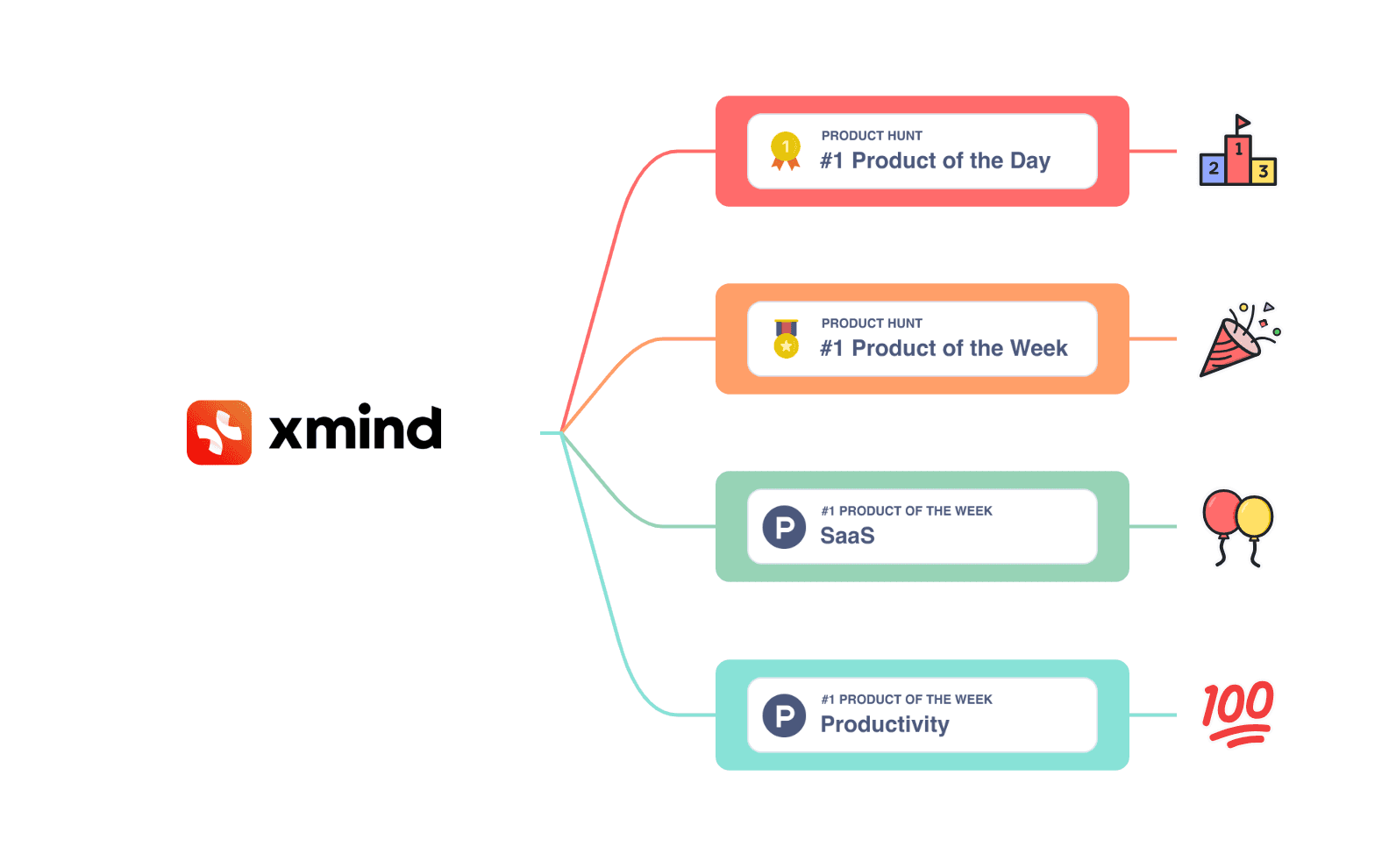
Wir haben auch einen glänzenden Moment zusammen gefeiert, als Project Management by Xmind auf Product Hunt ausgezeichnet wurde und Platz #1 Product of the Day, #1 Product of the Week, #1 SaaS Product und #1 Productivity Product belegte.
Viele von Ihnen haben den Launch unterstützt, Ihr Feedback geteilt und sich sogar die Zeit genommen abzustimmen, nachdem wir um Hilfe gebeten hatten. Diese Platzierungen waren mehr als nur eine Auszeichnung – sie waren das Zeichen einer Community, die sich für etwas einsetzt, das wir gemeinsam aufbauen.
Für uns war es eine Bestätigung, dass die Menschen einen echten Nutzen in einem einfachen Versprechen sahen: ein Ort, an dem man planen, denken und Fortschritte machen kann, ohne die Schwere traditioneller Tools. Und Ihre Unterstützung hat diesen Moment erst möglich gemacht.
Diese Momente zeigten uns, wie weit wir in diesem Jahr vorangekommen sind. Nichts davon wäre möglich gewesen ohne diejenigen, die Xmind jeden Tag nutzen, Feedback teilen und uns ständig anspornen, noch besser zu werden.
Wichtige Features, die 2025 veröffentlicht wurden
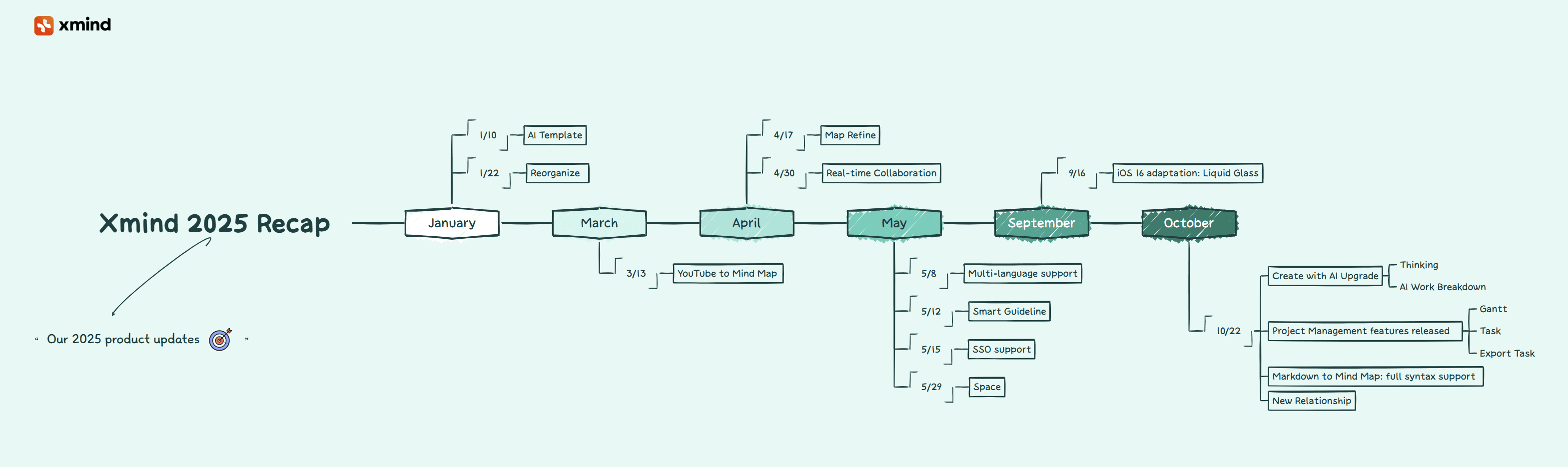
Ideen Form verleihen
Bevor ein Workflow beginnen kann, brauchen Ideen Raum, um sich zu entfalten. Viele Menschen starten mit verstreuten Notizen, langen Texten oder unklaren Entwürfen, die den Einstieg erschweren. Viele unserer diesjährigen KI-Features wurden genau für diese Momente entwickelt – Tools, die erste Gedanken ordnen, unvollständige Diagramme stärken und Ihnen helfen, rohe Inhalte in einen klaren Ausgangspunkt für alles Weitere in Ihrem Workflow zu verwandeln.
Ihr Diagramm sofort bereichern und stärken
Wenn Sie die Grundlagen eines Themas skizziert haben, aber das Gefühl bleibt, dass etwas fehlt, hilft Ihnen Map Refine, Ihre Gedanken zu vertiefen. Es fügt verwandte Ideen hinzu, stärkt lückenhafte Abschnitte und bringt zusätzlichen Kontext in Diagramme, die mehr Tiefe benötigen. Ihre ursprüngliche Absicht bleibt erhalten, aber das Diagramm gewinnt an Substanz.
Unordentliche Diagramme mit einem Klick aufräumen
Nach einem großen Brainstorming können Diagramme leicht unübersichtlich werden – Zweige driften ab, Ideen verlieren ihre Gruppierung und die Gesamtstruktur wird schwerer lesbar. Reorganize hilft, diesen Zustand zurückzusetzen. Mit einem einzigen Klick wird das Layout aufgeräumt, Zweige werden begradigt und eine klare visuelle Hierarchie wiederhergestellt. Ob Sie Ihre Ideen ordnen oder einfach eine sauberere Ansicht wünschen: Es bringt Ordnung zurück in Ihr Diagramm, damit Sie sich ganz auf Ihre Gedanken konzentrieren können.
Lange YouTube-Videos in klare mind maps verwandeln
Wenn Sie die wichtigsten Punkte eines langen Videos benötigen, aber keine Zeit haben, alles anzusehen, bietet Ihnen YouTube to Mind Map in Sekundenschnelle einen strukturierten Überblick. Fügen Sie einen Link ein, und Xmind verwandelt ihn in eine übersichtliche, leicht lesbare mind map. So lassen sich Informationen schneller erfassen und Sie sehen sofort, was einen genaueren Blick wert ist.
Tiefere Einblicke mit dem Thinking Mode erhalten
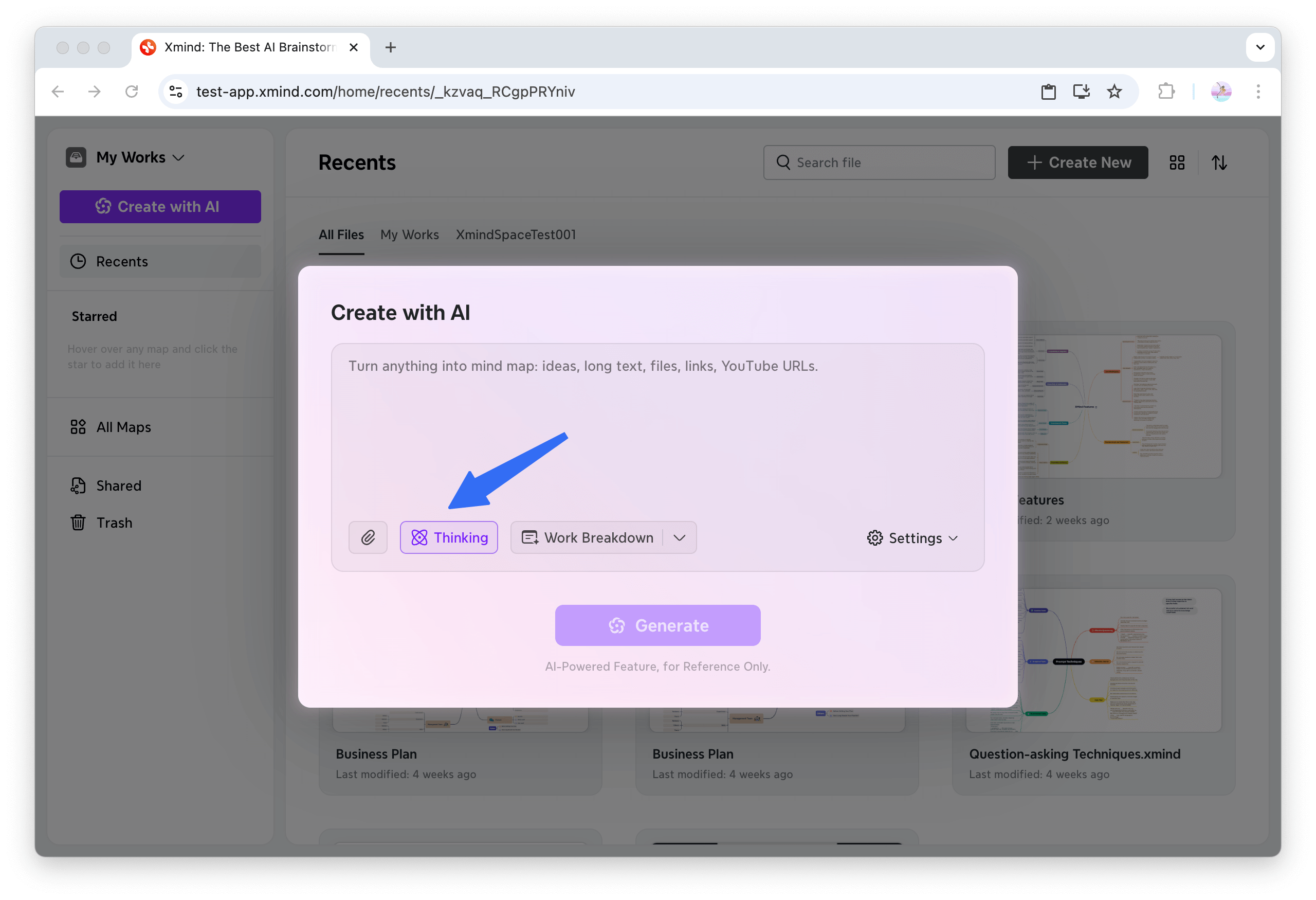
Manche Fragen erfordern mehr als eine schnelle Antwort. Der Thinking Mode nimmt sich die Zeit, Dinge zu durchdenken und eine fundiertere Antwort zu erstellen. Das ist besonders nützlich, wenn Sie ein komplexes Thema untersuchen, sich auf eine Diskussion vorbereiten oder die Logik hinter einer Idee verstehen wollen. Statt nur einer Antwort zeigt Ihnen das Tool den klaren Denkprozess der KI, den Sie direkt in Ihrem Diagramm behalten können.
Zusammenarbeiten – vom Zweierteam bis zur ganzen Abteilung
Im Laufe des Jahres 2025 hörten wir oft von Teams, die sich einfachere Wege wünschten, um Diagramme zu teilen, in Echtzeit zusammenzuarbeiten und die Arbeit abteilungsübergreifend zu organisieren. Unsere diesjährigen Updates für die Zusammenarbeit wurden entwickelt, um die Teamarbeit spürbar flüssiger zu machen.
In Echtzeit mit jedem und auf jedem Gerät zusammenarbeiten
Viele Nutzer berichteten uns, wie viel Energie verloren ging, wenn Dateien hin- und hergeschickt wurden, um auf dem gleichen Stand zu bleiben. Die Echtzeit-Zusammenarbeit bringt alle im selben Diagramm zusammen – im Web, mobil oder auf dem Desktop –, sodass Ideen ohne das übliche Hin und Her Gestalt annehmen.
Teams und Projekte in dedizierten Spaces organisieren
Space führt eine sauberere Möglichkeit ein, Abteilungen oder Initiativen innerhalb eines einzigen Teams zu trennen. Jeder Space hat seine eigenen Mitglieder und Dateien, teilt sich aber weiterhin eine gemeinsame Abrechnung und Teamidentität. Die Berechtigungen bleiben klar, Dateien getrennt und niemand zahlt doppelt.
Team-Zugriff mit SSO vereinfachen
Das Verwalten mehrerer Logins für verschiedene Tools führt oft zu Verwirrung und Sicherheitsrisiken. Mit SSO können sich Mitglieder mit ihren bestehenden Unternehmensdaten bei Xmind anmelden – ohne separate Konten oder Passwörter. Das sorgt für einen schnelleren, sichereren Zugriff, sodass alle schneller an die Arbeit gehen können, während die Identitätsverwaltung zentralisiert bleibt.
Pläne in die Tat umsetzen
Der Schritt von der Idee zur Ausführung erfordert oft andere Werkzeuge. Nach dem Entwurf eines Plans suchen viele Nutzer nach konkreten Schritten, Zeiten und einer Möglichkeit, den tatsächlichen Fortschritt zu verfolgen, ohne die aufgebaute Struktur zu verlieren. Die folgenden Updates schlagen genau diese Brücke.
Projektideen in strukturierte Pläne verwandeln
Große Projekte können erdrückend wirken, wenn man nicht weiß, wo man anfangen soll. AI Work Breakdown verwandelt ein Konzept in Sekundenschnelle in einen strukturierten Plan mit Teilaufgaben, Zeitplänen und potenziellen Abhängigkeiten. Das erleichtert den ersten Schritt und gibt eine klare Richtung vor.
Ihr Projekt mit einer synchronisierten Gantt-Ansicht verwalten
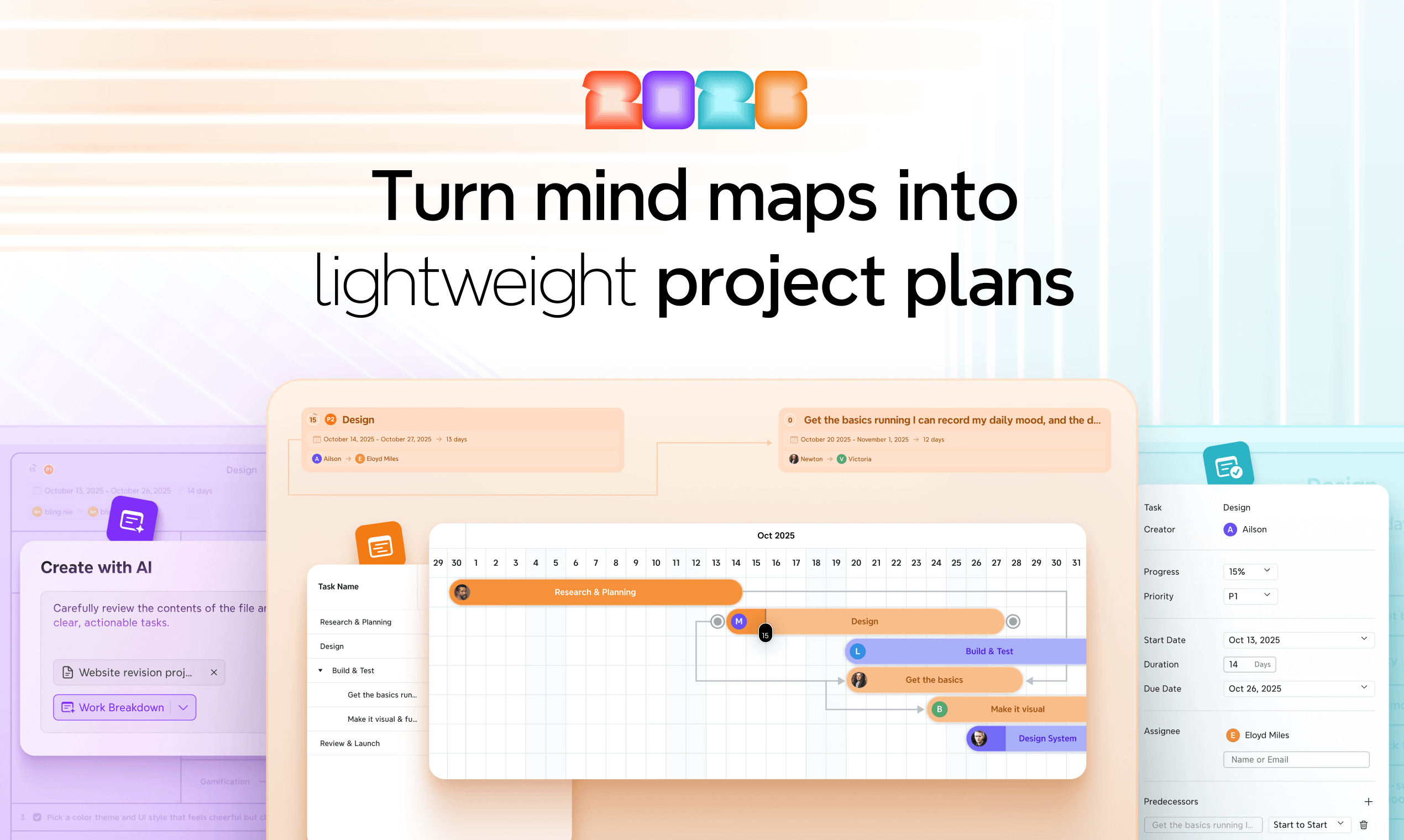
Wie viele Nutzer uns sagten: „Ein Diagramm ist toll für Ideen, aber ich brauche trotzdem eine klare Zeitachse, um die echte Arbeit zu steuern.“ Mind maps helfen Ihnen, ein Projekt zu strukturieren, aber das Verwalten von Zeitplänen, Abhängigkeiten und sich verschiebenden Fristen erfordert eine andere Ansicht. Das Xmind Gantt-Diagramm schließt diese Lücke: Sie können einfach zwischen Ihrem Diagramm und einer voll synchronisierten Zeitachse wechseln. Änderungen an Terminen oder Dauern werden automatisch aktualisiert, sodass Sie den Fortschritt verfolgen und Zeitpläne anpassen können, ohne das Tool zu wechseln.
Aufgaben direkt in Ihrer mind map hinzufügen
Für eine detailreichere Planung bietet Task alles, was Sie brauchen: Priorität, Daten, Fortschritt und Dauer – um vom Entwurf zur echten Projektsteuerung überzugehen. So verwandeln Sie ein strukturiertes Diagramm in einen umsetzbaren Plan, bei dem die Ausführung stets mit dem ursprünglichen Gedanken verbunden bleibt. Eine mind map in Xmind, mit detaillierten Aufgabeneinstellungen auf der linken Seite – einschließlich Priorität, Terminen, Dauer, Fortschritt und Zuständigkeiten – ermöglicht es Ihnen, Ihren Plan zu verwalten und zu verfeinern, ohne Ihr Diagramm zu verlassen.
Aufgaben per Export in andere Tools übertragen
Wenn Ihre Arbeit in einem anderen Projektmanagement-Tool fortgesetzt werden soll – oder Sie Aufgaben in Ihren Kalender importieren möchten –, schränkt Xmind Sie nicht ein. Mit Export Task können Sie Ihre Aufgabenliste in Ihre gewohnten Tools übertragen und genau dort weitermachen, wo Sie aufgehört haben. So bleibt der Planungsfluss in Xmind, während die Umsetzung dort stattfindet, wo Ihr Projekt zu Hause ist.
Kleine Details mit großer Wirkung
Flüssiger arbeiten dank verbesserter Markdown-Unterstützung
Xmind unterstützt jetzt die vollständige Markdown-Syntax, sodass Ihre Formatierungen, Hierarchien und Inhalte noch präziser in mind maps übertragen werden. Dies sorgt für einen saubereren Ausgangspunkt, reduziert manuelles Nachbessern und erleichtert den Übergang von linearen Notizen zum visuellen Denken.
Mühelos Flussdiagramme erstellen mit neuen Beziehungen & Formen
Die verbesserten Beziehungen und aktualisierten Formen sorgen für ein flüssigeres Erstellen von Flussdiagrammen. Verbindungslinien biegen und leiten sich vorhersehbarer, während die erweiterten Symbole die Lesbarkeit auf einen Blick verbessern. So lassen sich Schritte einfacher skizzieren, Logiken klären und Prozesse visualisieren.
Themen beim Bearbeiten sauber ausrichten
Halten Sie Ihr Diagramm stets übersichtlich. Wenn eine mind map voll wird und Themen sich verschieben, können selbst kleine Änderungen das gesamte Layout stören. Smart Guideline bietet beim Verschieben von Themen Ausrichtungshilfen in Echtzeit. So richten Sie alles mühelos aus und bewahren eine ordentliche, professionelle Struktur.
Xmind bequem in mehr Sprachen nutzen
Da die weltweite Community von Xmind weiter wächst, spielt die Sprachunterstützung eine immer größere Rolle, um Ideen natürlich zu strukturieren. Xmind unterstützt jetzt mehr als 14 Sprachen in der Desktop-App. Das macht es für Teams, Studierende und Lehrkräfte weltweit einfacher, barrierefrei zu denken, zu planen und zusammenzuarbeiten. Ganz gleich, ob Sie international arbeiten oder sich in Ihrer Muttersprache einfach wohler fühlen – Xmind passt sich Ihrer Ausdrucksweise an.
Hinter den Kulissen: Warum wir das gebaut haben
Alles, was wir in diesem Jahr veröffentlicht haben, entspringt einem einzigen Ziel: die Art und Weise zu unterstützen, wie Sie denken, planen und Ideen zum Leben erwecken. Wir haben den gesamten Weg gestärkt – vom ersten Gedanken über den fertigen Plan bis hin zur Zusammenarbeit und Umsetzung, damit sich Ihre Arbeit vernetzter, intuitiver und leichter anfühlt.
Wir haben Xmind so verfeinert, dass es sich leichter und flüssiger anfühlt, indem wir Interaktionen vereinfacht, Reibungspunkte reduziert und uns auf die Details konzentriert haben, die Ideen fließen lassen. Und hinter jeder Verbesserung stand Ihre Stimme. Echte Gespräche, echte Herausforderungen und echte Bedürfnisse haben geprägt, was wir gebaut haben.
Wir werden auch weiterhin mit genau diesem Ziel entwickeln – immer mit Klarheit, Fokus und SIE im Blick.
Eine stärkere Xmind-Community

2025 war auch das Jahr, in dem wir begonnen haben, eine stärkere, vernetztere Xmind-Community aufzubauen. Wir haben neue Programme gestartet – darunter das erneuerte Xmind-Botschafter-Programm, unser allererstes Xmind Campus Leader-Programm und das erneuerte Xmind-Webinar-Programm –, um Menschen zusammenzubringen, die Xmind nutzen, um auf vielfältige Weise zu denken, zu gestalten und Probleme zu lösen.
Wir bauen auch unsere Präsenz auf verschiedenen Plattformen aus – Discord, LinkedIn, X (Twitter) und Reddit –, um näher an den täglichen Gesprächen, der Kreativität und den echten Workflows zu sein. Auf diesen Kanälen werden Sie im Laufe des Jahres 2026 mehr Aktivitäten, Diskussionen und von der Community getragene Momente erleben, und wir laden Sie herzlich ein, dabei zu sein.
Dieses Jahr markiert den Beginn einer aktiveren Xmind-Community. Mit der 2025 Recap Challenge und neuen KI-Vorlagen haben wir Sie eingeladen, Ihre eigenen Highlights und Ihre Kreativität zu teilen – ein Format, das wir mit Blick auf das 20-jährige Jubiläum von Xmind weiter ausbauen wollen.
Gemeinsam nach vorn blicken
Auch im Jahr 2026 bleibt unser Fokus derselbe: Xmind noch intuitiver, unterstützender und enger mit Ihrem Denken zu verbinden. Wir arbeiten an noch intuitiverer KI, reibungsloseren Workflows und besseren Team-Erlebnissen, um Ihre tägliche Arbeit spürbar zu erleichtern.
Ihre Ideen und Ihr Feedback werden uns auch weiterhin leiten, und wir sind dankbar für jeden Beitrag, den Sie dazu leisten.
Vielen Dank für ein großartiges Jahr 2025. Lassen Sie uns das Jahr 2026 gemeinsam noch besser machen.